Alaska Acknowledgment for Corporation
Understanding this form
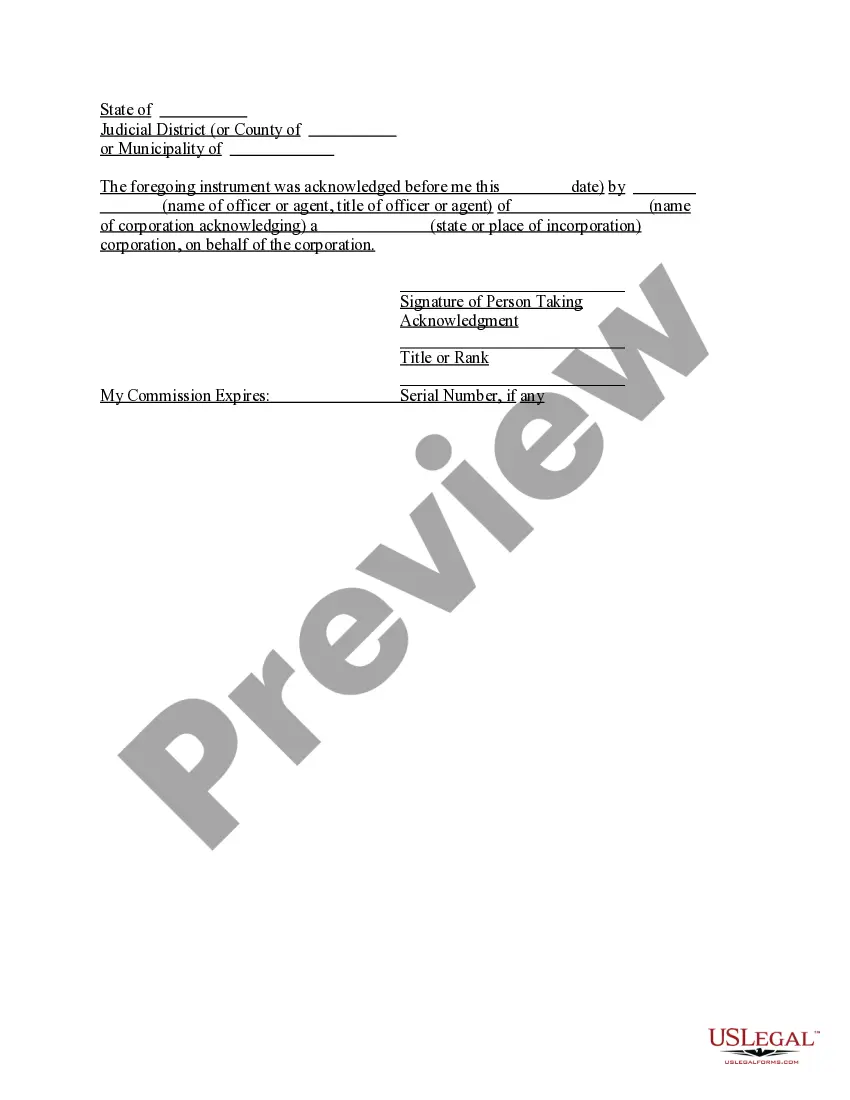
The Acknowledgment for Corporation is a legal document that verifies the authenticity of a signature on behalf of a corporation. This form serves a specific purpose by confirming that an officer or agent of the corporation has acknowledged their signature, which is crucial for the validity of many corporate actions. Unlike other general acknowledgment forms, this form is tailored specifically for corporations, ensuring compliance with corporate laws and regulations.
Form components explained
- Name of the officer or agent taking acknowledgment.
- Title or rank of the officer or agent.
- Name of the corporation acknowledging the signature.
- State or place of incorporation of the corporation.
- Date of acknowledgment.
- Signature of the person taking acknowledgment.

Common use cases
You should use the Acknowledgment for Corporation when a corporate officer or agent needs to formally acknowledge their signature on documents, such as contracts or official filings. This may be required during real estate transactions, business formation, or other situations where corporate action is legally binding and should be documented.
Who can use this document
- Corporation officers or agents who need to acknowledge their signatures.
- Legal representatives acting on behalf of a corporation.
- Corporations involved in transactions requiring signature verification.
Steps to complete this form
- Identify the corporate officer or agent who will be acknowledging the signature.
- Enter the title or rank of the officer or agent in the designated field.
- Insert the name of the corporation in the specified area.
- Provide the state or place of incorporation for the corporation.
- Fill in the date of the acknowledgment.
- Ensure the officer or agent signs the form, confirming the acknowledgment.
Is notarization required?
This form does not typically require notarization unless specified by local law. However, it is always advisable to check local regulations to ensure compliance.
Get your form ready online
Our built-in tools help you complete, sign, share, and store your documents in one place.
Make edits, fill in missing information, and update formatting in US Legal Forms—just like you would in MS Word.
Download a copy, print it, send it by email, or mail it via USPS—whatever works best for your next step.
Sign and collect signatures with our SignNow integration. Send to multiple recipients, set reminders, and more. Go Premium to unlock E-Sign.
If this form requires notarization, complete it online through a secure video call—no need to meet a notary in person or wait for an appointment.
We protect your documents and personal data by following strict security and privacy standards.

Make edits, fill in missing information, and update formatting in US Legal Forms—just like you would in MS Word.

Download a copy, print it, send it by email, or mail it via USPS—whatever works best for your next step.

Sign and collect signatures with our SignNow integration. Send to multiple recipients, set reminders, and more. Go Premium to unlock E-Sign.

If this form requires notarization, complete it online through a secure video call—no need to meet a notary in person or wait for an appointment.

We protect your documents and personal data by following strict security and privacy standards.
Avoid these common issues
- Forgetting to include the title or rank of the officer or agent.
- Not providing the correct state or place of incorporation.
- Leaving the date blank or incorrectly dated.
- Failing to sign the acknowledgment by the designated officer or agent.
Why use this form online
- Convenience of downloading and completing the form at your pace.
- Ability to edit the form as needed before finalizing it.
- Access to templates that are legally compliant and crafted by licensed attorneys.
Looking for another form?

Form popularity
FAQ
When you see (here insert the name and character of the officer) next to a blank as shown below, it means you should insert Your name, Notary Public in the blank.
For an acknowledgment, the signer must always: Be positively identified by the Notary. The Notary must always identify the signer for an acknowledgement; whether the signer personally knows the Notary, presents an ID document, or is identified by a credible witness depends on the circumstances.
What Is An Acknowledgment? The purpose of an acknowledgment is for a signer, whose identity has been verified, to declare to a Notary or notarial officer that he or she has willingly signed a document.The signer may either sign the document before appearing before you, or in your presence.
The certificate of a notary public, justice of the peace, or other authorized officer, attached to a deed, mortgage, or other instrument, setting forth that the parties thereto personally appeared before him on such a date and acknowledged the instrument to be their free and voluntary act and deed. Read v.
Require Personal Appearance. Review The Document. Screen The Signer And Verify The Facts. Record The Notarization. Complete The Notarization.
The preparer of the document adds both acknowledgment certificates for the notary public to decide and execute the acknowledgment certificate most appropriate to the situation. However, most documents that name two principal signers will generally include two notarial certificatesone for each signer.
Step 1: Require Personal Appearance. Step 2: Check Over The Document. Step 3: Carefully Identify The Signer. Step 4: Record Your Journal Entry. Step 5: Complete The Notarial Certificate. A Last Note: Never Give Advice.