Return Work Form Template With Time Slots
Description

Get your form ready online
Our built-in tools help you complete, sign, share, and store your documents in one place.
Make edits, fill in missing information, and update formatting in US Legal Forms—just like you would in MS Word.
Download a copy, print it, send it by email, or mail it via USPS—whatever works best for your next step.
Sign and collect signatures with our SignNow integration. Send to multiple recipients, set reminders, and more. Go Premium to unlock E-Sign.
If this form requires notarization, complete it online through a secure video call—no need to meet a notary in person or wait for an appointment.
We protect your documents and personal data by following strict security and privacy standards.

Make edits, fill in missing information, and update formatting in US Legal Forms—just like you would in MS Word.

Download a copy, print it, send it by email, or mail it via USPS—whatever works best for your next step.

Sign and collect signatures with our SignNow integration. Send to multiple recipients, set reminders, and more. Go Premium to unlock E-Sign.

If this form requires notarization, complete it online through a secure video call—no need to meet a notary in person or wait for an appointment.

We protect your documents and personal data by following strict security and privacy standards.
Looking for another form?

How to fill out Return To Work Interview Form?
The Return Work Form Template With Time Slots presented on this site is a versatile formal template crafted by experienced attorneys in accordance with national and local regulations.
For over 25 years, US Legal Forms has supplied individuals, businesses, and legal practitioners with more than 85,000 validated, state-specific documents for any commercial and personal circumstance. It’s the fastest, simplest, and most dependable method to acquire the documents you require, as the service ensures bank-standard data protection and anti-malware safeguards.
Subscribe to US Legal Forms to have validated legal templates for all of life’s situations readily available.
- Search for the document you require and examine it.
- Browse through the file you looked for and preview it or review the form description to confirm it meets your requirements. If it does not, utilize the search bar to locate the suitable one. Click Buy Now when you have identified the template you need.
- Choose and Log In.
- Select the pricing plan that best fits you and set up an account. Use PayPal or a credit card for a swift transaction. If you already possess an account, Log In and review your subscription to proceed.
- Obtain the editable template.
- Choose the format you desire for your Return Work Form Template With Time Slots (PDF, DOCX, RTF) and save the sample on your device.
- Complete and sign the documents.
- Print the template to fill it out manually. Alternatively, use an online multifunctional PDF editor to quickly and accurately complete and sign your form digitally.
- Re-download your documents as needed.
- Utilize the same document again whenever necessary. Access the My documents section in your profile to redownload any previously retrieved forms.
Form popularity
FAQ
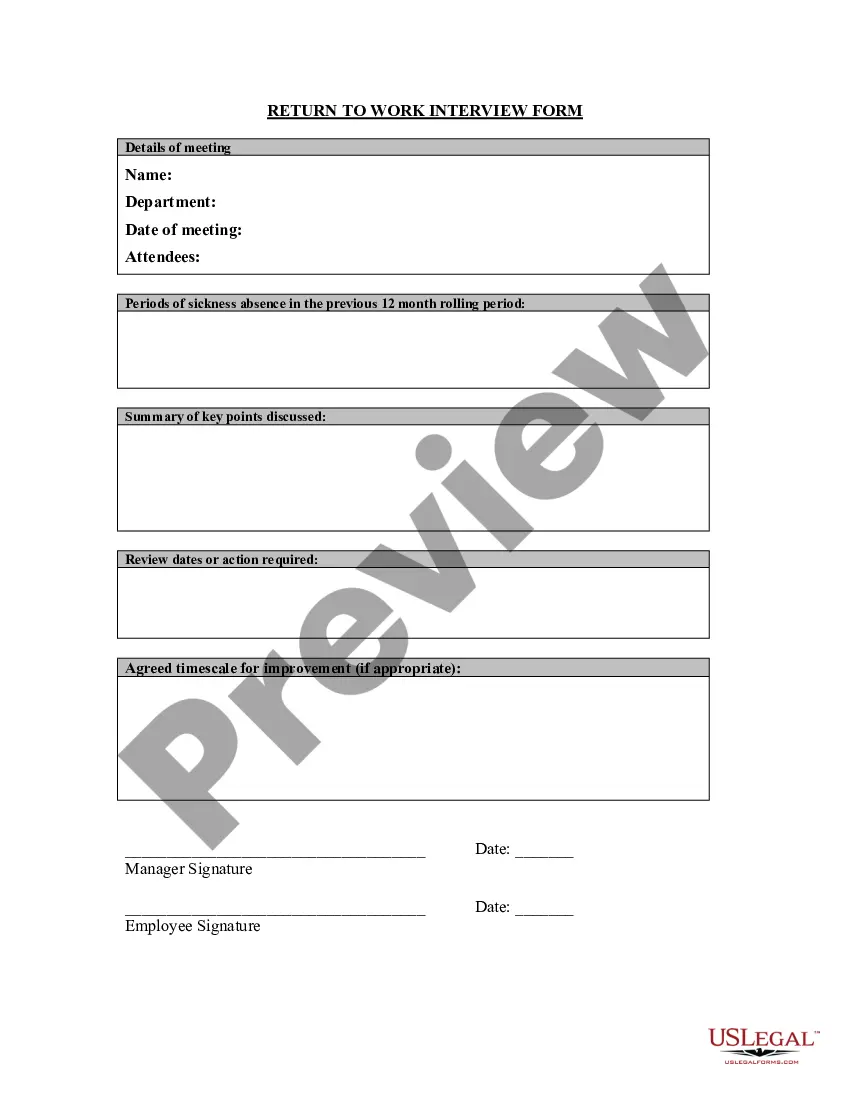
Within the return to work form, managers and employees will need to typically provide details relating to their absence, such as: the duration of absence; the method used by employees to notify of their absence; the reason for absence; details about previous absences over the past calendar year (if applicable);
For example, one person might want to return to normal as quickly as possible, so working every day, but for fewer hours, might help with that. But someone who is struggling might need more time to rest. So they might prefer to work 2-3 full days, with a longer weekend on either side.
If you want to create a productive daily schedule that meets your specific needs, follow these steps: Write everything down. ... Identify priorities. ... Note the frequency. ... Cluster similar tasks. ... Make a weekly chart. ... Optimize your tasks. ... Order the tasks. ... Stay flexible.
How to Write an Effective Return to Work Letter Address the Employee. As with any letter, start by addressing the recipient appropriately. ... Lay out the Reasons for Sending the Letter. ... Explain the Specifics of Their Return. ... Inform Employees of Any Changes to Their Role. ... Outline Policy or Office Changes that Affect Them.
How to create a work schedule for employees Create a blank spreadsheet. If not using a prefilled template, begin by opening a new spreadsheet on your computer. ... Insert column headings. ... Fill in employee names. ... Determine work times. ... Save as a new document. ... Share the schedule.