Sample Corporate Resolution For Signing Authority In Contra Costa
Description


Get your form ready online
Our built-in tools help you complete, sign, share, and store your documents in one place.
Make edits, fill in missing information, and update formatting in US Legal Forms—just like you would in MS Word.
Download a copy, print it, send it by email, or mail it via USPS—whatever works best for your next step.
Sign and collect signatures with our SignNow integration. Send to multiple recipients, set reminders, and more. Go Premium to unlock E-Sign.
If this form requires notarization, complete it online through a secure video call—no need to meet a notary in person or wait for an appointment.
We protect your documents and personal data by following strict security and privacy standards.

Make edits, fill in missing information, and update formatting in US Legal Forms—just like you would in MS Word.

Download a copy, print it, send it by email, or mail it via USPS—whatever works best for your next step.

Sign and collect signatures with our SignNow integration. Send to multiple recipients, set reminders, and more. Go Premium to unlock E-Sign.

If this form requires notarization, complete it online through a secure video call—no need to meet a notary in person or wait for an appointment.

We protect your documents and personal data by following strict security and privacy standards.
Looking for another form?





Form popularity
FAQ
“RESOLVED FURTHER THAT, any one of the above officials of the Company/Bank/Cooperative Society/Trust/legal entity, be and is hereby authorized to do all such acts, deeds, things, sign all such papers, documents, power of attorneys, indemnities, correspondence and to do and perform all such acts, deeds and things and ...
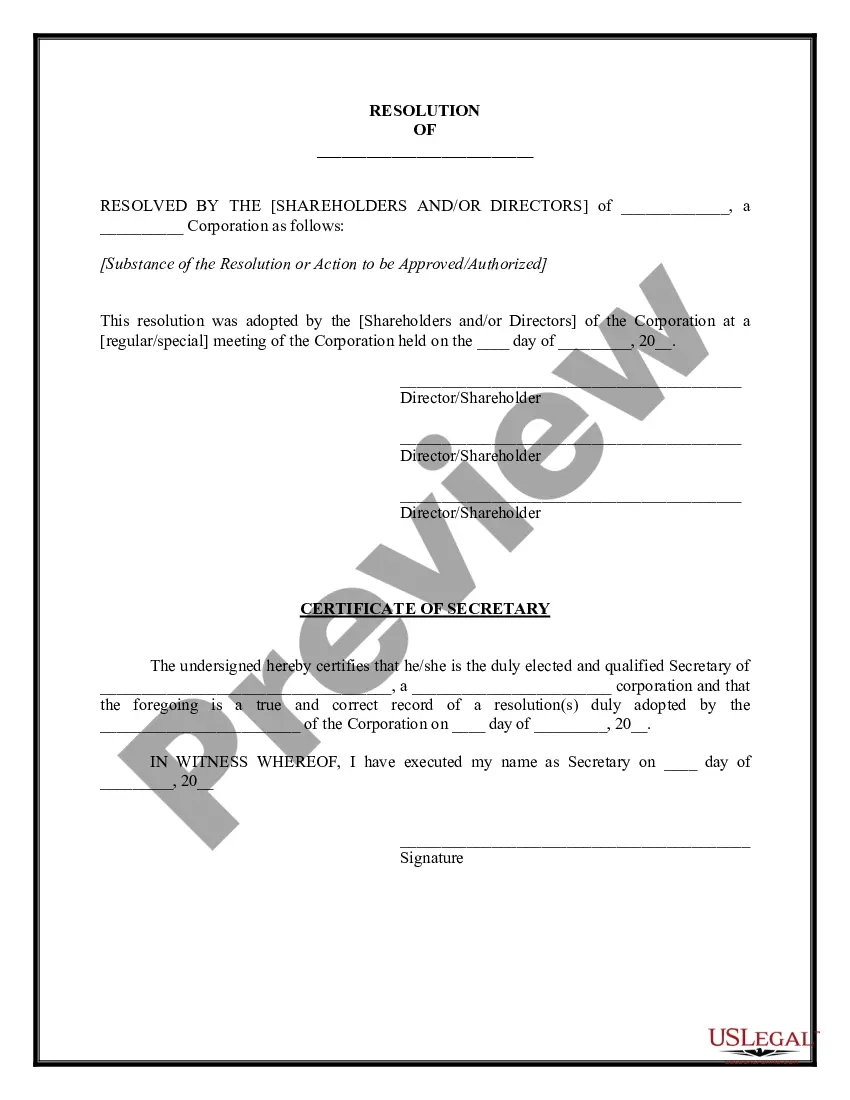
The corporate resolution for signing authority is a specific corporate resolution that authorizes specific corporate officers with the legal standing to sign contracts on behalf of the corporation.
“RESOLVED FURTHER THAT, any one of the above officials of the Company/Bank/Cooperative Society/Trust/legal entity, be and is hereby authorized to do all such acts, deeds, things, sign all such papers, documents, power of attorneys, indemnities, correspondence and to do and perform all such acts, deeds and things and ...
What's included in a corporate resolution? Legal company identification. Company legal name. Title and purpose of the resolution. Signatures of the individual(s) designated to sign resolutions (typically a chairman) List of board members present at the meeting. Date, time, and location of a board meeting.
7 steps for writing a resolution Put the date and resolution number at the top. Give the resolution a title that relates to the decision. Use formal language. Continue writing out each critical statement. Wrap up the heart of the resolution in the last statement.
Clearly state your name and that you're writing to grant authorization to another individual or organization. In the body of your letter, identify the parties involved, specify the authority you're granting, define the duration, and include any other necessary information.
How to write a corporate resolution Hold a board meeting. Board members typically create corporate resolutions at their board meetings to summarize what they discussed. Include introductory elements. Write a statement of consent. List the resolutions. Conclude with a statement of resolution. Proofread the document.
When there is a quorum of directors in office, a resolution in writing signed by all of the directors entitled to vote thereon at a meeting of the board or any committee thereof is as valid as if passed at such meeting.
Only one individual possesses the authority to sign documents on behalf of an organization. Typically, this type of signature is reserved for high-ranking executives. For instance, in a state university, the provost is commonly designated as the sole signatory for agreements about educational and research programs.
“RESOLVED FURTHER THAT, any one of the above officials of the Company/Bank/Cooperative Society/Trust/legal entity, be and is hereby authorized to do all such acts, deeds, things, sign all such papers, documents, power of attorneys, indemnities, correspondence and to do and perform all such acts, deeds and things and ...