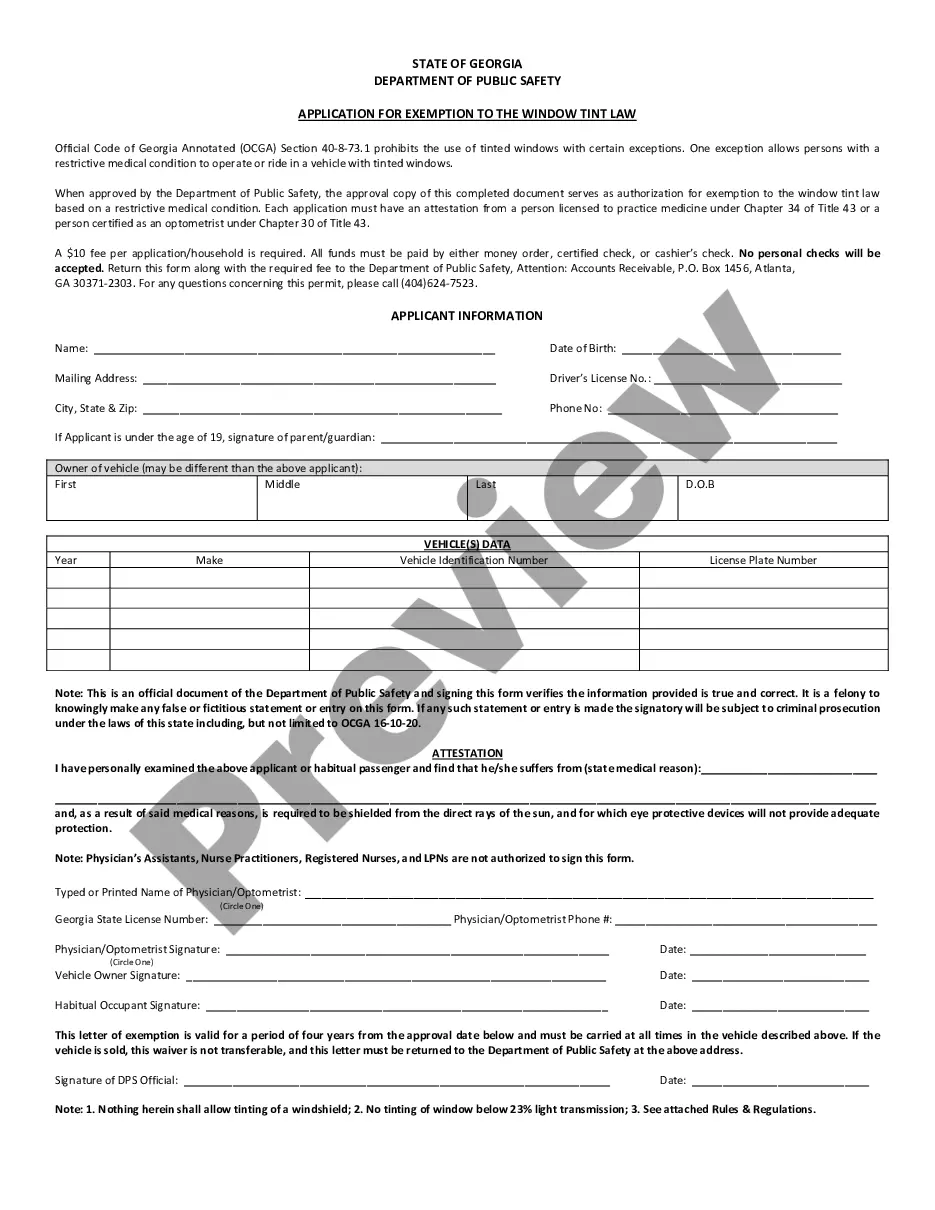
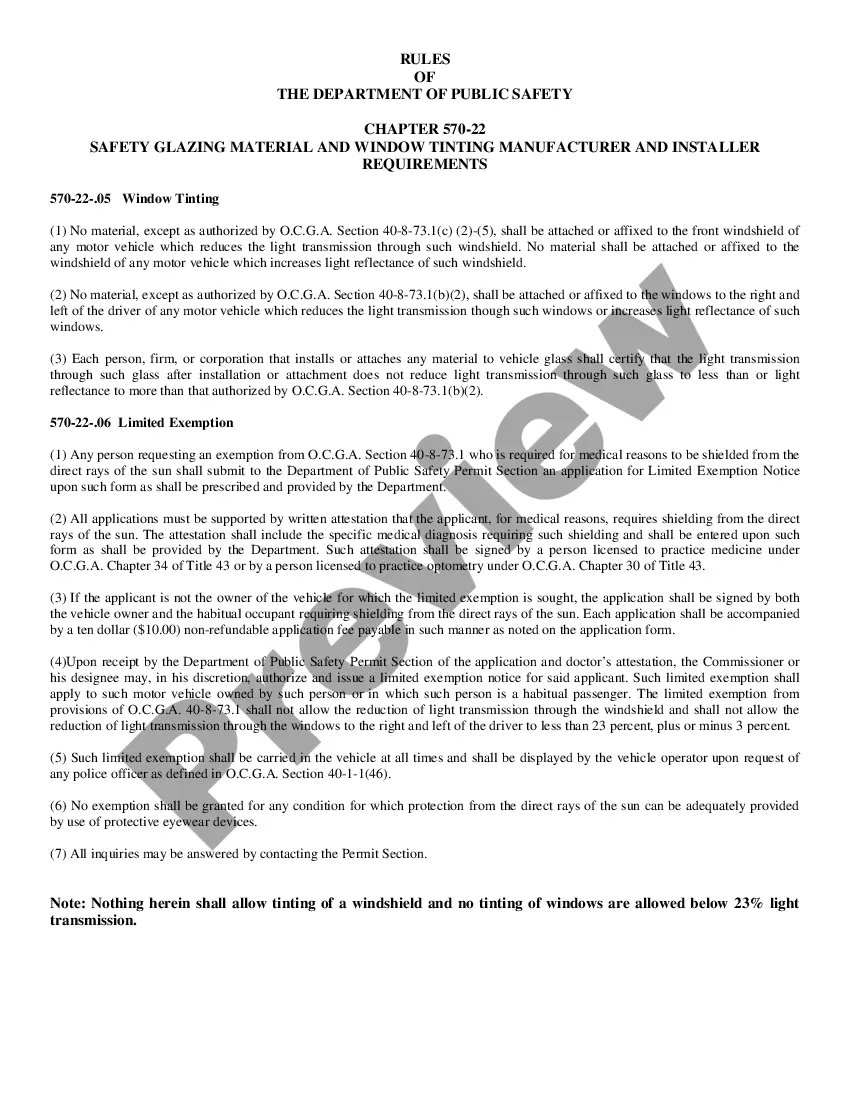
Georgia Tint Regulations
Description
Get your form ready online
Our built-in tools help you complete, sign, share, and store your documents in one place.
Make edits, fill in missing information, and update formatting in US Legal Forms—just like you would in MS Word.
Download a copy, print it, send it by email, or mail it via USPS—whatever works best for your next step.
Sign and collect signatures with our SignNow integration. Send to multiple recipients, set reminders, and more. Go Premium to unlock E-Sign.
If this form requires notarization, complete it online through a secure video call—no need to meet a notary in person or wait for an appointment.
We protect your documents and personal data by following strict security and privacy standards.

Make edits, fill in missing information, and update formatting in US Legal Forms—just like you would in MS Word.

Download a copy, print it, send it by email, or mail it via USPS—whatever works best for your next step.

Sign and collect signatures with our SignNow integration. Send to multiple recipients, set reminders, and more. Go Premium to unlock E-Sign.

If this form requires notarization, complete it online through a secure video call—no need to meet a notary in person or wait for an appointment.

We protect your documents and personal data by following strict security and privacy standards.
Looking for another form?



How to fill out Georgia Application For Exemption To The Window Tint Law?
Acquiring legal documents that conform to federal and state laws is essential, and the web presents numerous choices.
However, what is the purpose of spending time searching for the accurately prepared Georgia Tint Regulations template online when the US Legal Forms digital repository has already compiled such documents in one location.
US Legal Forms represents the largest online legal resource, boasting over 85,000 editable documents crafted by attorneys for various business and personal situations.
Utilize the most comprehensive and user-friendly legal documentation service!
- They are easy to navigate with all documents categorized by state and intended usage.
- Our professionals keep abreast of legislative updates, ensuring that your form remains current and compliant when obtaining a Georgia Tint Regulations from our site.
- Acquiring a Georgia Tint Regulations is straightforward and quick for both existing and new clients.
- If you already possess an account with an active subscription, Log In and download the template you need in your desired format.
- If you are a first-time visitor, adhere to the instructions below.
Form popularity
FAQ
Where Do You Do a Trademark Lookup? The USPTO Trademark Database ? TESS. ... State Trademark Databases. ... Google Trademark Search.
A reasonable trademark search costs from $500-$1500 or more. The search would include an attorney analysis of the results at this price. Many trademark attorneys have the trademark search in their overall trademark package.
Step 1: Choose a field to search. Tell TESS which type of information to search for. Step 2: Choose your search term. ... Step 3: (Optional) Add more search criteria. Step 4: Choose ?yes? or ?no? from the plurals drop down box. Step 5: Submit. Step 6: (Optional) Expand and filter your results. ... Step 7: View your results.
You may conduct a free online search of the USPTO database at the Public Search Facility (Madison East, 1st Floor; 600 Dulany Street, Alexandria, Virginia) between a.m. and p.m. USPTO personnel may not conduct trademark searches for the public. Private trademark search firms will conduct searches for a fee.
Open the USPTO Trademark Electronic Search System online Start your trademark search on the US Patent and Trademark Office's "TESS" (Trademark Electronic Search System) database. Start at the USPTO Trademarks homepage and click on "TESS - Search Trademarks" - that's the first icon in the "Tools" section.
The Trademark Electronic Search System (TESS) contains the records of all active and inactive trademark registrations and applications. You can search this database for any applied-for or registered trademarks to see if any are conflicting with your trademark.
Conduct the Search. Search on TESS--the USPTO's web-based Trademark Electronic Search System-at your local Patent and Trademark Resource Center (.uspto.gov/ptrc) or at home if you have Internet access.
How to Conduct a Trademark Search Open the USPTO Trademark Electronic Search System online. ... Select "Word and/or Design Mark Search (Free Form)". ... Try the obvious first. ... Make sure you're covering all the bases. ... Expand the field of search. ... Combining terms. ... Narrow the search to reduce distractions. ... Review the records you found.