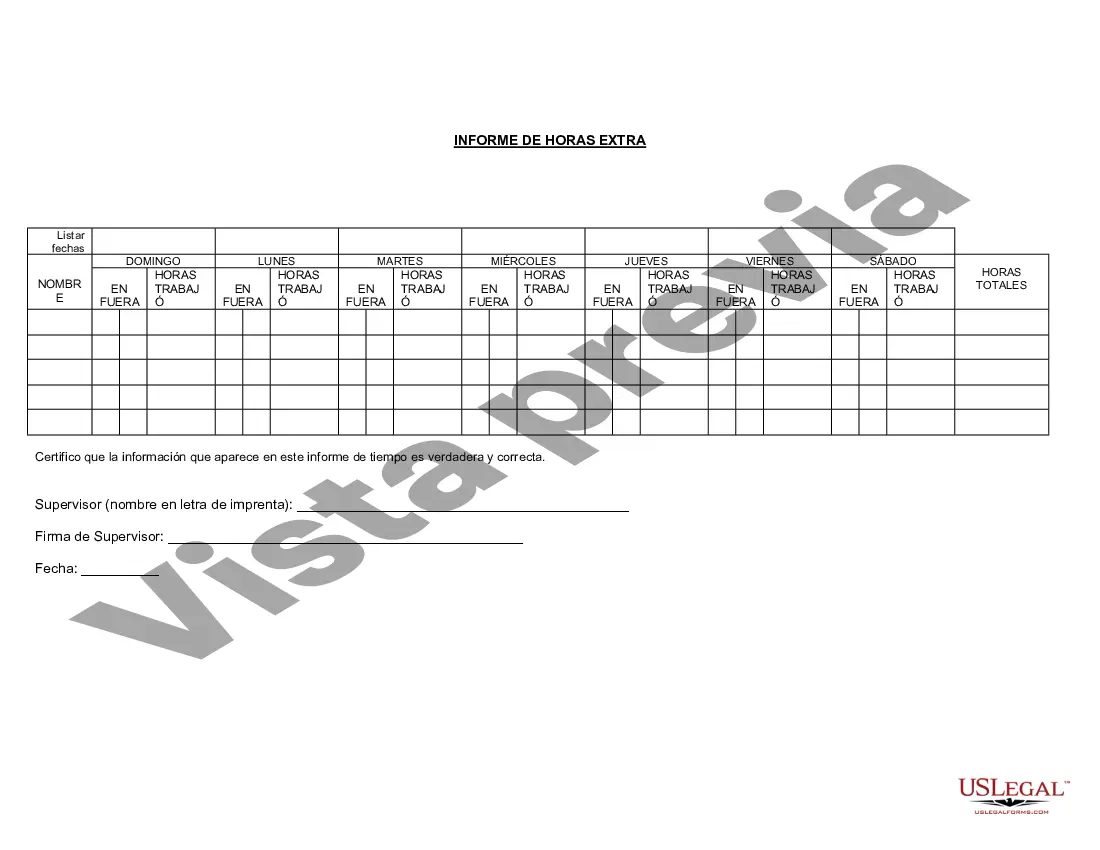
Informe de Horas Extras - Overtime Report
Description
Get your form ready online
Our built-in tools help you complete, sign, share, and store your documents in one place.
Make edits, fill in missing information, and update formatting in US Legal Forms—just like you would in MS Word.
Download a copy, print it, send it by email, or mail it via USPS—whatever works best for your next step.
Sign and collect signatures with our SignNow integration. Send to multiple recipients, set reminders, and more. Go Premium to unlock E-Sign.
If this form requires notarization, complete it online through a secure video call—no need to meet a notary in person or wait for an appointment.
We protect your documents and personal data by following strict security and privacy standards.

Make edits, fill in missing information, and update formatting in US Legal Forms—just like you would in MS Word.

Download a copy, print it, send it by email, or mail it via USPS—whatever works best for your next step.

Sign and collect signatures with our SignNow integration. Send to multiple recipients, set reminders, and more. Go Premium to unlock E-Sign.

If this form requires notarization, complete it online through a secure video call—no need to meet a notary in person or wait for an appointment.

We protect your documents and personal data by following strict security and privacy standards.
Looking for another form?


How to fill out Informe De Horas Extras?
Among lots of free and paid examples that you find on the web, you can't be sure about their reliability. For example, who made them or if they’re competent enough to deal with what you need these to. Keep relaxed and use US Legal Forms! Get Overtime Report templates created by professional attorneys and avoid the costly and time-consuming procedure of looking for an lawyer or attorney and then paying them to write a papers for you that you can easily find on your own.
If you have a subscription, log in to your account and find the Download button near the file you are looking for. You'll also be able to access your earlier downloaded examples in the My Forms menu.
If you are utilizing our platform for the first time, follow the instructions below to get your Overtime Report with ease:
- Ensure that the document you find is valid in your state.
- Review the template by reading the information for using the Preview function.
- Click Buy Now to start the ordering process or find another sample using the Search field located in the header.
- Select a pricing plan and create an account.
- Pay for the subscription using your credit/debit/debit/credit card or Paypal.
- Download the form in the preferred format.
When you have signed up and purchased your subscription, you can use your Overtime Report as often as you need or for as long as it stays valid where you live. Revise it in your favorite offline or online editor, fill it out, sign it, and print it. Do much more for less with US Legal Forms!
Form popularity
FAQ
Timesheet es una aplicacion muy sencilla que nos permite registrar las horas de trabajo o estudio con un solo botA³n. Del mismo modo, podemos ir aA±adiendo descansos, para cuadrarlo todo. Es una app muy sencilla, que sumarA¡ el tiempo total que hemos estado trabajando.
Esta hoja permite consolidar la informacion por servidor pAºblico o dependencia, que va a reportar tiempo extra laborado, el cual ha sido previamente autorizado por su jefe inmediato.
Asi, si la hora de entrada estA¡ en B2 y la de salida en B3, utilizaremos la fA³rmula =(B3-B2). Si tambiA©n queremos contabilizar las horas de descanso, la fA³rmula a la que recurrimos serA¡ =(Hora de salida-fin del descanso)+(inicio de descanso-hora de entrada).
El pago de la hora extra se calcula en base al valor de la remuneracion ordinaria. Se pagara por las 2 primeras horas mA¡s de trabajo, un 25% mA¡s el valor de la hora ya partir de mA¡s horas de trabajo el 35% mA¡s adicional al valor de la hora. En el turno noche se gana mA¡s el 35% de la jornada.
Esta guia te servirA¡ para elaborar un buen informe siempre que lo necesites:Escoge bien tu objetivo.Cambia tu lugar y piensa en el destinatario.Haz una lista con lo que quieres escribir.Busca fuentes autorizadas.Escribe el texto del informe siguiendo una estructura precisa.Se simple, claro y concreto.More items...a¢Jul 20, 2021
Las horas extraordinarias, o, abreviadamente, horas extras, son las cantidades de tiempo adicionales que un trabajador realiza sobre su jornada de trabajo, que normalmente suele ser una jornada de ocho horas. El termino es tambiA©n usado para el pago recibido por las horas extras trabajadas.
Segun lo dispuesto en el artAculo 33 del CA³digo del Trabajo, el empleador se encuentra obligado a llevar un registro para controlar la asistencia y horas trabajadas de los trabajadores, registro que puede consistir en un libro de asistencia o un reloj control con tarjeta de registro.
¿CA³mo redactar un informe laboral?Escogiendo el tipo de informe que quieres escribir.Definiendo el objetivo.Reuniendo tus fuentes.Organizando tu informaciA³n.El uso del lenguaje es muy importante.SA© prA¡ctico.No olvides despedirte.Nov 7, 2019
La introduccion debe contener:El nombre y cargo del destinatario del informe.La fecha del informe.El propA³sito del informe.Antecedentes del tema.El enunciado completo o resumido de los resultados obtenidos, de sus conclusiones o recomendaciones.La lista de capAtulos por orden de secuencia.More items...