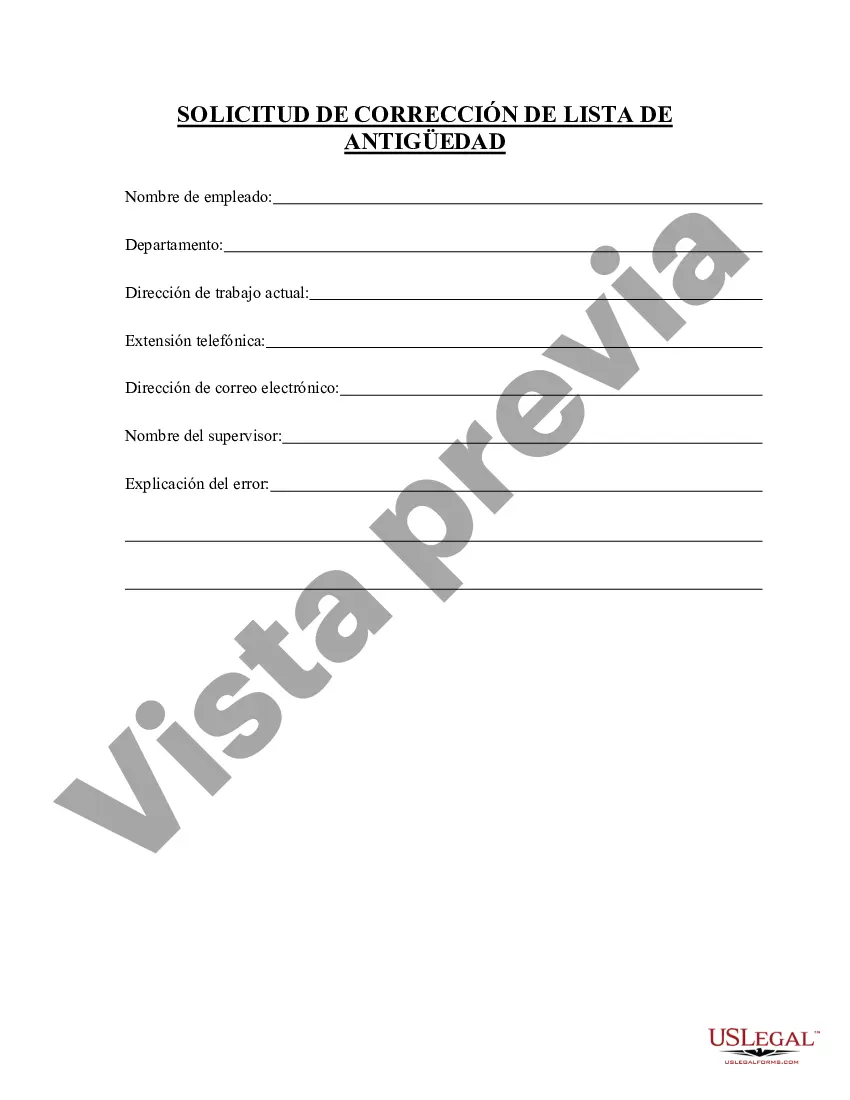
Solicitud de Corrección de Lista de Antigüedad - Seniority Roster Correction Request
Description
Get your form ready online
Our built-in tools help you complete, sign, share, and store your documents in one place.
Make edits, fill in missing information, and update formatting in US Legal Forms—just like you would in MS Word.
Download a copy, print it, send it by email, or mail it via USPS—whatever works best for your next step.
Sign and collect signatures with our SignNow integration. Send to multiple recipients, set reminders, and more. Go Premium to unlock E-Sign.
If this form requires notarization, complete it online through a secure video call—no need to meet a notary in person or wait for an appointment.
We protect your documents and personal data by following strict security and privacy standards.

Make edits, fill in missing information, and update formatting in US Legal Forms—just like you would in MS Word.

Download a copy, print it, send it by email, or mail it via USPS—whatever works best for your next step.

Sign and collect signatures with our SignNow integration. Send to multiple recipients, set reminders, and more. Go Premium to unlock E-Sign.

If this form requires notarization, complete it online through a secure video call—no need to meet a notary in person or wait for an appointment.

We protect your documents and personal data by following strict security and privacy standards.
Looking for another form?
How to fill out Solicitud De Corrección De Lista De Antigüedad?
Among lots of paid and free templates that you can get on the web, you can't be certain about their accuracy and reliability. For example, who made them or if they are skilled enough to deal with the thing you need these to. Keep relaxed and make use of US Legal Forms! Get Seniority Roster Correction Request templates created by skilled legal representatives and avoid the costly and time-consuming process of looking for an lawyer and then paying them to draft a document for you that you can find on your own.
If you already have a subscription, log in to your account and find the Download button near the form you’re looking for. You'll also be able to access your previously saved samples in the My Forms menu.
If you’re using our service the very first time, follow the guidelines listed below to get your Seniority Roster Correction Request fast:
- Make sure that the document you find is valid in your state.
- Review the file by reading the information for using the Preview function.
- Click Buy Now to start the purchasing procedure or look for another sample using the Search field located in the header.
- Choose a pricing plan sign up for an account.
- Pay for the subscription with your credit/debit/debit/credit card or Paypal.
- Download the form in the needed format.
As soon as you’ve signed up and bought your subscription, you may use your Seniority Roster Correction Request as often as you need or for as long as it remains valid where you live. Revise it in your favored editor, fill it out, sign it, and print it. Do much more for less with US Legal Forms!
Form popularity
FAQ
Tu CURP tiene un error: asi puedes corregirlo en lAnea Enviar un correo a tramitescurp@segob.gob.mx explicando la situaciA³n y dA³nde se encuentra el error en tu CURP, anexando fotografAa o escaneo de tu acta de nacimiento e INE, asA como un nAºmero telefA³nico donde los asesores te puedan contactar.
¿CA³mo se efectAºa la ModificaciA³n y ActualizaciA³n de datos? Acudir a las oficinas de AtenciA³n al PAºblico de PENSIONISSSTE. En la oficina de AtenciA³n al PAºblico de PENSIONISSSTE te proporcionarA¡n la solicitud de correcciA³n o actualizaciA³n de datos personales. El Trabajador deberA¡ verificar los datos asentados y firmarla.
Renapo realizara correcciA³n de la CURP mediante correo...Describir la solicitud del trA¡mite a realizar y anotar la CURP(s) que deseen corregir.Adjuntar los siguientes documentos:Copia del acta de nacimiento o carta de naturalizaciA³n, segAºn corresponda.Copia de una identificaciA³n oficial con fotografAa.More items...a¢Mar 23, 2020
Acudir a cualquier sucursal de la AFORE que administra la Cuenta Individual y solicitar la actualizacion de datos correspondiente presentando:Formato de solicitud de correcciA³n de datos llenado y firmado, mismo que deberA¡ ser proporcionado por la AFORE.IdentificaciA³n oficial vigente (original), que puede ser:More items...
Opciones para realizar tu tramite En lAnea: Realiza tu trA¡mite en lAnea aquA. Presencial: En el Departamento de AfiliaciA³n y Prestaciones EconA³micas en las Delegaciones Estatales y Regionales del ISSSTE y/o Area TA©cnica en las ClAnicas de Medicina Familiar del ISSSTE mA¡s cercana a tu domicilio.
Modificacion de datos personales en tu cuenta individual en el rA©gimen del dA©cimo transitorio en el ISSSTEDocumentos necesarios.CURP y/o datos base CURP.Apellido paterno, materno y/o nombre.Para modificaciA³n en RFC.Para actualizaciA³n de domicilio.
Cuando se tiene mas de una clave CURP, el tA©rmino para corregir y determinar esta situaciA³n es de 5 dAas hA¡biles, ya que es un trA¡mite que se hace en coordinaciA³n con la DirecciA³n General del Registro Nacional de PoblaciA³n e IdentificaciA³n Personal (RENAPO) en MA©xico.
Si tu Clave Unica de Registro de PoblaciA³n (CURP) tiene algAºn error en tu nombre, apellido, fecha y lugar de nacimiento, sexo, o bien, en los datos de registro (nAºmero de acta, libro, foja, tomo, entidad o municipio); o si tienes mA¡s de una CURP A¡Solicita la correcciA³n!
¿Requiero cita para realizar la correcciA³n? No es necesario agendar cita, el trA¡mite puede realizarse en la pA¡gina de internet de la DirecciA³n General de Profesiones o de manera personal. A¿QuA© documentaciA³n requiero para realizar el trA¡mite? Se requiere copia del CURP y TAtulo Profesional por ambos lados, legibles.