South Carolina Notice of Non-Responsibility by Corporation
What is this form?
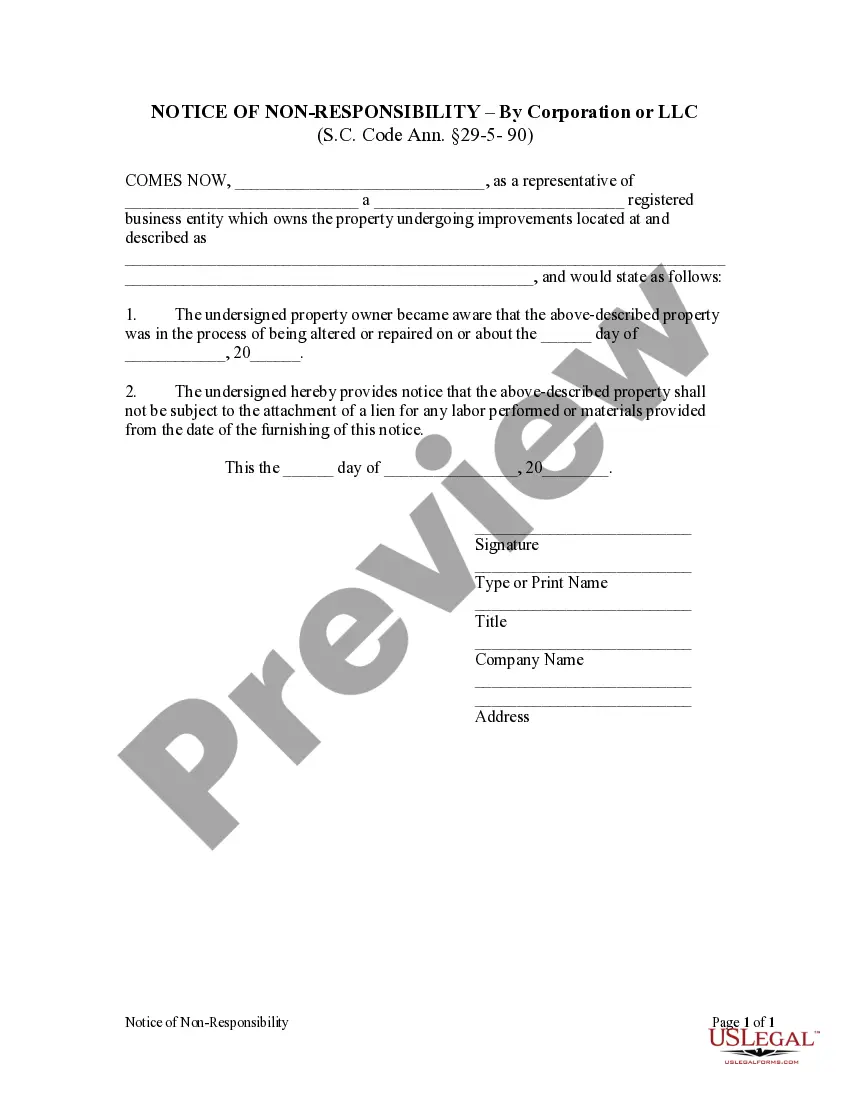
The Notice of Non-Responsibility by Corporation is a legal form used by property owners to notify contractors and suppliers that they will not be responsible for any liens related to work being done on their property. This form serves to protect the property owner from claims for unpaid labor or materials provided during construction or renovations, distinguishing it from other forms that may be related to property ownership or leasing.
What’s included in this form
- Property owner's name and contact information.
- Details about the registered business entity that owns the property.
- Description of the property undergoing improvements.
- Date the property owner became aware of the renovations.
- Statement indicating that the property shall not be responsible for any labor or materials from the date of this notice.
- Signature and printed name of the representative, along with their title and company name.
Situations where this form applies
This form should be used when a corporation is undertaking construction, alterations, or repairs on a property and wants to inform subcontractors and suppliers that it will not be liable for any labor or materials provided. It is particularly important to use this form when there is a possibility of liens being placed on the property for unpaid services or supplies.
Who should use this form
The following individuals and entities should consider using this form:
- Corporate property owners who are remodeling or constructing on their premises.
- Legal representatives of businesses managing property improvement projects.
- Property management companies acting on behalf of the owners.
How to prepare this document
To successfully complete the Notice of Non-Responsibility, follow these steps:
- Identify the parties involved by filling in the name of the property owner and their registered business entity.
- Describe the property that is undergoing improvements, including its location.
- Enter the date when the owner became aware of the alterations or repairs.
- State clearly that the property will not be subject to any liens for labor or materials from the date of the notice.
- Sign the form, and provide the printed name, title, and company name of the individual signing.
Is notarization required?
This form does not typically require notarization unless specified by local law. However, it is advisable to check with a legal professional for specific requirements in your jurisdiction.
Get your form ready online
Our built-in tools help you complete, sign, share, and store your documents in one place.
Make edits, fill in missing information, and update formatting in US Legal Forms—just like you would in MS Word.
Download a copy, print it, send it by email, or mail it via USPS—whatever works best for your next step.
Sign and collect signatures with our SignNow integration. Send to multiple recipients, set reminders, and more. Go Premium to unlock E-Sign.
If this form requires notarization, complete it online through a secure video call—no need to meet a notary in person or wait for an appointment.
We protect your documents and personal data by following strict security and privacy standards.

Make edits, fill in missing information, and update formatting in US Legal Forms—just like you would in MS Word.

Download a copy, print it, send it by email, or mail it via USPS—whatever works best for your next step.

Sign and collect signatures with our SignNow integration. Send to multiple recipients, set reminders, and more. Go Premium to unlock E-Sign.

If this form requires notarization, complete it online through a secure video call—no need to meet a notary in person or wait for an appointment.

We protect your documents and personal data by following strict security and privacy standards.
Mistakes to watch out for
- Failing to specify the correct property address, which can lead to ineffective notice.
- Not providing a clear date of awareness regarding the alterations or repairs.
- Omitting the signature or necessary identification of the representative of the corporation.
Why complete this form online
- Convenience of downloading and completing the form online.
- Editability allows customization to fit specific property details and circumstances.
- Reliability of using templates drafted by licensed attorneys ensuring legal compliance.
Main things to remember
- The Notice of Non-Responsibility protects property owners from potential liens related to construction work.
- It is specifically relevant for corporate property owners managing renovations or repairs.
- Accurate completion of the form is essential to ensure its legal effectiveness.
Looking for another form?
Form popularity
FAQ
South Carolina Fillable Forms is a FREE product and is only for filing your South Carolina return. South Carolina Fillable Forms provides the option to fill out your return online and mail it to the SCDOR OR to submit your return the SCDOR electronically.
If you qualify for a paper copy of a tax form based on these criteria, you can email your paper form request to forms@dor.sc.gov or call 1-844-898-8542 to speak to a representative. You will need to provide your name, address, and the form you are requesting.
Employee instructions Complete the SC W-4 so your employer can withhold the correct South Carolina Income Tax from your pay. If you have too much tax withheld, you will receive a refund when you file your tax return.
File SC1040, including all federal taxable income, and attach SC1040TC to claim a credit for taxes paid to another state.