Loading
Form preview
  • US Legal Forms
  • Other Templates
  • More Forms
  • More Multi-State Forms
  • Au Nab 68797a 2015

Get Au Nab 68797a 2015-2026

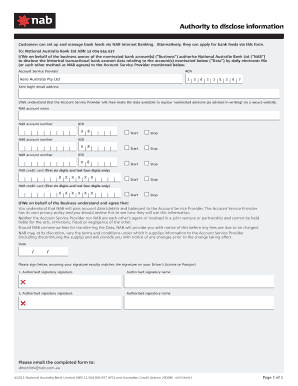
12 004 044 937 I/We on behalf of the business owner of the nominated bank account(s) ( Business ) authorise National Australia Bank Ltd ( NAB ) to disclose the historical transactional bank account data relating to the account(s) nominated below ( Data ) by daily electronic file (or such other method as NAB agrees) to the Account Service Provider mentioned below. Account Service Provider ACN 1 Xero Australia Pty Ltd 2 4 2 1 5 2 4 7 Xero login email address I/We understa.

How it works

  1. Open form

    Open form follow the instructions

  2. Easily sign form

    Easily sign the form with your finger

  3. Share form

    Send filled & signed form or save

How to fill out the AU NAB 68797A online

Filling out the AU NAB 68797A form is a crucial step for businesses looking to set up bank feeds with the National Australia Bank. This guide provides clear, user-friendly instructions to help you complete the form online with ease.

Follow the steps to complete and submit the AU NAB 68797A form online.

  1. Click ‘Get Form’ button to obtain the form and open it in the online editor.
  2. Identify the Account Service Provider by entering their name and ACN. This is the entity that will receive your bank data.
  3. Provide the Xero login email address associated with the Account Service Provider to ensure data linkage.
  4. Input the NAB account name and NAB account number for the account you wish to authorize data access for.
  5. Fill in the BSB number associated with the NAB account to ensure accurate processing.
  6. If applicable, enter the first six digits and last four digits of your NAB credit card numbers; this is for identification purposes only.
  7. Review the conditions stated regarding the understanding of data sharing and privacy policies; ensure you agree to the terms outlined.
  8. Set the date of completion at the designated field to signify when the form was filled out.
  9. Have the authorized signatory sign in the provided fields, ensuring that the signature matches one on an official ID, such as a Driver’s License or Passport.
  10. Enter the name of the authorized signatory below their signature.
  11. Once the form is completely filled, review all entries for accuracy before saving your changes.
  12. Download or print the form for your records, then email the completed form to directlink@nab.com.au for submission.

Complete your AU NAB 68797A form online today and streamline your bank feed setup with ease.

Get form

Experience a faster way to fill out and sign forms on the web. Access the most extensive library of templates available.
Get form

Related content

...
... Au|8 &APZ% $Jbj uvf% .itMf~ 3Jzkhu )Baennbh $!/ * ,# ! Flckd !8UH^ass...
Learn more
E ,.==.-.—......--.,
300 MPH 7- by 10-foot tunnel to determine the chordwise and spanwise load distribution on...
Learn more
Production, Prices, Employment, and Trade in...
This report presents current information on the timber situation in Alaska, Washington...
Learn more

Related links form

CT DRS CT-706 NT 2009 CT DRS CT-706 NT 2008 CT DRS CT-706 NT 2007 CT DRS CT-706 NT EXT 2018

Get This Form Now!

Use professional pre-built templates to fill in and sign documents online faster. Get access to thousands of forms.
Get form
If you believe that this page should be taken down, please follow our DMCA take down processhere.
Get AU NAB 68797A
Get form

Form categories

Real Estate
  • Home Sale
  • Deeds
  • Leases
  • Landlord Tenant
  • First Refusal Agreement
  • Lis Pendens
  • View all Real Estate
Business & Commercial
  • Small Business
  • Contracts
  • Construction
  • Employment
  • Limited Liability Company
  • Partnerships
  • View all Business & Commercial
Estate Planning
  • Personal Planning
  • Last Will and Testament
  • Living Trust
  • Power of Attorney
  • Living Will (Healthcare Directive)
  • Probate
  • Trusts
  • Small Estate
  • View all Estate Planning

Other Legal Areas

  • Civil Actions
  • Civil Procedure
  • Animals
  • Affidavits
  • Bill of Sale
  • Oil Gas and Minerals
  • Name Change
  • Other
Family Law
  • Divorce
  • Annulment
  • Adoption
  • Marriage
  • Child Justice
  • View all Family Law
  • Forms Catalog
  • Other Templates

Company

  • About Us
  • Pricing
  • Legal Hub
  • Affiliate Program

Knowledge Base

  • Help Portal
  • Legal Resources
  • Blog
  • Industries
  • Legal Guides
  • Sitemap

Services

  • Notarize
  • Form Selector

Support

  • Contact Us
  • Delete My Account

Products

  • USLegal
  • FormsPass
  • pdfFiller
  • signNow
  • altaFlow
  • DocHub
  • Instapage
Social Media
Call us now toll free:
+1 833 426 79 33
As seen in:
© 2026 US Legal Forms. All rights reserved.
  • Your Privacy Choices
  • Terms of Service
  • Privacy Notice
  • Content Takedown Policy
  • Bug Bounty Program