Loading
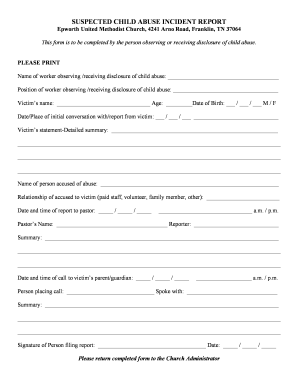
Get Suspected Child Abuse Incident Report - Epworth-umccom
How it works
-

Open form follow the instructions
-

Easily sign the form with your finger
-

Send filled & signed form or save
How to fill out the SUSPECTED CHILD ABUSE INCIDENT REPORT - Epworth-umccom online
Completing the SUSPECTED CHILD ABUSE INCIDENT REPORT is a crucial step in ensuring the safety of children. This guide provides detailed instructions to help you fill out the form online accurately and efficiently.
Follow the steps to successfully complete the report.
- Press the ‘Get Form’ button to access the form and open it in the designated online editor.
- Begin by entering your name as the worker who is observing or has received a disclosure of child abuse in the designated field.
- Next, fill in your position within the organization. This helps clarify your role in the reporting process.
- Provide the victim's name and their age, along with their date of birth. Ensure the information is accurate for proper documentation.
- Document the date and place of the initial conversation with the victim or the report from them. This information is crucial for the timeline of events.
- In the section labeled 'Victim’s statement - Detailed summary', provide a comprehensive account based on the victim’s disclosure. Use clear and neutral language.
- Identify the person accused of the abuse by entering their name in the appropriate space.
- Detail the relationship of the accused to the victim. Choose from the predefined categories such as paid staff, volunteer, family member, or other.
- Fill in the date and time when the report was made to the pastor, ensuring to indicate whether it was in the a.m. or p.m.
- Enter the name of the pastor who received the report and your name in the designated fields.
- Provide a summary of the interactions or discussions that took place concerning the report.
- Document the date and time of the call made to the victim’s parent or guardian, including whether it was in the a.m. or p.m., and the name of the person who made the call.
- Indicate who you spoke with during the call and summarize that conversation in the respective field.
- Finally, sign the form, enter the date, and ensure all fields are accurately filled out before submission.
- Once you have completed all sections, save your changes, and you may then download, print, or share the form as necessary.
Take the next step in safeguarding children by completing the SUSPECTED CHILD ABUSE INCIDENT REPORT online today.
Report Child Abuse: 877-237-0004 Call the Child Abuse Hotline to report child abuse or neglect in the State of Tennessee.