Loading
Get Ny Dtf It-2664 2021-2026
How it works
-

Open form follow the instructions
-

Easily sign the form with your finger
-

Send filled & signed form or save
How to fill out the NY DTF IT-2664 online
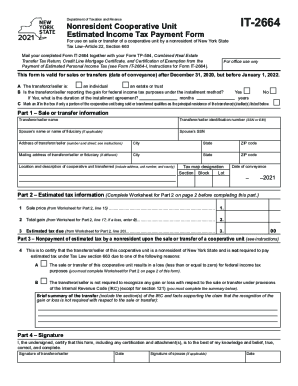
Filing the NY DTF IT-2664 form correctly is essential for nonresidents involved in the sale or transfer of a cooperative unit in New York State. This guide provides a step-by-step approach to help users navigate the online form efficiently.
Follow the steps to successfully complete the NY DTF IT-2664 form online.
- Click ‘Get Form’ button to obtain the form and open it in the editor.
- Begin by filling in the transferor/seller information. This includes the name, Social Security number (SSN) or Employer Identification Number (EIN), and address details of the transferor/seller. If applicable, also include the spouse’s details.
- In Part 1, provide details about the sale or transfer of the cooperative unit. This section requires the location and description of the unit, the date of conveyance, and tax map designation.
- Proceed to Part 2, where you will complete the Estimated Tax Information based on the worksheet provided. Ensure you have calculated the sale price, total gain, and estimated tax due.
- In Part 3, certify whether the transferor/seller qualifies for exemption from estimated tax due to a sale resulting in a loss or other tax provisions. Clearly summarize your reasoning.
- In Part 4, complete the signature section by providing the signatures and dates for both the transferor/seller and the spouse if applicable. This confirms the accuracy of the information provided.
- Review the completed form for accuracy and completeness. You may then choose to save your changes, download a copy for your records, print the form, or share it as needed.
Complete your NY DTF IT-2664 form online to ensure a smooth filing process.
Related links form
New York State Income Tax Return forms for Tax Year 2018 (Jan. 1 - Dec. 31, 2018) can be e-Filed in conjunction with an IRS Income Tax Return until October 15, 2019.