Loading
Form preview
  • US Legal Forms
  • Other Templates
  • Tax Forms
  • Executive Department Treasury IRS Forms
  • Treasurydirect Fs 4000 2015

Get Treasurydirect Fs 4000 2015

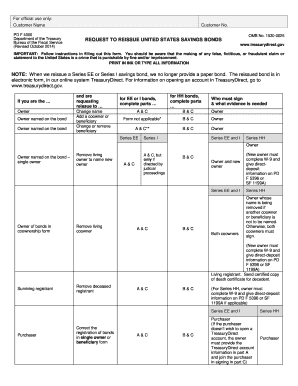
1530-0025 www.treasurydirect.gov IMPORTANT: Follow instructions in filling out this form. You should be aware that the making of any false, fictitious, or fraudulent claim or statement to the United States is a crime that is punishable by fine and/or imprisonment. PRINT IN INK OR TYPE ALL INFORMATION NOTE: When we reissue a Series EE or Series I savings bond, we no longer provide a paper bond. The reissued bond is in electronic form, in our online system TreasuryDirect. For information on op.

How it works

  1. Open form

    Open form follow the instructions

  2. Easily sign form

    Easily sign the form with your finger

  3. Share form

    Send filled & signed form or save

How to fill out the TreasuryDirect FS 4000 online

The TreasuryDirect FS 4000 form is a request to reissue United States savings bonds. This guide provides step-by-step instructions to help users navigate the online form efficiently. Whether you are an experienced user or new to digital document management, this guide aims to make the process straightforward and comprehensible.

Follow the steps to fill out the TreasuryDirect FS 4000 form online:

  1. Press the ‘Get Form’ button to access the TreasuryDirect FS 4000 form in the online editor.
  2. Identify yourself as the owner named on the bond. Ensure you select the correct option for your request to reissue, such as changing a name, adding a co-owner or beneficiary, or changing/removing a beneficiary.
  3. Provide details regarding the bonds you wish to reissue. This includes the bond description, such as issue dates, face amounts, and bond numbers. Ensure complete and accurate registration information.
  4. Indicate the extent of the reissue by selecting whether you are requesting the full amount or a fractional share.
  5. Enter the TreasuryDirect account information where the reissued bond(s) will be deposited. Include the account number and the Social Security Number or Employer Identification Number.
  6. Clearly describe the reason for the reissue. If correcting an error, provide details about who purchased the bonds and how the error occurred.
  7. Complete the certification section by signing the form in ink and ensuring the signature is witnessed by an authorized certifying officer.
  8. Review all information for completeness and accuracy before proceeding.
  9. Save the changes made to the form. Options to download, print, or share the form will be available once you finalize your entries.

Complete your TreasuryDirect FS 4000 form online today for a smooth reissue process.

Get form

Experience a faster way to fill out and sign forms on the web. Access the most extensive library of templates available.

Related content

Request To Reissue United States Savings Bonds
You'll need to provide death certificate. 2) Request reissue by. FS Form 4000. A & C. See...
Learn more
Financial Decision-Making - Wharton's Finance...
Oct 15, 2023 — This book is for people who need to practice finance - a group consisting...
Learn more

Related links form

TX 98-292 2015 TX 98-292 2007 TX Annual Tax-Exempt Confirmation Form 2011 TX AP-133 2017

Questions & Answers

Get answers to your most pressing questions about US Legal Forms API.

Contact support

The social security number that goes on a savings bond should be that of the primary owner or co-owner. This ensures that the bond is correctly linked to the owner for tax reporting and beneficiary purposes. When using TreasuryDirect FS 4000, be mindful to input the correct social security number to avoid any complications regarding ownership and tax obligations.

FS Form 4000 is used in the TreasuryDirect system to manage various transactions related to savings bonds. This form allows you to provide essential information needed for transactions such as purchases, redemptions, and transfers. Utilizing the TreasuryDirect FS 4000 effectively streamlines your bond management, enhancing your overall experience with the platform.

Yes, it does matter whose social security number is on a savings bond. The social security number identifies the bond owner and ties into tax reporting. When you use TreasuryDirect FS 4000, the correct social security number ensures that the bond's interest income is reported accurately to the IRS. Therefore, it's important to use the number of the actual owner or beneficiary.

Funding your TreasuryDirect account is straightforward and can be done through various methods, including bank transfers or direct deposit. You’ll find instructions on the TreasuryDirect FS 4000 that outline the most efficient ways to prepare your account for transactions. Ensuring your account is funded will help you manage your bonds effectively.

Yes, you typically need to report savings bonds on your taxes if they earn interest. This interest is taxable in the year you redeem the bonds unless you choose to defer it. Referencing the TreasuryDirect FS 4000 can assist you in understanding your tax obligations related to savings bonds. Being informed about these requirements can help you avoid any surprises come tax season.

To record savings bond interest, you need to calculate the total interest earned during the tax year. Use the information from the TreasuryDirect FS 4000 for guidance on recording this interest. Enter the total on your tax return, ensuring that you adhere to the correct reporting format. This will help you maintain clear financial records.

When you file your tax return, enter your savings bonds interest on the appropriate line designated for interest income. Often, you will report this on Schedule B. The TreasuryDirect FS 4000 offers clarity on where to locate your bond interest and how to report it accurately. By following these guidelines, you can streamline your filing process.

If you withdraw U.S. Treasury bonds before maturity, you may incur a penalty, which typically involves losing interest earnings. This penalty discourages early withdrawal and helps maintain the stability of Treasury investments. Understanding these terms is essential for anyone engaging with TreasuryDirect FS 4000 assets, as it aids in making informed investment decisions.

Buying a 6-month Treasury bill through TreasuryDirect is a straightforward process. First, log in to your account and select 'Buy Direct' from the main menu. Next, choose 'Treasury Bills' and then specify the 6-month option, allowing you to effectively invest in TreasuryDirect FS 4000 products easily.

To obtain your tax documents from TreasuryDirect, log in to your TreasuryDirect account. Navigate to the 'Manage Direct' section, where you can find tax documents for the current tax year. This ensures you have all the necessary information for reporting income from your TreasuryDirect FS 4000 investments.

Get This Form Now!

Use professional pre-built templates to fill in and sign documents online faster. Get access to thousands of forms.
If you believe that this page should be taken down, please follow our DMCA take down processhere.
Get TreasuryDirect FS 4000
  • Adoption
  • Bankruptcy
  • Contractors
  • Divorce
  • Home Sales
  • Employment
  • Identity Theft
  • Incorporation
  • Landlord Tenant
  • Living Trust
  • Name Change
  • Personal Planning
  • Small Business
  • Wills & Estates
  • Packages A-Z
  • Affidavits
  • Bankruptcy
  • Bill of Sale
  • Corporate - LLC
  • Divorce
  • Employment
  • Identity Theft
  • Internet Technology
  • Landlord Tenant
  • Living Wills
  • Name Change
  • Power of Attorney
  • Real Estate
  • Small Estates
  • Wills
  • All Forms
  • Forms A-Z
  • Other Templates
  • Legal Hub
  • About Us
  • Help Portal
  • Legal Resources
  • Blog
  • Affiliates
  • Contact Us
  • Delete My Account
  • Site Map
  • Industries
  • Forms in Spanish
  • Localized Forms
  • State-specific Forms
  • Forms Kit
  • Real Estate Handbook
  • All Guides
  • Notarize
  • Incorporation services
  • For Consumers
  • For Small Business
  • For Attorneys
  • USLegal
  • FormsPass
  • pdfFiller
  • signNow
  • altaFlow
  • DocHub
  • Instapage
Form Packages
  • Adoption
  • Bankruptcy
  • Contractors
  • Divorce
  • Home Sales
  • Employment
  • Identity Theft
  • Incorporation
  • Landlord Tenant
  • Living Trust
  • Name Change
  • Personal Planning
  • Small Business
  • Wills & Estates
  • Packages A-Z
Form Categories
  • Affidavits
  • Bankruptcy
  • Bill of Sale
  • Corporate - LLC
  • Divorce
  • Employment
  • Identity Theft
  • Internet Technology
  • Landlord Tenant
  • Living Wills
  • Name Change
  • Power of Attorney
  • Real Estate
  • Small Estates
  • Wills
  • All Forms
  • Forms A-Z
  • Other Templates
Customer Service
  • Legal Hub
  • About Us
  • Help Portal
  • Legal Resources
  • Blog
  • Affiliates
  • Contact Us
  • Delete My Account
  • Site Map
  • Industries
  • Forms in Spanish
  • Localized Forms
  • State-specific Forms
  • Forms Kit
Legal Guides
  • Real Estate Handbook
  • All Guides
Prepared for you
  • Notarize
  • Incorporation services
Our Customers
  • For Consumers
  • For Small Business
  • For Attorneys
Our Sites
  • USLegal
  • FormsPass
  • pdfFiller
  • signNow
  • altaFlow
  • DocHub
  • Instapage
Social Media
Call us now toll free:
+1 833 426 79 33
As seen in:
© Copyright 1999-2026 airSlate Legal Forms, Inc. 17 Station Street, Suite 303, Brookline, MA 02445
  • Your Privacy Choices
  • Terms of Service
  • Privacy Notice
  • Content Takedown Policy
  • Bug Bounty Program
TreasuryDirect FS 4000
This form is available in several versions.
Select the version you need from the drop-down list below.
2019 TreasuryDirect FS 4000
Select form
  • 2019 TreasuryDirect FS 4000
  • 2018 TreasuryDirect FS 4000
  • 2015 TreasuryDirect FS 4000
  • 2014 TreasuryDirect FS 4000
  • 2012 TreasuryDirect FS 4000
  • 2010 TreasuryDirect FS 4000
Select form