Loading
Get Ks K-59 2020
How it works
-

Open form follow the instructions
-

Easily sign the form with your finger
-

Send filled & signed form or save
How to fill out the KS K-59 online
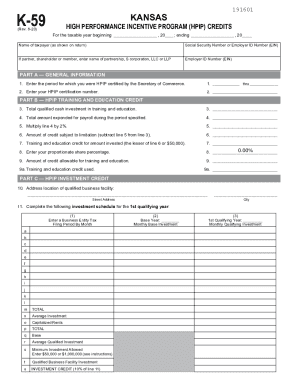
This guide provides clear instructions on how to fill out the KS K-59 form for the Kansas High Performance Incentive Program credits. Designed for individuals with various levels of experience, this guide breaks down each section to ensure a smooth online filing process.
Follow the steps to complete the KS K-59 online form.
- Use the ‘Get Form’ button to access the KS K-59 form and open it in your preferred online editor.
- Enter the taxable year for which you are applying for credits in the designated fields at the top of the form.
- Provide the name of the taxpayer as it appears on the tax return and input the Social Security Number or Employer ID Number (EIN). If applicable, enter the name of the partnership, S corporation, LLC, or LLP.
- Complete Part A—General Information by entering the period for which you were certified, your HPIP certification number, total qualified cash investment in training and education, amount expended for payroll, and other related financials.
- In Part B—HPIP Training and Education Credit, input the total investment in employee training and education along with the associated payroll information.
- Move to Part C—HPIP Investment Credit. Fill in the qualified business facility address and complete the investment schedule for the qualifying year by reporting investment values and calculations.
- For Parts D and E, provide details on job creation, payroll generated, additional revenue or losses, and complete the Carry Forward Schedule if applicable.
- Finally, review all entered details, save your changes, and download or print the completed KS K-59 form for your records.
Complete your KS K-59 form online today to benefit from the High Performance Incentive Program.
Get form
Experience a faster way to fill out and sign forms on the web. Access the most extensive library of templates available.
Get This Form Now!
Use professional pre-built templates to fill in and sign documents online faster. Get access to thousands of forms.