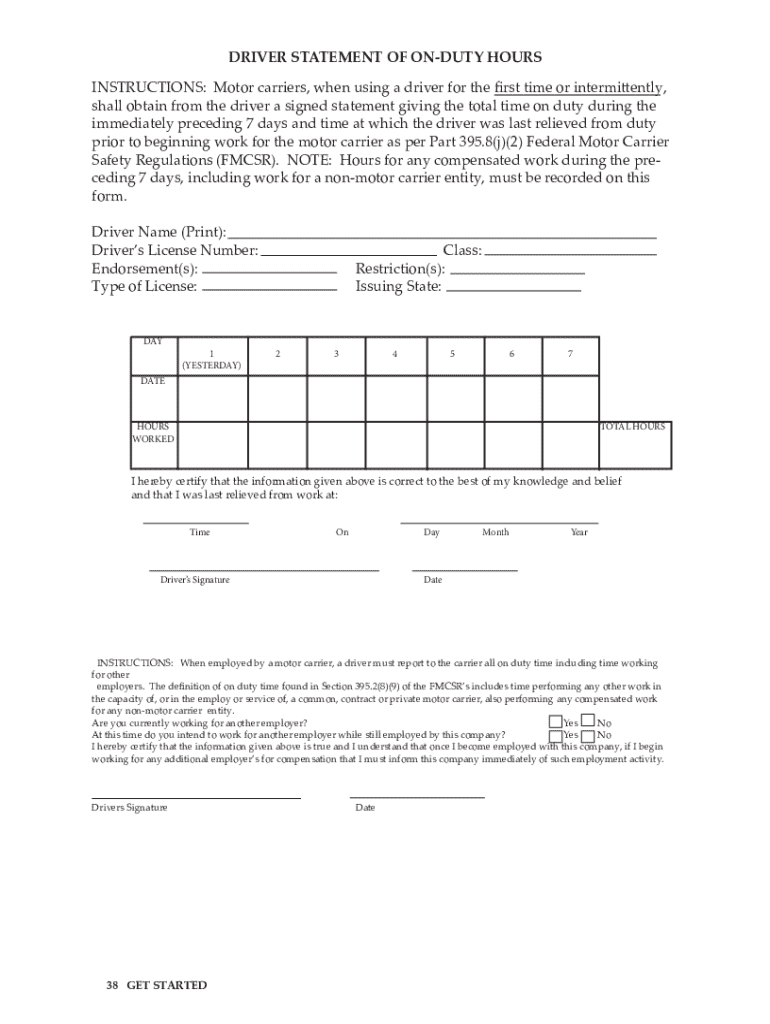
DRIVER STATEMENT OF ONDUTY HOURS shall obtain from the driver a signed statement giving the total time on duty during the prior to beginning work for the motor carrier as per Part 395.
Loading

Open form follow the instructions

Easily sign the form with your finger

Send filled & signed form or save
How to fill out the UT Driver Statement Of On-duty Hours online
Filling out the UT Driver Statement Of On-duty Hours online is a crucial step for drivers to log their on-duty time accurately. This guide provides a clear, step-by-step method to assist users in completing the form correctly.
Follow the steps to fill out the form effectively.
- Click the ‘Get Form’ button to access the UT Driver Statement Of On-duty Hours form and open it for editing.
- In the first section, enter your name and information about your driving license, including the type of license and any restrictions that apply.
- Proceed to the days section, where you will fill in the dates from the previous week. Enter the total hours worked each day under the corresponding day column.
- Certify that the information provided is accurate by signing in the designated area. Include the time you were last relieved from work, ensuring to enter the specific day, month, and year.
- Finally, review all entered information for accuracy. Once confirmed, you can save changes, download, print, or share the completed form as needed.
Start filling out the UT Driver Statement Of On-duty Hours online today to ensure your on-duty hours are recorded accurately.
Experience a faster way to fill out and sign forms on the web. Access the most extensive library of templates available.
Related content
Jun 8, 2020 — NOTE: Hours for any compensated work during the pre- ceding 7 days...
This policy is to outline the responsibilities and procedures for the safe operation of...
When a driver is inspected for hours of service compliance during an ELD malfunction, the...
Get answers to your most pressing questions about US Legal Forms API.
Does a driver have to be released from duty after 14 hours?
Yes, after 14 hours on duty, a driver must be released from duty. This regulation is in place to prevent driver fatigue and to promote safety on the road. It is vital that drivers adhere to these guidelines to maintain their health and the well-being of others. The UT Driver Statement Of On-duty Hours plays a significant role in helping drivers manage their time and ensure they meet these important legal requirements.
How long is a driver allowed to be on duty?
In the United States, regulations typically allow a driver to be on duty for a maximum of 14 consecutive hours. Within this timeframe, drivers can drive for up to 11 hours after resting for 10 consecutive hours. Knowing these limits is essential for maintaining safety and compliance with the law. Utilizing the UT Driver Statement Of On-duty Hours helps drivers monitor their work hours effectively.
What is the driver statement of on-duty hours?
The driver statement of on-duty hours is a crucial document that records the amount of time a driver spends on duty. This statement helps ensure compliance with regulations and promotes safety on the roads. By tracking on-duty hours, drivers can avoid fatigue and reduce the risk of accidents. Using the UT Driver Statement Of On-duty Hours is an efficient way to maintain accurate records of driving hours.
How many hours can a local driver be on duty?
Local drivers, under the UT Driver Statement Of On-duty Hours, can typically be on duty for up to 12 hours. This allows flexibility while also ensuring that they adhere to safety regulations. Local routes often demand specific time management to help drivers stay within these limits.
What is the maximum duty time a driver can have in a day?
The maximum duty time for a driver in a day is 14 hours, as outlined in the UT Driver Statement Of On-duty Hours. It is essential for drivers to be aware of this limit to ensure safety and compliance. They should plan their schedules to include adequate rest periods.
How many hours must a driver spend off-duty?
Drivers must spend at least 10 consecutive hours off-duty to comply with the UT Driver Statement Of On-duty Hours. This off-duty time is critical for recovery and safety. Implementing proper rest periods enables drivers to perform at their best and meet required legal standards.
How long is your driver allowed to be?
According to the UT Driver Statement Of On-duty Hours, a driver is typically allowed to be on duty for 14 consecutive hours. This duration includes any driving and non-driving tasks. Drivers must manage their time effectively within this limit to ensure they remain compliant and safe.
How many hours must a driver spend resting or off-duty?
Under the regulations for the UT Driver Statement Of On-duty Hours, drivers must spend at least 10 hours off-duty to reset their on-duty clock. This off-duty time is crucial for ensuring safe operation of their vehicle and adherence to legal standards. Regular rest helps prevent fatigue and promote alertness on the road, benefiting the driver and others.
How do you check how long you've been driving?
To check how long you have been driving, use an electronic logging device or mobile app that logs your driving time. These resources conform to the UT Driver Statement Of On-duty Hours requirements, providing accurate tracking of your hours. Regularly reviewing your logs is essential, as it helps you remain compliant while managing your time effectively. Take the initiative to monitor your progress actively.
How many hours a day can OTR drivers drive?
Over-the-road (OTR) drivers are permitted to drive a maximum of 11 hours after taking a 10-hour break. This rule aligns with the UT Driver Statement Of On-duty Hours, emphasizing the importance of rest for driver safety. Understanding these regulations helps OTR drivers plan their routes and rest stops effectively. You should take advantage of tools that assist with compliance to ensure proper logging of hours.
Use professional pre-built templates to fill in and sign documents online faster. Get access to thousands of forms.
If you believe that this page should be taken down, please follow our DMCA take down process here.