Loading
Get Canada Rbc E-form 822 2010-2026
How it works
-

Open form follow the instructions
-

Easily sign the form with your finger
-

Send filled & signed form or save
How to fill out the Canada RBC E-Form 822 online
Filling out the Canada RBC E-Form 822 online is a straightforward process. This guide provides clear, step-by-step instructions to assist you in completing this essential document used for trustee certification.
Follow the steps to complete the Canada RBC E-Form 822.
- Click ‘Get Form’ button to obtain the form and open it in the editor.
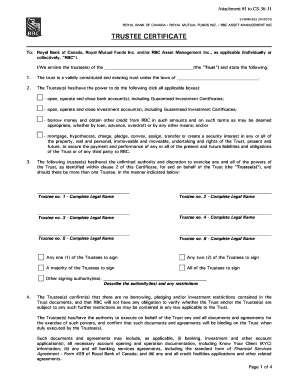
- Fill in the name of the trust in the designated field where it asks for the trust name. Ensure the spelling is accurate as it is critical for identification purposes.
- Indicate the jurisdiction where the trust is validly constituted by entering the appropriate province or territory in the specified area.
- Review the powers of the trustee section. Tick all applicable boxes to confirm the trustees have the authority to perform actions such as opening bank accounts, borrowing, and securing interests.
- List the complete legal names of all trustees in the spaces provided. Ensure all required trustees are included.
- Select the signing authority preferences. Indicate whether it requires one, two, a majority, or all trustees to sign.
- Confirm whether there are any restrictions related to borrowing, pledging, or investments by explicitly stating yes or no.
- For corporate trustees, input the name and complete legal names of authorized signatories under the corporate trustee section. Specify the signing authority.
- Ensure all declarations regarding the trust documents and the authority to execute documents for the trust are acknowledged.
- Finish by adding the signatures, names, and dates for all trustees in the designated areas to validate the form.
- Once completed, save any changes, and download, print, or share the form as necessary.
Start completing your documents online today for easy management.
To download an electronic bank statement, start by logging into your RBC online banking account. Once logged in, go to the 'Accounts' menu, then select 'eStatements.' Find the Canada RBC E-Form 822 for download, and save it onto your computer or device.