Loading
Form preview
  • US Legal Forms
  • Other Templates
  • More Forms
  • More Multi-State Forms
  • Dod Swg Form 1192-j 2010

Get Dod Swg Form 1192-j 2010-2026

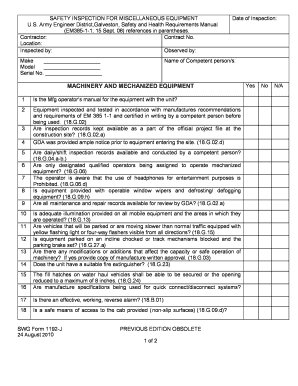
No. Location: Inspected by: Observed by: Make Model Serial No. Date of Inspection: Name of Competent person/s: MACHINERY AND MECHANIZED EQUIPMENT 1 Is the Mfg operator s manual for the equipment with the unit? 2 Equipment inspected and tested in accordance with manufactures recommendations and requirements of EM 385 1-1 and certified in writing by a competent person before being used. (18.G.02) Are inspection records kept availa.

How it works

  1. Open form

    Open form follow the instructions

  2. Easily sign form

    Easily sign the form with your finger

  3. Share form

    Send filled & signed form or save

How to fill out the DOD SWG Form 1192-J online

Filling out the DOD SWG Form 1192-J is essential for ensuring compliance with safety standards for machinery and mechanized equipment. This guide provides clear, step-by-step instructions to assist you in completing this form accurately online.

Follow the steps to complete the DOD SWG Form 1192-J online.

  1. Click ‘Get Form’ button to obtain the form and open it in the editor.
  2. Fill in the contractor's name, contract number, and location in the designated fields. This information is crucial for identifying the specific project and the responsibilities tied to it.
  3. Complete the 'Inspected by' and 'Observed by' sections with the names of the individuals conducting the inspection. This ensures accountability and proper documentation.
  4. Input the make, model, and serial number of the equipment being inspected. This information should be accurately recorded to match the physical equipment.
  5. Enter the date of inspection. It is important to provide the most recent date to reflect the validity of the inspection findings.
  6. List the names of competent individuals who performed the inspection in the 'Name of Competent person/s' section.
  7. For each of the inspection items numbered 1 through 24, enter 'Yes', 'No', or 'N/A' as appropriate. Ensure that each item is carefully assessed to meet safety requirements.
  8. If any deficiencies are noted, list them in the 'Correction of Deficiencies' section along with the date corrected to document timely resolutions.
  9. Attach any necessary supporting documents in the 'Attachments' section. Indicate what is included, such as communication systems or electrical clearance plans.
  10. Once all fields are filled out, review the form for accuracy. Make any necessary corrections before finalizing.
  11. After completing the form, you can save changes, download, print, or share the form as needed.

Begin completing your DOD SWG Form 1192-J online today!

Get form

Experience a faster way to fill out and sign forms on the web. Access the most extensive library of templates available.
Get form

Related content

current_excel_file_name
TERTIARY SWG TRTMNT(INCI), 50650, 24960, 24960, 24960, -103. 480, 1205, N, Milcon, N, 01...
Learn more
Approvals List
... J”) courses as a result of program review evaluation: COM250, HEA110, HON312...
Learn more
EISEN
... J. Plichta; Potpourri, From A to Z (Geiger); Waltz. Vive la Dense (Waldteta ... form...
Learn more

Related links form

WI Order Of The Eastern Star SF142 2014 IL DuPage AME Church Quarterly Conference Report 2012 VA Prince William County Public Schools 61582450404G 1997 IE Safe Electric Form R44 2020

Get This Form Now!

Use professional pre-built templates to fill in and sign documents online faster. Get access to thousands of forms.
Get form
If you believe that this page should be taken down, please follow our DMCA take down processhere.
Get DOD SWG Form 1192-J
Get form
  • Adoption
  • Bankruptcy
  • Contractors
  • Divorce
  • Home Sales
  • Employment
  • Identity Theft
  • Incorporation
  • Landlord Tenant
  • Living Trust
  • Name Change
  • Personal Planning
  • Small Business
  • Wills & Estates
  • Packages A-Z
  • Affidavits
  • Bankruptcy
  • Bill of Sale
  • Corporate - LLC
  • Divorce
  • Employment
  • Identity Theft
  • Internet Technology
  • Landlord Tenant
  • Living Wills
  • Name Change
  • Power of Attorney
  • Real Estate
  • Small Estates
  • Wills
  • All Forms
  • Forms A-Z
  • Other Templates
  • Legal Hub
  • About Us
  • Help Portal
  • Legal Resources
  • Blog
  • Affiliates
  • Contact Us
  • Delete My Account
  • Site Map
  • Industries
  • Forms in Spanish
  • Localized Forms
  • State-specific Forms
  • Forms Kit
  • Real Estate Handbook
  • All Guides
  • Notarize
  • Incorporation services
  • For Consumers
  • For Small Business
  • For Attorneys
  • USLegal
  • FormsPass
  • pdfFiller
  • signNow
  • altaFlow
  • DocHub
  • Instapage
Form Packages
  • Adoption
  • Bankruptcy
  • Contractors
  • Divorce
  • Home Sales
  • Employment
  • Identity Theft
  • Incorporation
  • Landlord Tenant
  • Living Trust
  • Name Change
  • Personal Planning
  • Small Business
  • Wills & Estates
  • Packages A-Z
Form Categories
  • Affidavits
  • Bankruptcy
  • Bill of Sale
  • Corporate - LLC
  • Divorce
  • Employment
  • Identity Theft
  • Internet Technology
  • Landlord Tenant
  • Living Wills
  • Name Change
  • Power of Attorney
  • Real Estate
  • Small Estates
  • Wills
  • All Forms
  • Forms A-Z
  • Other Templates
Customer Service
  • Legal Hub
  • About Us
  • Help Portal
  • Legal Resources
  • Blog
  • Affiliates
  • Contact Us
  • Delete My Account
  • Site Map
  • Industries
  • Forms in Spanish
  • Localized Forms
  • State-specific Forms
  • Forms Kit
Legal Guides
  • Real Estate Handbook
  • All Guides
Prepared for you
  • Notarize
  • Incorporation services
Our Customers
  • For Consumers
  • For Small Business
  • For Attorneys
Our Sites
  • USLegal
  • FormsPass
  • pdfFiller
  • signNow
  • altaFlow
  • DocHub
  • Instapage
Social Media
Call us now toll free:
+1 833 426 79 33
As seen in:
© Copyright 1999-2026 airSlate Legal Forms, Inc. 17 Station Street, Suite 303, Brookline, MA 02445
  • Your Privacy Choices
  • Terms of Service
  • Privacy Notice
  • Content Takedown Policy
  • Bug Bounty Program