Loading
Form preview
  • US Legal Forms
  • Other Templates
  • More Forms
  • More Multi-State Forms
  • Tx Hickman & Leckrone Schedule C Worksheet 2017

Get Tx Hickman & Leckrone Schedule C Worksheet 2017-2026

How it works

  1. Open form

    Open form follow the instructions

  2. Easily sign form

    Easily sign the form with your finger

  3. Share form

    Send filled & signed form or save

How to fill out the TX Hickman & Leckrone Schedule C Worksheet online

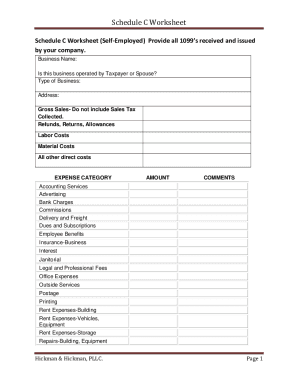
This guide will provide you with clear, step-by-step instructions on how to complete the TX Hickman & Leckrone Schedule C Worksheet online. This worksheet is essential for self-employed individuals to report their income and expenses accurately.

Follow the steps to complete your Schedule C Worksheet online

  1. Click ‘Get Form’ button to obtain the Schedule C Worksheet and open it for editing.
  2. Enter your business name at the top of the worksheet. Ensure that it is the legal name as registered with relevant authorities.
  3. Indicate whether the business is operated by you or your partner by selecting the appropriate option.
  4. Specify the type of business by listing the business structure or function.
  5. Fill in the business address including street, city, state, and zip code.
  6. Report your gross sales, ensuring not to include sales tax collected.
  7. Input any refunds, returns, and allowances in the designated field.
  8. Record your labor costs and material costs, ensuring all expenses are accounted for.
  9. List all other direct costs associated with the business operations.
  10. Complete the expense categories section by entering amounts for each category and providing comments if necessary.
  11. Fill in the vehicle information section for each vehicle used in the business, including business miles driven.
  12. For fixed asset purchases, detail any major purchases or repairs, including descriptions, dates, and costs.
  13. Review all entries for accuracy and completeness before finalizing the form.
  14. Once complete, you can save changes, download, print, or share the form as necessary.

Start completing your TX Hickman & Leckrone Schedule C Worksheet online today.

Get form

Experience a faster way to fill out and sign forms on the web. Access the most extensive library of templates available.
Get form

Related content

SBOE Member District 6 | Texas Education Agency
Will Hickman, a Republican from Houston, serves as a member of the State Board of...
Learn more
Hickman Legacy Project : Department of Philosophy
Dr. Hickman was born in Texas, and we are honored to welcome him to our lovely Hill...
Learn more
SBOE Member District 6 | Texas Education Agency
Will Hickman, a Republican from Houston, serves as a member of the State Board of...
Learn more

Related links form

VA DoT 760PY 2014 VA DoT 760PY 2013 VA DoT 760PY 2012 VA DoT 763 2018

Get This Form Now!

Use professional pre-built templates to fill in and sign documents online faster. Get access to thousands of forms.
Get form
If you believe that this page should be taken down, please follow our DMCA take down processhere.
Get TX Hickman & Leckrone Schedule C Worksheet
Get form

Form categories

Real Estate
  • Home Sale
  • Deeds
  • Leases
  • Landlord Tenant
  • First Refusal Agreement
  • Lis Pendens
  • View all Real Estate
Business & Commercial
  • Small Business
  • Contracts
  • Construction
  • Employment
  • Limited Liability Company
  • Partnerships
  • View all Business & Commercial
Estate Planning
  • Personal Planning
  • Last Will and Testament
  • Living Trust
  • Power of Attorney
  • Living Will (Healthcare Directive)
  • Probate
  • Trusts
  • Small Estate
  • View all Estate Planning

Other Legal Areas

  • Civil Actions
  • Civil Procedure
  • Animals
  • Affidavits
  • Bill of Sale
  • Oil Gas and Minerals
  • Name Change
  • Other
Family Law
  • Divorce
  • Annulment
  • Adoption
  • Marriage
  • Child Justice
  • View all Family Law
  • Forms Catalog
  • Other Templates

Company

  • About Us
  • Pricing
  • Legal Hub
  • Affiliate Program

Knowledge Base

  • Help Portal
  • Legal Resources
  • Blog
  • Industries
  • Legal Guides
  • Sitemap

Services

  • Notarize
  • Form Selector

Support

  • Contact Us
  • Delete My Account

Products

  • USLegal
  • FormsPass
  • pdfFiller
  • signNow
  • altaFlow
  • DocHub
  • Instapage
Social Media
Call us now toll free:
+1 833 426 79 33
As seen in:
© 2026 US Legal Forms. All rights reserved.
  • Your Privacy Choices
  • Terms of Service
  • Privacy Notice
  • Content Takedown Policy
  • Bug Bounty Program