Loading
Get Fl Sunshine State Health Plan Prior Authorization Fax Form 2021-2026
How it works
-

Open form follow the instructions
-

Easily sign the form with your finger
-

Send filled & signed form or save
How to fill out the FL Sunshine State Health Plan Prior Authorization Fax Form online
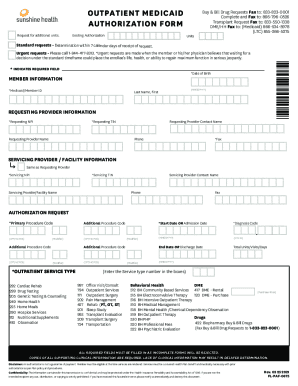
This guide provides an easy-to-follow process for completing the FL Sunshine State Health Plan Prior Authorization Fax Form online. Clear instructions are included for each section of the form to ensure all required information is captured accurately.
Follow the steps to complete the form effectively.
- Press the ‘Get Form’ button to obtain the form and open it in your preferred document editor.
- Begin by entering the member information. Fill out the required fields, which include the member's Medicaid/Member ID, date of birth, last name, and first name.
- Next, move to the requesting provider information section. Enter the requesting provider's NPI and TIN, as well as the provider and contact names, phone number, and fax number.
- If the servicing provider or facility is the same as the requesting provider, check the corresponding box. Otherwise, fill in the servicing provider information, including NPI, TIN, name, contact name, phone number, and fax number.
- In the authorization request section, enter the primary procedure code and any additional procedure codes as needed. Ensure to include relevant modifiers where applicable.
- Select the appropriate outpatient service type from the provided options by entering the corresponding service type number.
- Complete the start date or admission date, as well as the end date or discharge date, using the correct format (MMDDYYYY). Fill in the total units, visits, or days required.
- Review all entered information to ensure that every required field is complete, as incomplete forms will be rejected.
- After completing the form, gather and attach copies of any supporting clinical information necessary for your request.
- Finally, save your changes, and then download, print, or share the completed form as needed. Make sure to fax it to the appropriate number listed on the form.
Complete your forms online today to ensure timely processing of your authorization requests.
Applicant submits an Enrollment Application via the Florida Medicaid Web Portal Online Enrollment Wizard. 2. The Enrollment Application is evaluated based on the enrollment rules. The Agency completes the credential verification process and site visit, when applicable.