Loading
Get Account Closing Reequest - Midflorida Credit Union
How it works
-

Open form follow the instructions
-

Easily sign the form with your finger
-

Send filled & signed form or save
How to fill out the Account Closing Request - MidFlorida Credit Union online
Filling out the Account Closing Request form for MidFlorida Credit Union is a straightforward process. This guide provides detailed instructions to assist you with each section and field of the form, ensuring a smooth completion of your request.
Follow the steps to successfully fill out the form.
- Press the ‘Get Form’ button to obtain the form and open it in the editor.
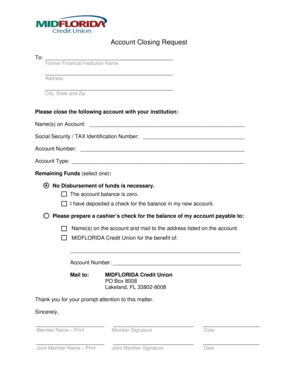
- Fill in the details of the financial institution from which you wish to close your account. This includes the institution's name, address, city, state, and zip code.
- Specify the account to be closed by entering the name(s) on the account.
- Provide the Social Security or Tax Identification Number associated with the account.
- Enter the account number of the account you wish to close.
- Select the account type from the provided options.
- Indicate the status of the remaining funds in the account by selecting one of the options: no disbursement necessary, account balance is zero, a check has been deposited in a new account, or request for a cashier’s check payable to the account holders.
- If requesting a cashier’s check, provide the name(s) on the account and the mailing address where the check should be sent.
- Review your entries for accuracy and completeness before proceeding.
- Save your changes, then download, print, or share the completed form as needed.
Complete your document online today and ensure a smooth account closure.
Full account number. Your account number has more digits than your member number. Log on to Online Banking, go to the Accounts tab, and click on View/Edit Accounts to find your full account number.