Get Authorization Of Agent Form - Santa Barbara County Planning ... - Sbcountyplanning
How it works
-

Open form follow the instructions
-

Easily sign the form with your finger
-

Send filled & signed form or save
How to fill out the Authorization Of Agent Form - Santa Barbara County Planning online
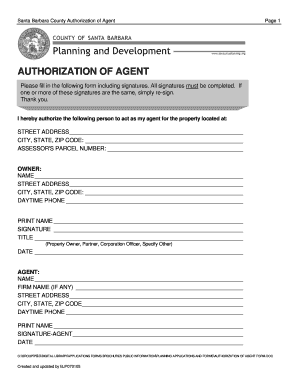
Filling out the Authorization Of Agent Form for Santa Barbara County is an essential step for designating someone to act on your behalf regarding property matters. This guide provides clear instructions to help you complete the form accurately and efficiently.
Follow the steps to fill out the form correctly
- Click the ‘Get Form’ button to obtain the Authorization Of Agent Form and open it in your editing tool of choice.
- In the designated area, provide the street address, city, state, and ZIP code of the property for which you are granting authorization.
- Enter the Assessor's Parcel Number associated with the property to ensure precise identification.
- Fill in your name as the owner of the property along with your street address, city, state, and ZIP code.
- Provide your daytime phone number for any necessary contact regarding the authorization.
- Print your name and sign in the appropriate fields as the property owner. Also indicate your title (property owner, partner, corporation officer, or other).
- Enter the date on which you are filling out the form.
- Next, complete the agent's details by entering their name, firm name (if applicable), street address, city, state, and ZIP code.
- Provide the agent's daytime phone number for any required communication.
- Print the name of the agent and obtain their signature in the designated area, followed by the date they are signing.
- Review the form to ensure all sections are accurately filled out with required signatures. If necessary, re-sign any duplicate signatures.
- Once finished, save your changes, download the form for your records, print a copy, or share it as needed.
Complete the Authorization Of Agent Form online today to ensure your property permissions are documented correctly.
Get form
2:26 9:09 How To Use Autofill In Mac Numbers - YouTube YouTube Start of suggested clip End of suggested clip You could type a date like this. And another date. And then you can use the yellow dot autofill. ButMoreYou could type a date like this. And another date. And then you can use the yellow dot autofill. But with date values it's actually even easier. Because if you just enter one date.