Loading
Get Johns Hopkins Online Consultation Form
How it works
-

Open form follow the instructions
-

Easily sign the form with your finger
-

Send filled & signed form or save
How to fill out the Johns Hopkins Online Consultation Form online
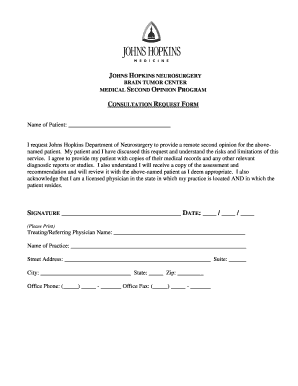
Filling out the Johns Hopkins Online Consultation Form is a straightforward process designed to facilitate the request for a medical second opinion. This guide provides a step-by-step approach to ensure that all necessary information is accurately captured.
Follow the steps to complete the online consultation form.
- Press the ‘Get Form’ button to retrieve the form and open it for completion.
- Begin by entering the name of the patient in the designated field at the top of the form.
- Indicate your request for the Johns Hopkins Department of Neurosurgery to provide a remote second opinion for the patient.
- Confirm that you, along with the patient, have discussed the request, understanding the risks and limitations of this service.
- Acknowledge your responsibility to provide the patient with copies of their medical records and relevant diagnostic reports.
- Complete the signature section, ensuring you include the date of signing.
- Provide your name, the name of your practice, and the full street address, including suite number if applicable.
- Enter the city, state, and zip code of your practice's location.
- Fill in your office phone and fax number in their respective fields.
- Once all sections are completed, save your changes to the form, and download or print a copy for your records. You can also share the completed form as necessary.
Complete your documents online today and ensure a smooth consultation process.
Schedule by Phone To speak with a Johns Hopkins Medicine representative, please call 410-955-5000 (Adults) or 443-997-5437 (Pediatrics). For existing Johns Hopkins Medicine patients, certain primary care and specialty care appointments are available to schedule online.