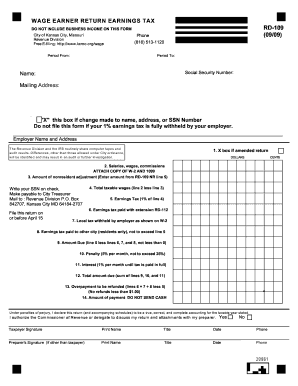
Get Mo Rd-109 - Kansas City 2009
How it works
-

Open form follow the instructions
-

Easily sign the form with your finger
-

Send filled & signed form or save
How to fill out the MO RD-109 - Kansas City online
This guide provides a clear and concise approach to filling out the MO RD-109 form online for Kansas City, helping you navigate each section with ease. Whether you have prior experience or this is your first time, these instructions will support you in completing the form effectively.
Follow the steps to complete your MO RD-109 form accurately.
- Click the ‘Get Form’ button to obtain the form and open it in your chosen document editor.
- Fill in your name, mailing address, and social security number in the designated fields.
- Specify the period for which you are filing this return by providing the starting and ending dates.
- If you have made any changes to your name, address, or social security number, check the box indicating these changes.
- Complete the employer name and address section. If you have more than one employer, attach additional sheets as necessary.
- If you are filing an amended return, mark the box for amended return at the top of the form.
- Report your total salaries, wages, commissions, and other compensation in the appropriate field.
- If applicable, enter the amount of nonresident adjustment as indicated on the relevant schedule.
- Calculate your total taxable wages by subtracting the nonresident adjustment from your total compensation.
- Determine your earnings tax by multiplying the total taxable wages by 1% and input this amount in the designated field.
- Enter any earnings tax that has already been paid with an extension, if applicable.
- Fill in the local tax withheld by your employer, as specified on your W-2.
- For residents, if you have paid earnings tax to another city, indicate this amount ensuring it does not exceed your calculated earnings tax.
- Calculate the total amount due by subtracting any already paid amounts from your earnings tax.
- Add any applicable penalties or interest if the amount due is past due.
- Sum all amounts due to determine the total amount to pay or indicate any overpayment for refund.
- Sign the return, print your name, title, and date of signing in the corresponding sections.
- Prepare your payment, making sure to include your social security number on the check, and ensure not to send cash.
- After completing the form, save your changes, download, print it, or share as necessary.
Complete your wage earner return online today to ensure timely and accurate filing.
Get form
To receive your tax refund while working from home in Kansas City, you must file the RD-109 form indicating your earnings and any deductions you qualify for. Ensure that all necessary documentation, such as proof of income and home office expenses, is submitted with your return. The city will process your claim, and you can expect a refund within a few weeks if everything is accurate. Using services like USLegalForms can streamline this process for you.