Sferor s Notice to Transferee of Unemployment Tax Liability and Rate 1 (Form UIA 1027). The seller, seller s real estate broker or other agent must deliver the completed Form UIA 1027 to the purchaser of the business at least two business days before the transfer of the business. You may obtain this form at the UIA Web site at www. michigan.gov/uia or by calling 1-855-484-2636 or 313-456-2300. A Disclosure of Transferor Account (Form UIA 1346), provides the information needed to complete Fo.
Loading

Open form follow the instructions

Easily sign the form with your finger

Send filled & signed form or save
How to fill out the MI DoT 518 online
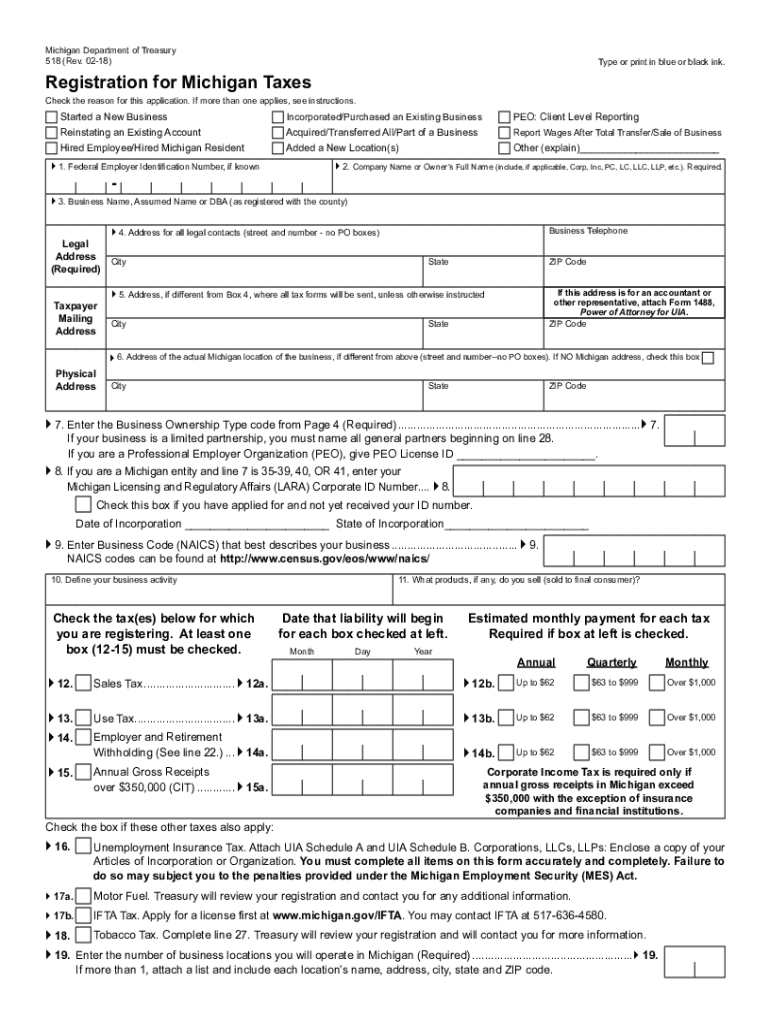
The MI DoT 518 form is essential for businesses registering for various state taxes in Michigan. This guide provides clear, step-by-step instructions for filling out the form online, ensuring you navigate the process effectively and with confidence.
Follow the steps to accurately complete the MI DoT 518 form online.
- Click ‘Get Form’ button to obtain the form and open it in the editor.
- Select the reason for completing the application by checking the appropriate boxes. You may select multiple reasons if applicable.
- Enter the Federal Employer Identification Number (FEIN) on line 1. If you do not have this number, you will need to obtain it from the IRS.
- Provide your company name on line 2. If applicable, include indicators such as LLC, Corp, or Inc.
- Complete line 4 with the legal address where your business records are maintained, ensuring it is a valid street address.
- On line 5, fill in the mailing address for tax forms; this can be a PO Box if needed.
- Enter the physical address of the business on line 6 if it differs from the legal address.
- Choose the appropriate Business Ownership Type Code on line 7 that corresponds with your business structure.
- If you have a Michigan business entity, provide the Corporate ID number on line 8.
- Locate and enter the relevant North American Industrial Classification System (NAICS) code on line 9 that describes your business.
- Briefly describe the business activity in line 10 and list the products you will sell in line 11.
- Indicate the tax types you are registering for in lines 12 to 15 by checking the corresponding boxes and specifying the start date of your liability.
- Fill out line 16 for Unemployment Insurance Tax, ensuring you complete the attached UIA Schedule A and Schedule B if applicable.
- Provide the number of locations your business will operate in Michigan on line 19.
- Enter your business's fiscal year closing month on line 20 and, if applicable, provide the seasonal business opening and closing months on line 21.
- Complete line 22 if you use a payroll service, and enter the provider's name.
- If incorporating an existing business, list the previous business names and account numbers on line 23.
- Ensure all owners or partners' names and signatures are provided in lines 28 to 31.
- After finalizing all sections, review for accuracy, and submit the completed form as instructed.
Complete the MI DoT 518 form online to ensure your business is registered for the necessary Michigan taxes.
Experience a faster way to fill out and sign forms on the web. Access the most extensive library of templates available.
Related content
If you will make retail sales at only one or two events in Michigan per year, do not...
Bachelor of Science (BS) in Graphic Design Technology at the State University of New York...
from RTDs and thermocouples, and also from resistance and millivolt sources. There can be...
Get answers to your most pressing questions about US Legal Forms API.
What is my Michigan withholding account number?
Your Michigan withholding account number is a unique identifier assigned to your business by the Michigan Department of Treasury. This number is essential for accurately filing withholding taxes and should be kept in a secure location. If you misplace your number, you can retrieve it by contacting the Michigan Department of Treasury directly or checking your previous tax filings. For quick access to documents and resources, visiting US Legal Forms can be a great help.
How do I get a Michigan withholding account number?
To obtain a Michigan withholding account number, you must first register with the Michigan Department of Treasury. This process usually includes submitting the MI DoT 518 form, which captures your business details and tax information. Once your registration is processed, you will receive your withholding account number, which is necessary for filing and paying your payroll taxes. With platforms like US Legal Forms, you can simplify your registration process.
How do I register for withholding tax in Michigan?
You can register for withholding tax in Michigan by filling out the necessary Michigan Department of Treasury forms. This typically involves the MI DoT 518, which details your business information and employee wage data. Submitting this form early ensures you meet your tax obligations without delay. For assistance with form completion, US Legal Forms has helpful templates that can guide you.
How do I register for Michigan withholding tax?
To register for Michigan withholding tax, complete the appropriate registration form available on the Michigan Department of Treasury's website. You will need to gather essential business information, such as your Employer Identification Number. After submitting the form, you will receive confirmation from the state, allowing you to withhold taxes from employee wages. Utilizing US Legal Forms can streamline this process for you.
How do I set up tax withholding?
Setting up tax withholding in Michigan involves determining the appropriate amount to withhold from your employees' wages based on their earnings. You will need to complete the MI DoT 518 form and provide it to your employees. Furthermore, ensure you familiarize yourself with state tax regulations to maintain correct withholding practices. For comprehensive resources, consider exploring the solutions offered by US Legal Forms.
How do I register for sales tax in Michigan?
To register for sales tax in Michigan, you will need to submit a Michigan Sales and Use Tax Registration form. This process is straightforward and can be completed online through the Michigan Department of Treasury's website. Ensure you have all required business information handy to avoid any delays. For assistance, you might consider platforms like US Legal Forms that provide step-by-step guidance.
How to request a tax clearance from the Michigan Department of Treasury?
To request a tax clearance from the Michigan Department of Treasury, you should submit a completed request form along with any necessary documentation. Visit the Department's website to find specific instructions and forms needed for the process. Ensure you are in good standing with your sales tax filings, including the MI DoT 518, to facilitate a smooth clearance process.
How do I file sales tax on my taxes?
To file sales tax on your taxes, you will first need to compute the total sales tax collected during the tax period. You then report this amount on your business tax return, alongside filing the necessary forms like the MI DoT 518. This process helps maintain accurate records and simplifies your financial reporting.
Do I need to file sales tax in Michigan?
Yes, if your business sells taxable goods or services in Michigan, you are required to file sales tax. It's essential to stay compliant to avoid penalties and fines. By filing the MI DoT 518 form, you can efficiently manage your sales tax responsibilities, ensuring that you're consistently meeting state requirements.
How to file Michigan Form 5081?
Filing Michigan Form 5081 requires you to gather necessary sales data for the reporting period. You can access the form online through the Michigan Department of Treasury's website. To ensure accuracy and compliance, consider using the MI DoT 518 form as a reference for your calculations and filing procedures.
Use professional pre-built templates to fill in and sign documents online faster. Get access to thousands of forms.
If you believe that this page should be taken down, please follow our DMCA take down process here.