Loading
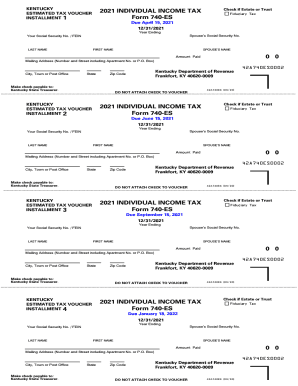
Get Ky Dor 740-es 2021-2026
How it works
-

Open form follow the instructions
-

Easily sign the form with your finger
-

Send filled & signed form or save
How to fill out the KY DoR 740-ES online
Filling out the Kentucky Department of Revenue's 740-ES form is a straightforward process that allows you to submit your estimated tax payments accurately. This guide will walk you through the essential steps to complete this form online with ease.
Follow the steps to successfully fill out the KY DoR 740-ES form.
- Click the ‘Get Form’ button to access the 740-ES form and open it in your chosen editor.
- Begin by entering your first name and last name in the designated fields for the primary taxpayer. If applicable, fill in your spouse's name as well, ensuring that you use a consistent naming format.
- Fill in the mailing address, including the number and street, apartment number (if any), city, town, and zip code. Double-check spelling and formatting.
- Identify whether you are filing as an individual, estate, or trust by ticking the appropriate box. This affects your filing status and the computations.
- In the ‘Amount Paid’ field, enter the payment amount you are submitting with the voucher. Ensure that this amount accurately reflects your estimated payment.
Complete your Kentucky estimated tax voucher online today for a seamless filing experience.
You can check the status of your Kentucky income tax refund by calling (502) 564-1600. It is anticipated that income tax refunds from Kentucky tax returns filed in the Federal/State Electronic Filing Program will be issued in two to three weeks.