Loading
Get Ks Dor K-41 2021-2026
How it works
-

Open form follow the instructions
-

Easily sign the form with your finger
-

Send filled & signed form or save
How to fill out the KS DoR K-41 online
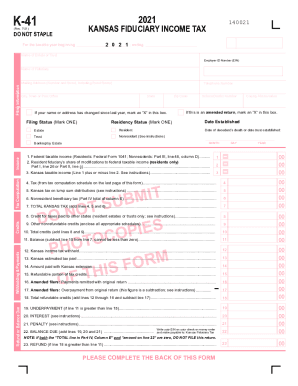
The KS DoR K-41 form is essential for reporting fiduciary income tax for estates and trusts in Kansas. This guide provides clear, step-by-step instructions to assist users in completing the form accurately and efficiently online.
Follow the steps to fill out your KS DoR K-41 form online.
- Press the ‘Get Form’ button to obtain the KS DoR K-41 form and open it in your preferred editor.
- Fill in the 'Name of Estate or Trust' and 'Employer ID Number (EIN)' fields at the top of the form. Ensure that the information is accurate as it identifies the entity.
- Provide the 'Name of Fiduciary' in the appropriate field. This should be the person responsible for managing the trust or estate.
- Enter the 'Mailing Address' including the number and street, city, state, and zip code of the fiduciary.
- Include the 'Telephone Number' for the fiduciary to ensure that there is a way to contact them regarding the filing.
- Mark an 'X' in the box if your name or address has changed since the last filing.
- Select your 'Filing Status' by marking one of the options: either 'Estate' or 'Trust'.
- Choose your 'Residency Status' by marking either 'Resident' or 'Nonresident' according to your situation.
- Complete the sections on 'Income', 'Tax Computation', 'Credits', and 'Withholding & Payments'. Use the instructions provided in the form for any calculations needed in these sections.
- If applicable, mark an ‘X’ in the box if this submission is an amended return.
- Fill in the 'Date Established' for either the estate or trust, indicating the month and day.
- Proceed through each line of the tax computation, carefully inputting totals as instructed. This includes calculations for taxable income, Kansas tax, nonresident beneficiary tax, and potential refunds.
- Review all sections for accuracy before signing in the designated area, affirming that the information provided is correct to the best of your knowledge.
- Save changes to your completed form, then download or print it as needed for your records or submission. Ensure you also share it with relevant parties if required.
Complete your KS DoR K-41 form online today for an efficient filing experience.
All types of retirement income are subject to Connecticut's income tax, although Social Security is exempted for some seniors. The state has a sales tax near the national average and some of the highest property taxes in the U.S.