Loading
Get Ma Dor M-4506 2018-2026
How it works
-

Open form follow the instructions
-

Easily sign the form with your finger
-

Send filled & signed form or save
How to fill out the MA DoR M-4506 online
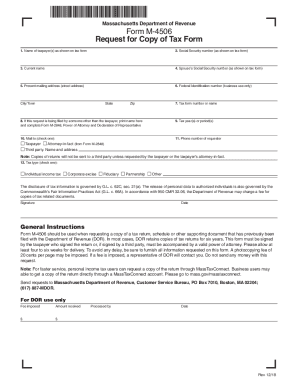
The MA DoR M-4506 form is essential for individuals seeking a copy of their tax documents from the Massachusetts Department of Revenue. This guide will provide a step-by-step approach to help you fill out the form accurately and efficiently.
Follow the steps to complete the MA DoR M-4506 online.
- Click the ‘Get Form’ button to obtain the form and open it in the editor.
- Begin filling out the form by entering the name of the taxpayer(s) as shown on the tax form in the appropriate field.
- Provide the Social Security number of the taxpayer(s) as it appears on the tax form.
- If applicable, enter the current name in the designated field.
- Input the spouse’s Social Security number if relevant, ensuring accuracy.
- Fill out the present mailing address, including the street address, city/town, state, and zip code.
- If applicable, enter the Federal Identification number for business use.
- Indicate the tax form number or name related to the request.
- If the request is made by someone other than the taxpayer, print their name and ensure Form M-2848, Power of Attorney and Declaration of Representative, is completed.
- Specify the tax year(s) or period(s) for which the documents are requested.
- Choose the mailing option by checking the appropriate box.
- Provide a phone number for the requester to facilitate communication.
- Select the tax type by checking one of the options: individual income tax, corporate excise, fiduciary, partnership, or other.
- Complete the signature and date fields, ensuring the request is validated.
- Review all the information for accuracy before proceeding.
- Once everything is filled out correctly, save changes, and download, print, or share the form as needed.
Start filling out the MA DoR M-4506 online today for your tax document retrieval needs!