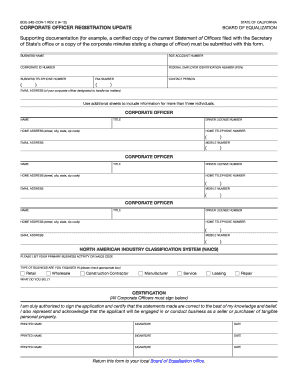
BOE-245-COR-1 REV. 2 (4-15) STATE OF CALIFORNIA CORPORATE OFFICER REGISTRATION UPDATE BOARD OF EQUALIZATION Supporting documentation (for example, a certified copy of the current Statement of Officers.

How it works
  • Open form

    Open form follow the instructions

  • Easily sign form

    Easily sign the form with your finger

  • Share form

    Send filled & signed form or save

How to use or fill out the CA CDTFA-245-COR-1 (Formerly BOE-245-COR-1) online

Completing the CA CDTFA-245-COR-1 form online is a straightforward process designed to streamline corporate officer registration updates in California. By following this guide, you can efficiently fill out the necessary information and ensure compliance with state requirements.

Follow the steps to fill out the CA CDTFA-245-COR-1 form online.

  1. Click ‘Get Form’ button to obtain the form and open it in your document editor.
  2. Provide the business name as it appears in official documents.
  3. Enter your BOE account number, which is necessary for your business registration.
  4. Input your corporate ID number to identify your organization.
  5. Fill in your Federal Employer Identification Number (FEIN) for tax purposes.
  6. Include the business telephone number and fax number for official communications.
  7. List the contact person's name, along with their email address designated for tax matters.
  8. For each corporate officer, provide their full name, title, driver license number, home address (including street, city, state, and zip code), home telephone number, mobile number, and email address. Use additional sheets if you have more than three officers.
  9. Indicate your primary business activity or the NAICS code that corresponds to your operation.
  10. Choose the type of business you are engaged in by checking the appropriate box, such as retail, wholesale, or service.
  11. Describe what your business sells or provides to clarify your operations.
  12. All corporate officers must sign and print their name, along with the date of signature, to certify the accuracy of the information provided.
  13. After completing the form, save your changes, and use available options to download, print, or share the completed form as required.

Start completing your documents online today!

Get form

Experience a faster way to fill out and sign forms on the web. Access the most extensive library of templates available.

Related content

CPPM Chapter 3 - CDTFA

by C Policy — CDTFA-245-COR-1, Corporate Officer Registration Update, completed by the...

Learn more
Questions & Answers

Get answers to your most pressing questions about US Legal Forms API.

Contact support

How do I submit a power of attorney to CDTFA?

To submit a power of attorney to the CA CDTFA-245-COR-1 (Formerly BOE-245-COR-1), you must complete and file the appropriate form, which allows a designated individual to act on your behalf. You can find the necessary form on the CDTFA website, ensuring that all required information is accurately filled in. It’s important to keep a copy for your records. If you need guidance navigating this process, uslegalforms provides user-friendly templates that can save time and effort.

To amend your sales tax return with CA CDTFA-245-COR-1 (Formerly BOE-245-COR-1), you should first access your online account with the CDTFA. Once logged in, you can locate the option to amend the return for the relevant tax period. You will need to provide revised figures and rationale for the changes. Utilizing the uslegalforms platform can simplify this process, offering tailored resources to ensure compliance and accuracy.

The filing basis for CA CDTFA-245-COR-1 (Formerly BOE-245-COR-1) involves reporting your sales and use tax obligations accurately. You must determine the appropriate period for filing based on your sales revenue. The CDTFA allows various filing frequencies, including monthly, quarterly, and annually, depending on your business size and tax liability. Ensuring accuracy in your filings helps mitigate potential penalties.

To print a payment voucher from the CDTFA, visit their official website and navigate to the payment section. You will need to enter your information to generate the voucher. Following the guidelines for CA CDTFA-245-COR-1 (Formerly BOE-245-COR-1) will ensure you complete this step correctly.

To print a payment voucher from QuickBooks (QB), go to the 'Vouchers' section or use the 'Print' feature after creating the voucher. QuickBooks allows you to customize and edit the voucher, making it suitable for your needs. Make sure to refer to the CA CDTFA-245-COR-1 (Formerly BOE-245-COR-1) for any specific information concerning your tax obligations.

You can print your California seller's permit directly from the CDTFA website by logging into your account. Ensure your account is active and up to date to facilitate the printing process. If you need further assistance, visiting guidelines related to CA CDTFA-245-COR-1 (Formerly BOE-245-COR-1) will be helpful.

To request a payment plan from the CDTFA, you must complete an application form and submit it along with the necessary documentation. This process allows you to spread your tax payments over a period, easing your financial obligations. Many find that the CA CDTFA-245-COR-1 (Formerly BOE-245-COR-1) guidelines provide clarity on this subject.

A payment voucher for California state taxes is a document that allows taxpayers to submit payments for various state taxes owed. This helps you track your payments clearly while ensuring you meet your tax obligations on time. Utilizing the CA CDTFA-245-COR-1 (Formerly BOE-245-COR-1) form can streamline this process for you and your business.

cause audit is typically triggered by specific events or findings, such as reports of tax fraud or significant discrepancies found during a preliminary review. If the CDTFA suspects that a business is not complying with sales tax regulations, it may initiate a forcause audit. Ensuring that all records are accurate and complete helps minimize the risk of such audits related to CA CDTFA245COR1 (Formerly BOE245COR1).

Certain activities are more likely to trigger a tax audit, including frequent amendments to your returns, booking unusual expenses, or having multiple tax credits claimed inconsistently. If your business reports high expenses relative to its income, this may also attract attention from the CDTFA. Being mindful of these potential pitfalls can help you maintain compliance with CA CDTFA-245-COR-1 (Formerly BOE-245-COR-1) and avoid unnecessary audits.

Get This Form Now!

Use professional pre-built templates to fill in and sign documents online faster. Get access to thousands of forms.

If you believe that this page should be taken down, please follow our DMCA take down process here.

CA CDTFA-245-COR-1 (Formerly BOE-245-COR-1) Form

This form is available in several versions. Select the version you need from the drop-down list below.

Get CA CDTFA-245-COR-1 (Formerly BOE-245-COR-1)