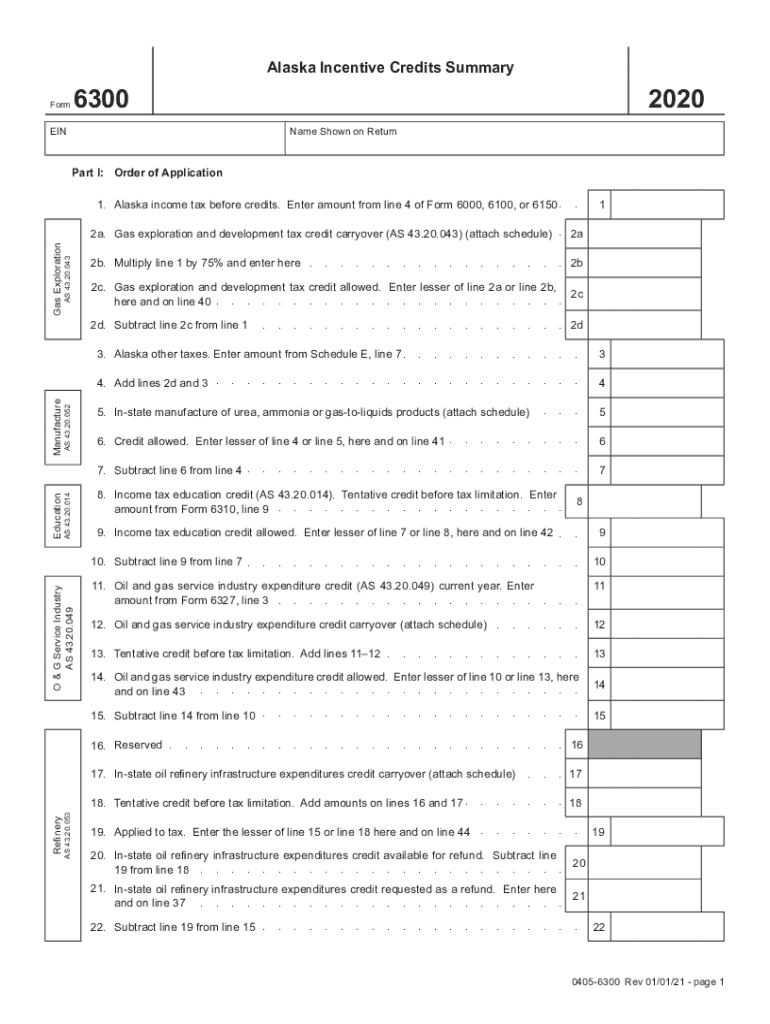
Alaska Incentive Credits Summary6300Form2020EINName Shown on ReturnPart I: Order of Application 1. Alaska income tax before credits. Enter amount from line 4 of Form 6000, 6100, or 6150 ..1AS 43.20.043Gas.
Loading

Open form follow the instructions

Easily sign the form with your finger

Send filled & signed form or save
How to fill out the AK DoR 6300 online
In this guide, we will provide clear and supportive instructions on completing the AK DoR 6300 form online. Whether you are familiar with tax documents or filling one out for the first time, these steps will help you navigate the process efficiently.
Follow the steps to complete the AK DoR 6300 online.
- Click ‘Get Form’ button to access the AK DoR 6300 and open it in the digital editor.
- Begin with Part I, where you will enter your Alaska income tax amount before credits as noted from lines of previous forms such as 6000, 6100, or 6150. This will be input in the first field.
- In Section 2, you will report various tax credits. Start with line 2a, where you may need to attach a schedule for any gas exploration and development tax credit carryover.
- Calculate the amount by multiplying the amount from line 1 by 75%, and enter that value in line 2b.
- Continue down Part I by entering any other taxes from Schedule E into line 3, and subsequently add totals from lines 2d and 3 in line 4.
- If applicable, indicate any in-state manufacture of urea, ammonia, or gas-to-liquids products in line 5, and enter the lesser of line 4 or line 5 in line 6.
- Proceed through the remaining fields in Part I, ensuring to carry over amounts correctly into subsequent lines, as indicated in the instructions.
- After completing all necessary fields and reviewing your entries, you can save your changes, download the form, print it for your records, or share it as needed.
Complete your AK DoR 6300 forms online today to ensure a seamless filing experience.
Experience a faster way to fill out and sign forms on the web. Access the most extensive library of templates available.
Related content
Aug 22, 1998 · Alaska. Department of Revenue. No state sales tax. N/A. Cities may have...
Use professional pre-built templates to fill in and sign documents online faster. Get access to thousands of forms.
If you believe that this page should be taken down, please follow our DMCA take down process here.
This form is available in several versions. Select the version you need from the drop-down list below.