Loading
Form preview
  • US Legal Forms
  • Form Library
  • Tax Forms
  • New York Tax Forms
  • Ny Dtf Dtf-70 2014

Get Ny Dtf Dtf-70 2014-2026

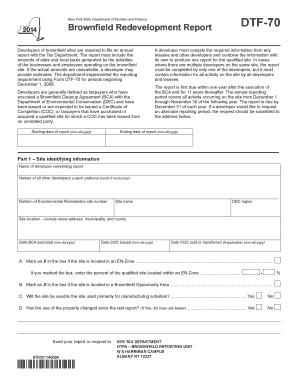
OTPA BROWNFIELD REPORTING UNIT W A HARRIMAN CAMPUS ALBANY NY 12227 DTF-70 (2014) (back) Has any new development occurred on the property since the last report? (If Yes, describe below).......................... Yes No Part 2 - Tax information For each applicable tax article or type below, list the actual or estimated amount of tax generated by the activities of the businesses and employees operating on the brownfield site. If the businesses were subject to the tax, but did not genera.

How it works

  1. Open form

    Open form follow the instructions

  2. Easily sign form

    Easily sign the form with your finger

  3. Share form

    Send filled & signed form or save

How to fill out the NY DTF DTF-70 online

The NY DTF DTF-70 form is essential for developers of brownfield sites to report on state and local taxes generated. This guide will provide clear, step-by-step instructions to assist you in completing this form accurately and efficiently.

Follow the steps to complete the NY DTF DTF-70 online.

  1. Select the ‘Get Form’ button to access the form and open it in the editor.
  2. Start by entering the starting date of the report in the format mm-dd-yyyy. This marks the beginning of the reporting period.
  3. In Part 1, provide site identifying information. Fill in your name as the developer completing the report, along with the names of all other developers involved. If necessary, include additional sheets.
  4. Complete the Division of Environmental Remediation site number, the site name, and the DEC region. Additionally, include the full location of the site, detailing the street address, municipality, and county.
  5. Record the dates for the execution of the Brownfield Cleanup Agreement (BCA) and the issuance of the Certificate of Completion (COC). If applicable, provide the date the COC was sold or transferred.
  6. For questions A and B in Part 1, mark an X in the appropriate boxes if applicable and provide the percentage for the EN-Zone site if relevant.
  7. Respond to questions regarding the site's primary use for manufacturing activities and if there have been any changes in property use since the last report.
  8. Proceed to Part 2 where you will list tax information. For each applicable tax article or type, indicate the actual or estimated amount of tax generated by activities on the site. If no tax revenue was generated, enter 0, or mark N/A for not applicable.
  9. Ensure all sections of the form are completed accurately. After reviewing your entries, you can save changes, download, print, or share the completed form.

Complete your NY DTF DTF-70 form online today!

Get form

Experience a faster way to fill out and sign forms on the web. Access the most extensive library of templates available.
Get form

Related content

Numerical list by form number: DTF-4 through...
DTF-70, Obsolete, Brownfield Redevelopment Report. This form is obsolete. DTF-75...
Learn more
2009 NEW YORK STATE REFERENCE MANUAL FOR ...
Oct 1, 2009 — The new law defines the ways in which tax fraud can be committed and is...
Learn more
Spectrum Master™
Jan 12, 2007 — IEEE, New York, NY, 1992. SCPI Standard-1999, Standard Commands for...
Learn more

Related links form

WI FA-4110V 2012 CT Mileage Worksheet For Medical Treatment 2004 CA DHCS Form MC 330 2003 USCIS I-865 - Instructions 2015

Questions & Answers

Get answers to your most pressing questions about US Legal Forms API.

Contact support

The primary difference between IT-203 and IT-201 lies in residency status. IT-203 is the form used by non-residents who earn income in New York State, while IT-201 is for full-year residents. Knowing which form to use is crucial for accurate tax reporting and compliance with the NY DTF. If you're uncertain, platforms like uslegalforms can guide you through selecting the right document.

You can file New York Form IT-203 at the designated address found on the form itself. If you are filing by mail, ensure that you send your completed form to the NY DTF office for non-residents. Alternatively, e-filing is available for more convenient submission, which can help speed up processing. This helps streamline your tax administration related to the NY DTF DTF-70.

Filing a New York sales tax return is a straightforward process. Start by collecting your sales data for the reporting period. You can file electronically through the NY DTF website or via mail using Form ST-100. Be sure to include any applicable deductions or exemptions, as these can reduce your overall tax liability.

You should file the NY IT-203, which is the nonresident income tax form, with the NYS Department of Taxation and Finance. If you are filing electronically, use their online services for faster processing. Alternatively, if you prefer mailing your forms, ensure you send them to the correct address listed on the form instructions for timely delivery. The NY DTF DTF-70 can help clarify any specific instructions needed.

You can obtain New York tax forms directly from the NYS Department of Taxation and Finance website. They offer a comprehensive library of tax forms, including the DTF-70, that you can download and print. Additionally, some local libraries and post offices may have these forms available. This accessibility makes it easier for you to complete your tax obligations.

NY additions and subtractions are adjustments made to your federal adjusted gross income to arrive at your New York taxable income. Additions may include specific types of income that are taxable in New York but not federally. Conversely, subtractions relate to exemptions recognized in New York taxation. Reviewing the NY DTF DTF-70 provides guidelines to ensure accurate calculations.

To cancel your NYS estimated tax payment, you will need to contact the New York Department of Taxation and Finance directly. Make sure to have your tax identification number and payment details on hand for verification. Understanding the implications of cancellation can be complex, and the NY DTF DTF-70 can help clarify any potential consequences.

To fill out the NY ST 120 form, which is used for claiming a sales tax exemption, you need to provide business information and detail what items are exempt. Start by gathering all necessary documents and data to make the process smoother. Resources like the NY DTF DTF-70 can assist you by providing guidelines and examples to ensure proper completion of the form.

If you are receiving mail from the NYS Department of Taxation and Finance, it could relate to various tax matters, including tax returns, assessments, or notifications about your DTF payments. It’s important to review such correspondence closely to ensure your compliance with tax regulations and to respond appropriately if needed.

A DTF payment in New York refers to the payments made to the New York Department of Taxation and Finance. These payments are typically for taxes owed, estimated tax payments, or penalties. Ensuring timely DTF payments is essential to avoid accumulated interests and penalties on your dues.

Get This Form Now!

Use professional pre-built templates to fill in and sign documents online faster. Get access to thousands of forms.
Get form
If you believe that this page should be taken down, please follow our DMCA take down processhere.

Industry-leading security and compliance

US Legal Forms protects your data by complying with industry-specific security standards.
  • In businnes since 1997
    25+ years providing professional legal documents.
  • Accredited business
    Guarantees that a business meets BBB accreditation standards in the US and Canada.
  • Secured by Braintree
    Validated Level 1 PCI DSS compliant payment gateway that accepts most major credit and debit card brands from across the globe.
Get NY DTF DTF-70
Get form
  • Adoption
  • Bankruptcy
  • Contractors
  • Divorce
  • Home Sales
  • Employment
  • Identity Theft
  • Incorporation
  • Landlord Tenant
  • Living Trust
  • Name Change
  • Personal Planning
  • Small Business
  • Wills & Estates
  • Packages A-Z
  • Affidavits
  • Bankruptcy
  • Bill of Sale
  • Corporate - LLC
  • Divorce
  • Employment
  • Identity Theft
  • Internet Technology
  • Landlord Tenant
  • Living Wills
  • Name Change
  • Power of Attorney
  • Real Estate
  • Small Estates
  • Wills
  • All Forms
  • Forms A-Z
  • Form Library
  • Legal Hub
  • About Us
  • Help Portal
  • Legal Resources
  • Blog
  • Affiliates
  • Contact Us
  • Delete My Account
  • Site Map
  • Industries
  • Forms in Spanish
  • Localized Forms
  • State-specific Forms
  • Forms Kit
  • Real Estate Handbook
  • All Guides
  • Notarize
  • Incorporation services
  • For Consumers
  • For Small Business
  • For Attorneys
  • USLegal
  • FormsPass
  • pdfFiller
  • signNow
  • altaFlow
  • DocHub
  • Instapage
Form Packages
  • Adoption
  • Bankruptcy
  • Contractors
  • Divorce
  • Home Sales
  • Employment
  • Identity Theft
  • Incorporation
  • Landlord Tenant
  • Living Trust
  • Name Change
  • Personal Planning
  • Small Business
  • Wills & Estates
  • Packages A-Z
Form Categories
  • Affidavits
  • Bankruptcy
  • Bill of Sale
  • Corporate - LLC
  • Divorce
  • Employment
  • Identity Theft
  • Internet Technology
  • Landlord Tenant
  • Living Wills
  • Name Change
  • Power of Attorney
  • Real Estate
  • Small Estates
  • Wills
  • All Forms
  • Forms A-Z
  • Form Library
Customer Service
  • Legal Hub
  • About Us
  • Help Portal
  • Legal Resources
  • Blog
  • Affiliates
  • Contact Us
  • Delete My Account
  • Site Map
  • Industries
  • Forms in Spanish
  • Localized Forms
  • State-specific Forms
  • Forms Kit
Legal Guides
  • Real Estate Handbook
  • All Guides
Prepared for you
  • Notarize
  • Incorporation services
Our Customers
  • For Consumers
  • For Small Business
  • For Attorneys
Our Sites
  • USLegal
  • FormsPass
  • pdfFiller
  • signNow
  • altaFlow
  • DocHub
  • Instapage
Social Media
Call us now toll free:
+1 833 426 79 33
As seen in:
© Copyright 1999-2026 airSlate Legal Forms, Inc. 3720 Flowood Dr, Flowood, Mississippi 39232
  • Your Privacy Choices
  • Terms of Service
  • Privacy Notice
  • Content Takedown Policy
  • Bug Bounty Program