Loading
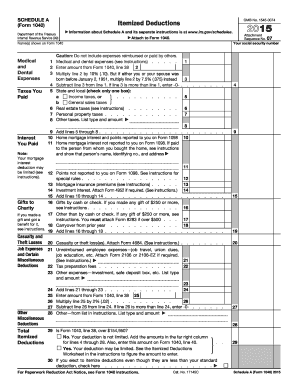
Get Irs 1040 - Schedule A 2015
This website is not affiliated with IRS
How it works
-

Open form follow the instructions
-

Easily sign the form with your finger
-

Send filled & signed form or save
How to fill out the IRS 1040 - Schedule A online
This guide provides you with a comprehensive walkthrough of filling out the IRS 1040 - Schedule A form online. Schedule A is used to itemize deductions, which can help reduce your taxable income.
Follow the steps to complete your IRS 1040 - Schedule A online.
- Click ‘Get Form’ button to obtain the form and open it in the editor.
- Enter your name as it appears on Form 1040 in the designated field.
- Fill out the medical and dental expenses section by entering all eligible expenses on line 1. Note that these expenses must not include amounts reimbursed or paid by others.
- Calculate 10% of the amount from line 2 (or 7.5% if either you or your spouse was born before January 2, 1951) and record it on line 3.
- Subtract the amount from line 3 from the total on line 1 and enter this on line 4.
- For the taxes you paid section, check either box 5a for income taxes or box 5b for general sales taxes. Fill in the values for real estate taxes on line 6 and personal property taxes on line 7.
- For any other taxes, provide details on line 8 and sum the total in line 9.
- Enter your home mortgage interest from Form 1098 on line 10. If you have any mortgage interest that is not reported on Form 1098, list it on line 11.
- Complete lines 12 through 19 by recording any relevant points and mortgage insurance premiums as instructed.
- In the gifts to charity section, document gifts made by cash or check on line 16, and any other gifts on line 17. Make sure to follow the instructions for gifts of $250 or more.
- Calculate total deductions from lines 16 to 18 and enter the amount on line 19.
- If applicable, report casualty or theft losses on line 20.
- For job expenses, enter unreimbursed employee expenses on line 21, and capture any investment and miscellaneous deductions on lines 22 and 23.
- Add all miscellaneous deductions from lines 21 to 23 and enter that total on line 24.
- Carry over amounts as needed and calculate any limitations based on your income as indicated on line 29. Complete the form as necessary.
- Once all sections are complete, save your changes. You can then download, print, or share the form as required.
Start your filing process by completing your IRS 1040 - Schedule A online today.
Get form
Experience a faster way to fill out and sign forms on the web. Access the most extensive library of templates available.
Related links form
You can find IRS Form 1040 Schedule 1 on the IRS website, which offers all the necessary tax forms for download. This schedule is essential for those reporting additional income or adjustments. For streamlined tax preparation, consider using USLegalForms; they have the IRS 1040 - Schedule A available to you in an easy format.
Get This Form Now!
Use professional pre-built templates to fill in and sign documents online faster. Get access to thousands of forms.