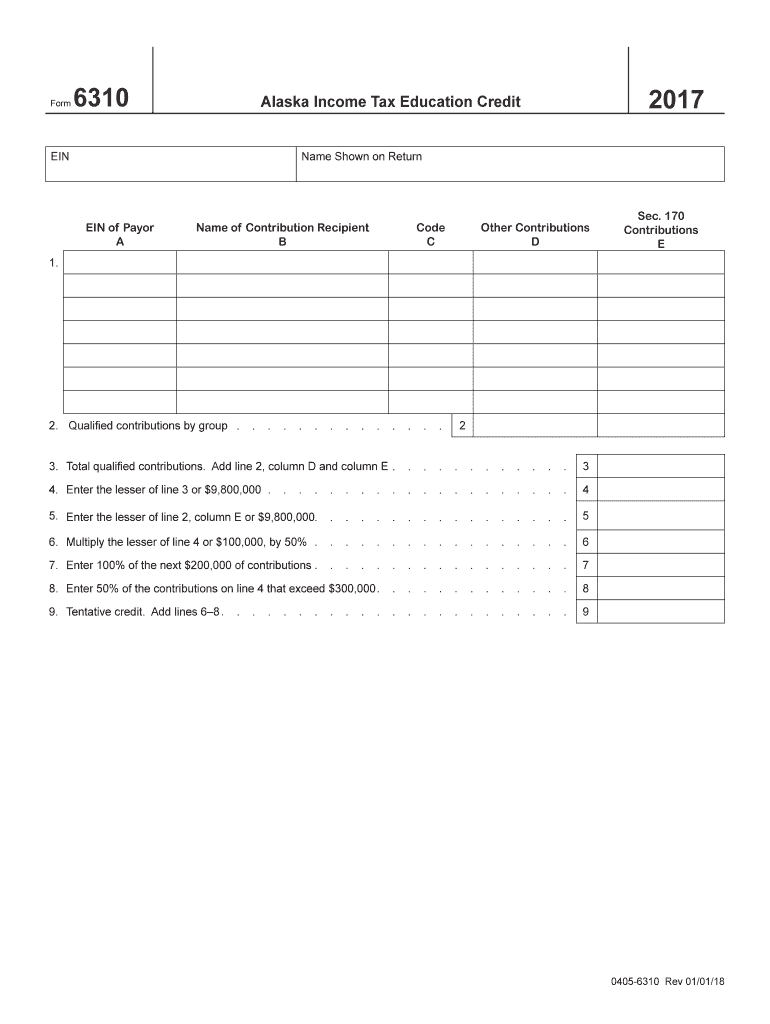
Form63102017Alaska Income Tax Education CreditEINName Shown on ReturnEIN of Payor AName of Contribution Recipient BCode COther Contributions DSec. 170 Contributions E1.2. Qualified contributions by.

Open form follow the instructions

Easily sign the form with your finger

Send filled & signed form or save
How to fill out the AK DoR 6310 online
Filling out the AK DoR 6310 form online provides an efficient way to claim potential income tax education credits. This guide will walk you through each component of the form step-by-step, ensuring that users of all experience levels can navigate the process with ease.
Follow the steps to successfully complete the form.
- Press the ‘Get Form’ button to access and open the form in your document management interface.
- Begin with the 'EIN' field, where you will enter your Employer Identification Number associated with the tax return.
- Next, fill in the 'Name Shown on Return' field with the name that appears on your tax return.
- Input the 'EIN of Payor' field, which is crucial for identifying the source of the contributions.
- In 'Name of Contribution Recipient,' specify the name of the organization receiving the contribution.
- For the 'Code' section, refer to the provided list to identify and enter the appropriate code corresponding to your contribution recipient.
- Record any additional contributions in the 'Other Contributions' field as necessary.
- Proceed to line 1 and enter all contributions for which you are claiming credit. Categorize them according to whether they qualify under IRC Sec. 170.
- On line 2, total contributions from line 1, separating them into column D and column E categories.
- Calculate the overall total on line 3 by adding the amounts from column D and column E.
- On line 4, enter the lesser of the total from line 3 or $9,800,000, determining the potential contributions generating an education credit.
- Lastly, save your changes, download the completed form, or print it for your records.
Complete your AK DoR 6310 form online today to ensure you effectively claim your education credits.
Experience a faster way to fill out and sign forms on the web. Access the most extensive library of templates available.
Related content
amount from Form 6310, line 6. Income tax education credit allowed. Enter lesser of line 7...
Oct 10, 2010 — ... DOR Excise (sales tax) Return. 70.20.30.i. Relieving the...
... DOR 3030. RCDCD. A RECORD CODE. AR. 8160. ACRE:C. DEFAULT. 'A'. ACT I VE RECORD CODE...
Get answers to your most pressing questions about US Legal Forms API.
How do I claim exempt on my tax form?
To claim exempt on your tax form, fill out the W-4 form and clearly indicate your exempt status. Be aware that to qualify for exempt, you must have had no tax liability in the last year and expect none in the current year. By correctly claiming exempt, you can manage your withholding efficiently. If you need additional insight into this process, uslegalforms can provide useful guidance on AK DoR 6310.
What is AK 40 form?
The AK 40 form is the Alaska Resident Individual Income Tax Return, used by residents to file their state income taxes. This form captures necessary details about your income, deductions, and credits, in relation to your tax obligations in Alaska. It's essential to complete the AK 40 accurately to avoid errors in your tax filings. If you need templates or detailed instruction, uslegalforms offers a variety of resources related to AK DoR 6310.
How to file exempt on tax form?
To file exempt on your tax form, start with the W-4 form where you will indicate your exempt status. Make sure you meet the IRS criteria to avoid unexpected tax liabilities. Properly filing exempt ensures that you’re not having taxes withheld from your paycheck, which can lead to a larger refund if done correctly. For detailed help, uslegalforms can lead you through the process seamlessly.
What is the excise tax in Alaska?
Alaska has various excise taxes, which can apply to specific goods, services, and activities. The rates depend on what is being taxed, and they can impact your overall tax liability. Understanding how these taxes relate to your situation is crucial, especially in the context of AK DoR 6310. For easy access to legal forms and resources, visit uslegalforms for clarity.
How to file Alaska PFD on taxes?
Filing your Alaska Permanent Fund Dividend (PFD) on your taxes involves reporting it as income on your federal tax return. You will receive a 1099-MISC form detailing the PFD amount, which you'll need for accurate reporting. Make sure to take into account the tax implications of this income in relation to AK DoR 6310. For further assistance, uslegalforms can provide helpful templates and guides.
Is it better to claim 0 or exempt?
Choosing whether to claim 0 or exempt depends on your financial situation. Claiming 0 means more tax is withheld, while claiming exempt removes federal tax withholding entirely. If you expect your income to remain low and tax liability to be minimal, exempt could be beneficial. However, ensure you understand the implications of AK DoR 6310 before making a decision.
How do I change my tax status to exempt?
To change your tax status to exempt, you need to fill out the appropriate IRS form, typically the W-4. Specify that you qualify for exempt status and ensure that you meet the requirements outlined by the IRS. It's essential to understand the implications of this status, as you may not owe federal income tax for the year. For guidance on this process, consider using uslegalforms, which offers resources related to AK DoR 6310.
What state has no income tax for LLC?
Several states have no income tax for LLCs, but Alaska stands out due to its lack of a state income tax. This benefit can significantly impact your overall business profitability. When choosing a state for your LLC, consider the advantages offered by Alaska, especially when it comes to the filing processes discussed in the AK DoR 6310.
How to fill out a withholding allowance form?
To fill out a withholding allowance form, start by determining your filing status and the number of allowances you can claim. Next, carefully follow the instructions provided to ensure you complete each section accurately. If you encounter any difficulties or require templates, uslegalforms can guide you through the process.
Do you have to file income tax in Alaska?
No, individuals and LLCs in Alaska do not have to file a state income tax. This unique feature makes Alaska a financially appealing choice for business owners. Keep in mind that while federal taxes still apply, you can benefit from the savings that come from avoiding state income tax. You can find more information on this topic through the AK DoR 6310.
Use professional pre-built templates to fill in and sign documents online faster. Get access to thousands of forms.
If you believe that this page should be taken down, please follow our DMCA take down process here.
This form is available in several versions. Select the version you need from the drop-down list below.