Loading
Get Ak Dor 578 2016-2026
How it works
-

Open form follow the instructions
-

Easily sign the form with your finger
-

Send filled & signed form or save
How to fill out the AK DoR 578 online
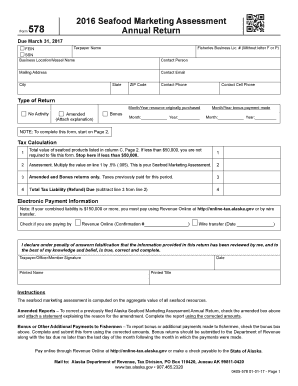
This guide provides comprehensive and user-friendly instructions for completing the Alaska Department of Revenue Form 578. Users will find clear step-by-step guidance to ensure accurate submission of the Seafood Marketing Assessment Annual Return.
Follow the steps to successfully fill out the AK DoR 578 online.
- Click ‘Get Form’ button to obtain the form and open it in the editor.
- Begin by entering your taxpayer name and FEIN or SSN in the designated fields. Ensure accuracy to avoid issues with your submission.
- Provide details about your fisheries business license number by entering it without the letters F or P. Fill out the business location or vessel name as appropriate.
- Complete the contact information by entering the name of the contact person, mailing address, email, city, state, zip code, and phone numbers.
- Select the type of return you are filing by checking 'No Activity,' 'Amended,' or 'Bonus.' If filing an amended return, be sure to attach an explanation.
- Enter the month and year for the resource originally purchased and for the bonus payment made. Ensure this information is precise.
- Proceed to tax calculation. Transfer the total value of seafood products from column C on page 2 to line 1. Note that if this value is less than $50,000, you do not need to continue with the form.
- For line 2, calculate the assessment by multiplying the value on line 1 by 0.5% (0.005). This amount reflects your seafood marketing assessment.
- Complete line 3 if applicable. If you have previously paid any taxes for this period, enter that amount.
- Calculate your total tax liability (or refund) by subtracting line 3 from line 2. Enter the result on line 4.
- Indicate your payment method by checking the box for either 'Revenue Online' or 'Wire transfer.' If applicable, provide the confirmation number or date.
- Review all information provided for accuracy. Once confirmed, you can save changes, download, print, or share the completed form.
Complete your AK DoR 578 form online today for accurate and timely submission.