Get Co Jdf 87 2017-2026
How it works
-

Open form follow the instructions
-

Easily sign the form with your finger
-

Send filled & signed form or save
How to fill out the CO JDF 87 online
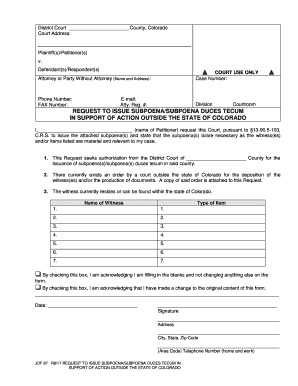
Filling out the CO JDF 87 form is an important step in requesting a subpoena or subpoena duces tecum in support of an action outside the state of Colorado. This guide provides clear, step-by-step instructions to help you complete the form accurately and efficiently.
Follow the steps to complete the CO JDF 87 form online
- Click ‘Get Form’ button to obtain the form and open it in the editor.
- Begin by filling in the Court Address at the top of the form. Make sure to include the full address where the court is located.
- In the ‘Plaintiff(s)/Petitioner(s)’ section, enter your name and the names of any additional plaintiffs or petitioners involved in the case.
- In the ‘Defendant(s)/Respondent(s)’ section, provide the names of the defendants or respondents to your request.
- Fill out the section for ‘Attorney or Party Without Attorney’ with your name and address if you are representing yourself. If you have an attorney, enter their information here.
- In the ‘Court Use Only’ section, leave the case number and other fields blank, as they are to be filled out by court personnel.
- Complete the ‘Request to Issue Subpoena/Subpoena Duces Tecum’ by entering your name where indicated. This confirms your request for the court to issue subpoenas.
- Provide details about the witness or items needed by listing them in the appropriate sections. Be sure to include the name of each witness and the type of item requested as material for your case.
- Check the appropriate box to indicate whether you made any changes to the form. This is important for keeping the record accurate.
- Enter the date you are filling out the form, and then sign your name in the provided signature field.
- Fill out your address, city, state, and zip code in the designated fields below your signature.
- Finally, include your telephone number with the area code, ensuring the court can reach you if needed.
- Once you have completed all sections of the form, you may save the changes, download, print, or share the form as necessary for filing.
Start completing your documents online to ensure a smooth filing process.
To fill out a motion for court, clearly state the purpose of your motion at the beginning of the document. Include all pertinent facts, supporting evidence, and your request for the court's action. For a well-structured motion, you can refer to the CO JDF 87 format available on US Legal Forms. This platform offers helpful tools that guide you through the process, ensuring that your motion is professionally presented.