We use cookies to improve security, personalize the user experience, enhance our marketing activities (including cooperating with our marketing partners) and for other business use.
Click "here" to read our Cookie Policy. By clicking "Accept" you agree to the use of cookies. Read less
Read more
Accept
Loading
Form preview
  • US Legal Forms
  • Form Library
  • More Forms
  • More Multi-State Forms
  • Uw Health Uwh302443-dt (formerly 1280490v-dt) 2019

Get Uw Health Uwh302443-dt (formerly 1280490v-dt) 2019-2025

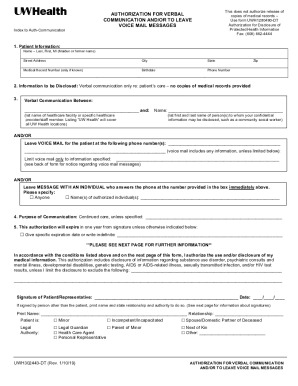
NICATION AND/OR TO LEAVE VOICE MAIL MESSAGES Index to Auth-Communication 1. Patient Information: Name Last, First, MI (Maiden or former name) Street Address City State Medical Record Number (only if known) Birthdate Phone Number Zip 2. Information to be Disclosed: Verbal communication only re: patient s care no copies of medical records provided 3. Verbal Communication Between: and: (list name of healthcare facility or specific.

How it works

  1. Open form

    Open form follow the instructions

  2. Easily sign form

    Easily sign the form with your finger

  3. Share form

    Send filled & signed form or save

How to fill out and sign UW Health UWH302443-DT (Formerly 1280490V-DT) online?

Get your online template and fill it in using progressive features. Enjoy smart fillable fields and interactivity.Follow the simple instructions below:

Business, legal, tax as well as other documents need an advanced level of protection and compliance with the legislation. Our templates are updated on a regular basis according to the latest legislative changes. In addition, with our service, all of the details you include in your UW Health UWH302443-DT (Formerly 1280490V-DT) is well-protected from loss or damage with the help of cutting-edge file encryption.

The tips below will help you fill out UW Health UWH302443-DT (Formerly 1280490V-DT) quickly and easily:

  1. Open the document in our full-fledged online editing tool by clicking Get form.
  2. Fill in the required boxes that are marked in yellow.
  3. Click the green arrow with the inscription Next to move from field to field.
  4. Go to the e-autograph solution to put an electronic signature on the template.
  5. Add the date.
  6. Double-check the whole template to make sure you haven?t skipped anything important.
  7. Press Done and save the resulting document.

Our solution allows you to take the whole process of submitting legal papers online. Due to this, you save hours (if not days or weeks) and eliminate unnecessary payments. From now on, fill in UW Health UWH302443-DT (Formerly 1280490V-DT) from the comfort of your home, workplace, or even while on the go.

Tips on how to fill out, edit and sign UW Health UWH302443-DT (Formerly 1280490V-DT) online

How to fill out and sign UW Health UWH302443-DT (Formerly 1280490V-DT) online?

Get your online template and fill it in using progressive features. Enjoy smart fillable fields and interactivity.Follow the simple instructions below:

Business, legal, tax as well as other documents need an advanced level of protection and compliance with the legislation. Our templates are updated on a regular basis according to the latest legislative changes. In addition, with our service, all of the details you include in your UW Health UWH302443-DT (Formerly 1280490V-DT) is well-protected from loss or damage with the help of cutting-edge file encryption.

The tips below will help you fill out UW Health UWH302443-DT (Formerly 1280490V-DT) quickly and easily:

  1. Open the document in our full-fledged online editing tool by clicking Get form.
  2. Fill in the required boxes that are marked in yellow.
  3. Click the green arrow with the inscription Next to move from field to field.
  4. Go to the e-autograph solution to put an electronic signature on the template.
  5. Add the date.
  6. Double-check the whole template to make sure you haven?t skipped anything important.
  7. Press Done and save the resulting document.

Our solution allows you to take the whole process of submitting legal papers online. Due to this, you save hours (if not days or weeks) and eliminate unnecessary payments. From now on, fill in UW Health UWH302443-DT (Formerly 1280490V-DT) from the comfort of your home, workplace, or even while on the go.

How to edit UW Health UWH302443-DT (Formerly 1280490V-DT): customize forms online

Sign and share UW Health UWH302443-DT (Formerly 1280490V-DT) together with any other business and personal paperwork online without wasting time and resources on printing and postal delivery. Get the most out of our online document editor with a built-in compliant electronic signature tool.

Signing and submitting UW Health UWH302443-DT (Formerly 1280490V-DT) templates electronically is quicker and more productive than managing them on paper. However, it requires making use of online solutions that guarantee a high level of data security and provide you with a certified tool for creating eSignatures. Our powerful online editor is just the one you need to complete your UW Health UWH302443-DT (Formerly 1280490V-DT) and other personal and business or tax forms in a precise and appropriate manner in line with all the requirements. It offers all the necessary tools to easily and quickly complete, edit, and sign documentation online and add Signature fields for other people, specifying who and where should sign.

It takes just a few simple actions to fill out and sign UW Health UWH302443-DT (Formerly 1280490V-DT) online:

  1. Open the selected file for further managing.
  2. Utilize the top toolkit to add Text, Initials, Image, Check, and Cross marks to your sample.
  3. Underline the most significant details and blackout or remove the sensitive ones if needed.
  4. Click on the Sign tool above and decide on how you want to eSign your document.
  5. Draw your signature, type it, upload its picture, or use an alternative option that suits you.
  6. Move to the Edit Fillable Fileds panel and place Signature areas for others.
  7. Click on Add Signer and type in your recipient’s email to assign this field to them.
  8. Verify that all data provided is complete and accurate before you click Done.
  9. Share your documentation with others utilizing one of the available options.

When approving UW Health UWH302443-DT (Formerly 1280490V-DT) with our robust online editor, you can always be sure to get it legally binding and court-admissible. Prepare and submit documents in the most effective way possible!

Get form

Experience a faster way to fill out and sign forms on the web. Access the most extensive library of templates available.
Get form

Related links form

Canada BMO Bank Of Montreal Personal And Mortgage Lending Introduction For Use With World Financial 2016 UK Leeds Building Society LB1086 SPAIN 2008 UK ELMMB Medication Administration Record (MAR) Chart Audit 2020 Canada School District 91 Nechako Lakes Capstone Plan For Transition To Work Or Other Life Options 2010

Questions & Answers

Get answers to your most pressing questions about US Legal Forms API.

Contact support

Yes, UW Health functions as a not-for-profit organization, which enables the reinvestment of resources into community health initiatives and patient care improvements. As a not-for-profit, UW Health prioritizes the needs of patients, providing high-quality services without the focus of generating excess profits. UW Health UWH302443-DT (Formerly 1280490V-DT) embodies this mission through various programs and offerings.

While UW Health is affiliated with the state through the University of Wisconsin-Madison, it operates as a nonprofit healthcare provider rather than a traditional state job. Employment opportunities exist in a variety of areas, making it possible for applicants to experience the benefits of working at a prominent healthcare facility. Positions at UW Health UWH302443-DT (Formerly 1280490V-DT) may offer unique opportunities for career growth.

Many employees find UW Health to be a rewarding place to work due to its commitment to employee development and patient care. The organization fosters an inclusive culture, prioritizing employee well-being and professional growth. If you are considering a career in healthcare, UW Health UWH302443-DT (Formerly 1280490V-DT) is often seen as an attractive option.

UW Health is an academic medical center associated with the University of Wisconsin-Madison. It provides a wide range of healthcare services, including patient care, research, and education. With an emphasis on quality and innovation, UW Health UWH302443-DT (Formerly 1280490V-DT) plays a significant role in serving the community and advancing medical knowledge.

The format for UW Health email typically follows the structure of first initial followed by last name, and then the domain name. For example, if your name is John Doe, your email would likely appear as jdoe@uwhealth. Always confirm the correct email address for specific departments or individuals when contacting UW Health UWH302443-DT (Formerly 1280490V-DT).

The address for UW Health billing is 4801 Forest Run Road, Suite 101, Madison, WI 53704. You can also reach out to their customer service for billing inquiries. Having the correct address helps ensure that your payments and inquiries are processed efficiently and within the UW Health UWH302443-DT (Formerly 1280490V-DT) framework.

The UW Health low income program provides financial assistance to eligible patients who require medical care but may face difficulties in affording services. This program is designed to ensure that all patients have access to necessary healthcare regardless of their financial situation. If you're interested in learning more about assistance options at UW Health UWH302443-DT (Formerly 1280490V-DT), reach out to their financial services team.

To set up UW Health MyChart, visit the UW Health MyChart website and click on the 'Sign Up' option. You will need personal information for verification and to create an account. This platform allows you to manage appointments, view health records, and communicate with healthcare providers, enhancing your experience with UW Health UWH302443-DT (Formerly 1280490V-DT).

The zip code for UW, referring to the University of Wisconsin, is primarily 53706. However, different departments and buildings may have specific zip codes. It is advisable to verify the exact location you intend to reach to avoid any confusion.

To obtain medical records from UW Health, you will need to submit a request form to the office that holds your records. You can often complete this request online, by mail, or in-person, depending on your preference. Ensure that you include necessary identification and details about the records you require for a smooth process at UW Health UWH302443-DT (Formerly 1280490V-DT).

Get This Form Now!

Use professional pre-built templates to fill in and sign documents online faster. Get access to thousands of forms.
Get form
If you believe that this page should be taken down, please follow our DMCA take down processhere.

Industry-leading security and compliance

US Legal Forms protects your data by complying with industry-specific security standards.
  • In businnes since 1997
    25+ years providing professional legal documents.
  • Accredited business
    Guarantees that a business meets BBB accreditation standards in the US and Canada.
  • Secured by Braintree
    Validated Level 1 PCI DSS compliant payment gateway that accepts most major credit and debit card brands from across the globe.
Get UW Health UWH302443-DT (Formerly 1280490V-DT)
Get form
Form Packages
Adoption
Bankruptcy
Contractors
Divorce
Home Sales
Employment
Identity Theft
Incorporation
Landlord Tenant
Living Trust
Name Change
Personal Planning
Small Business
Wills & Estates
Packages A-Z
Form Categories
Affidavits
Bankruptcy
Bill of Sale
Corporate - LLC
Divorce
Employment
Identity Theft
Internet Technology
Landlord Tenant
Living Wills
Name Change
Power of Attorney
Real Estate
Small Estates
Wills
All Forms
Forms A-Z
Form Library
Customer Service
Terms of Service
Privacy Notice
Legal Hub
Content Takedown Policy
Bug Bounty Program
About Us
Help Portal
Legal Resources
Blog
Affiliates
Contact Us
Delete My Account
Site Map
Industries
Forms in Spanish
Localized Forms
State-specific Forms
Forms Kit
Legal Guides
Real Estate Handbook
All Guides
Prepared for You
Notarize
Incorporation services
Our Customers
For Consumers
For Small Business
For Attorneys
Our Sites
US Legal Forms
USLegal
FormsPass
pdfFiller
signNow
airSlate WorkFlow
DocHub
Instapage
Social Media
Call us now toll free:
+1 833 426 79 33
As seen in:
  • USA Today logo picture
  • CBC News logo picture
  • LA Times logo picture
  • The Washington Post logo picture
  • AP logo picture
  • Forbes logo picture
© Copyright 1997-2025
airSlate Legal Forms, Inc.
3720 Flowood Dr, Flowood, Mississippi 39232
Form Packages
Adoption
Bankruptcy
Contractors
Divorce
Home Sales
Employment
Identity Theft
Incorporation
Landlord Tenant
Living Trust
Name Change
Personal Planning
Small Business
Wills & Estates
Packages A-Z
Form Categories
Affidavits
Bankruptcy
Bill of Sale
Corporate - LLC
Divorce
Employment
Identity Theft
Internet Technology
Landlord Tenant
Living Wills
Name Change
Power of Attorney
Real Estate
Small Estates
Wills
All Forms
Forms A-Z
Form Library
Customer Service
Terms of Service
Privacy Notice
Legal Hub
Content Takedown Policy
Bug Bounty Program
About Us
Help Portal
Legal Resources
Blog
Affiliates
Contact Us
Delete My Account
Site Map
Industries
Forms in Spanish
Localized Forms
State-specific Forms
Forms Kit
Legal Guides
Real Estate Handbook
All Guides
Prepared for You
Notarize
Incorporation services
Our Customers
For Consumers
For Small Business
For Attorneys
Our Sites
US Legal Forms
USLegal
FormsPass
pdfFiller
signNow
airSlate WorkFlow
DocHub
Instapage
Social Media
Call us now toll free:
+1 833 426 79 33
As seen in:
  • USA Today logo picture
  • CBC News logo picture
  • LA Times logo picture
  • The Washington Post logo picture
  • AP logo picture
  • Forbes logo picture
© Copyright 1997-2025
airSlate Legal Forms, Inc.
3720 Flowood Dr, Flowood, Mississippi 39232