Loading
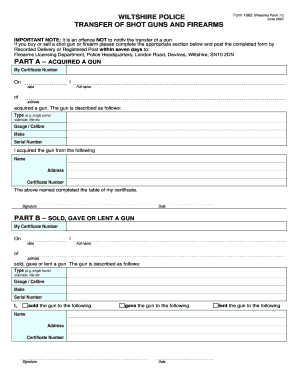
Get Wiltshire Police Firearms Transfer 2020-2026
How it works
-

Open form follow the instructions
-

Easily sign the form with your finger
-

Send filled & signed form or save
How to fill out the Wiltshire Police Firearms Transfer online
Filling out the Wiltshire Police Firearms Transfer form is vital for responsibly managing the transfer of firearms and shot guns. This guide provides clear and supportive instructions to ensure users can complete the form online efficiently.
Follow the steps to complete the firearms transfer form accurately.
- Click ‘Get Form’ button to obtain the form and open it in the editor.
- Begin by filling out Part A if you have acquired a gun. Enter your certificate number and the date of acquisition, followed by your full name and address.
- Describe the gun you acquired by specifying the type (e.g., single barrel, side-by-side, rifle, etc.), gauge or calibre, make, and serial number.
- Indicate who you acquired the gun from by providing their name, address, and certificate number, ensuring that all information is correct.
- Sign and date the form in the designated area at the end of Part A.
- Complete Part B if you have sold, gave, or lent a gun. Fill in your certificate number and the date of the transaction, along with your full name and address.
- Provide a description of the gun in the same manner as in Part A: specify the type, gauge or calibre, make, and serial number.
- For each transaction (sold, gave, lent), enter the recipient's name, address, and certificate number in the respective sections.
- Sign and date the form at the end of Part B.
- Once you have completed the form, review the information for accuracy. Save your changes, then download, print, or share the form as needed.
Ensure your firearms transfer is compliant by completing the form online today.
+61 444 444 444.