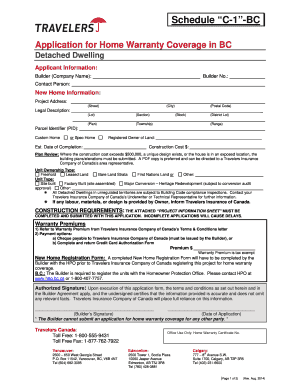
(Street) (City) (Postal Code) Legal Description: ______________________________________________________________________________ (Lot) (Section) (Plan) (Township) (Block) (District Lot) (Range) Parcel Identifier (PID): Custom Home or Spec Home Registered Owner of Land: Est. Date of Completion: Construction Cost $: Plan Review: Where the construction cost exceeds $500,000, a unique design exists, or the house is in an exposed location, the building plans/elevations must be submitted.

How it works
  • Open form

    Open form follow the instructions

  • Easily sign form

    Easily sign the form with your finger

  • Share form

    Send filled & signed form or save

How to fill out the CA Travelers Schedule C-1-BC online

Filling out the CA Travelers Schedule C-1-BC is an essential step for individuals and builders seeking home warranty coverage for detached dwellings in British Columbia. This guide will provide a clear, step-by-step approach to help users complete the form online with confidence and accuracy.

Follow the steps to complete the form effectively.

  1. Click ‘Get Form’ button to obtain the form and open it in the editor.
  2. Begin by entering the applicant information. Include the builder's company name, builder number, and the contact person's details.
  3. Fill in the new home information, including the project address, legal description, and the registered owner of the land. Ensure the completion date and construction cost are accurately stated.
  4. If applicable, determine if the construction cost exceeds $500,000 or if a unique design exists. If so, prepare to submit the building plans/elevations in PDF format.
  5. Select the type of unit ownership and the type of unit being constructed. Clearly indicate whether it is a custom home or a spec home.
  6. Complete the construction requirements by ensuring the attached project information sheet is filled out and submitted with this application.
  7. Review warranty premiums and payment options carefully. Note the options for payment via cheque or credit card authorization form.
  8. Ensure that an authorized signature is provided, certifying the accuracy of the information included in the application.
  9. After completing the form, review all sections to confirm accuracy. You can save changes, download the form, print it, or share it online as necessary.

Start completing your CA Travelers Schedule C-1-BC online now for a smooth application process.

Get form

Experience a faster way to fill out and sign forms on the web. Access the most extensive library of templates available.

Related content

2024 Instructions for Schedule CA (540)California...

For more information, see Schedule CA (540) specific line instructions in Part I, Section...

Learn more
2023 Instructions for Form 1040-NR

Jan 19, 2024 — You will need to complete the applicable items on Schedule OI (Form...

Learn more
best practices audit guide

The licensee's records must identify the quantity of fuel taken from the licensee's own...

Learn more
Questions & Answers

Get answers to your most pressing questions about US Legal Forms API.

Contact support

How do I report a claim to Travelers Canada?

Reporting a claim to Travelers Canada can be done easily online or over the phone. If you prefer, you can complete the form associated with the CA Travelers Schedule C-1-BC. This ensures you provide all necessary information. Don't hesitate to ask their support team for guidance if you encounter any difficulties during the reporting process.

To file a claim with Travelers, you can use their dedicated claims hotline. When you call, having your policy details handy will make the process smoother. Additionally, if you’re working with the CA Travelers Schedule C-1-BC, mention it during the call to ensure they provide you with the appropriate assistance. Their representatives are ready to help you with everything you need.

The timeframe to file a claim varies by insurer and specific policy. Generally, it’s important to file your claim as soon as possible, especially if you are utilizing the CA Travelers Schedule C-1-BC. Many insurers recommend submitting claims within days of the incident to avoid any issues. Therefore, always check your policy for precise deadlines.

Filing an insurance claim in Canada generally begins with notifying your insurance provider. For those using the CA Travelers Schedule C-1-BC, be sure to check the required documents specific to your policy. You can typically file through your insurer’s website or mobile app. Knowing your policy details helps streamline the process.

To obtain a Schedule C, you can easily access it through the US Legal Forms platform. They provide a simple and efficient way to download the CA Travelers Schedule C-1-BC directly. Once you have the form, you can fill it out according to your specific details. After completing it, make sure to keep a copy for your records.

Get This Form Now!

Use professional pre-built templates to fill in and sign documents online faster. Get access to thousands of forms.

If you believe that this page should be taken down, please follow our DMCA take down process here.

CA Travelers Schedule C-1-BC Form

This form is available in several versions. Select the version you need from the drop-down list below.

Get CA Travelers Schedule C-1-BC