Loading
Form preview
  • US Legal Forms
  • Other Templates
  • More Forms
  • More Multi-State Forms
  • Ca Palo Alto Unified School District Concussion Form 2014

Get Ca Palo Alto Unified School District Concussion Form 2014-2026

How it works

  1. Open form

    Open form follow the instructions

  2. Easily sign form

    Easily sign the form with your finger

  3. Share form

    Send filled & signed form or save

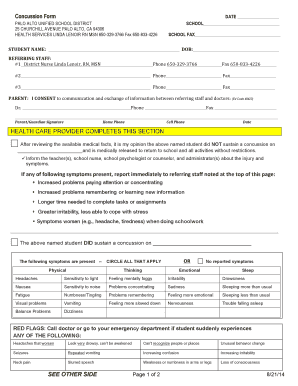
How to fill out the CA Palo Alto Unified School District Concussion Form online

Filling out the CA Palo Alto Unified School District Concussion Form online is an important step in ensuring the health and safety of students. This guide provides clear instructions on how to complete each section of the form to ensure accurate and effective communication regarding concussions.

Follow the steps to successfully complete the form.

  1. Click 'Get Form' button to access the form and open it in your preferred online document management tool.
  2. Enter the date at the top of the form. This helps document when the information is being recorded.
  3. Fill in the school name where the student is enrolled. This identifies the institution related to the concussion incident.
  4. Complete the student details, including their name and date of birth. This information is crucial for accurate identification.
  5. Identify the referring staff member, ensuring to provide their name and contact details for follow-up communication.
  6. In the parent/guardian section, consent to communication and information exchange regarding the concussion should be indicated.
  7. Parents/guardians must provide their contact information, including home and cell phone numbers, for effective communication.
  8. The health care provider section should be reserved for completion by the relevant medical professional after evaluating the student’s condition.
  9. Ensure to circle the symptoms present in the student to provide a comprehensive overview of their condition.
  10. In the returning to school and sports sections, check all relevant options to indicate any necessary accommodations or restrictions.
  11. Physician and parent signatures are required at the end of the form to validate the information provided.
  12. Once all fields are filled, you may save changes, download, print, or share the completed form as necessary.

Complete the CA Palo Alto Unified School District Concussion Form online for your student’s safety and health.

Get form

Experience a faster way to fill out and sign forms on the web. Access the most extensive library of templates available.
Get form

Related content

Return to Learn After Sport-Related Concussion: A...
by CL Williamson · 2018 · Cited by 35 — Recent recommendations have emphasized...
Learn more
A project to educate parents on high school...
by CM Chelini · 1919 — In Vendrell v School District No 26C, the school was sued for...
Learn more
Apple II History Compiled and written by Steven...
Oct 31, 2004 — At the Homebrew Computer club in Palo Alto, California (in Silicon ... He...
Learn more

Related links form

MD Baltimore Neighborhoods Procedures For Tenants And Landlords 2016 CA OES F-42 2016 CA Metro CIV 5 - Los Angeles City 2018 GA Veterinary Feed Directive Inspection Tool 2018

Get This Form Now!

Use professional pre-built templates to fill in and sign documents online faster. Get access to thousands of forms.
Get form
If you believe that this page should be taken down, please follow our DMCA take down processhere.
Get CA Palo Alto Unified School District Concussion Form
Get form

Form categories

Real Estate
  • Home Sale
  • Deeds
  • Leases
  • Landlord Tenant
  • First Refusal Agreement
  • Lis Pendens
  • View all Real Estate
Business & Commercial
  • Small Business
  • Contracts
  • Construction
  • Employment
  • Limited Liability Company
  • Partnerships
  • View all Business & Commercial
Estate Planning
  • Personal Planning
  • Last Will and Testament
  • Living Trust
  • Power of Attorney
  • Living Will (Healthcare Directive)
  • Probate
  • Trusts
  • Small Estate
  • View all Estate Planning

Other Legal Areas

  • Civil Actions
  • Civil Procedure
  • Animals
  • Affidavits
  • Bill of Sale
  • Oil Gas and Minerals
  • Name Change
  • Other
Family Law
  • Divorce
  • Annulment
  • Adoption
  • Marriage
  • Child Justice
  • View all Family Law
  • Forms Catalog
  • Other Templates

Company

  • About Us
  • Pricing
  • Legal Hub
  • Affiliate Program

Knowledge Base

  • Help Portal
  • Legal Resources
  • Blog
  • Industries
  • Legal Guides
  • Sitemap

Services

  • Notarize
  • Form Selector

Support

  • Contact Us
  • Delete My Account

Products

  • USLegal
  • FormsPass
  • pdfFiller
  • signNow
  • altaFlow
  • DocHub
  • Instapage
Social Media
Call us now toll free:
+1 833 426 79 33
As seen in:
© 2026 US Legal Forms. All rights reserved.
  • Your Privacy Choices
  • Terms of Service
  • Privacy Notice
  • Content Takedown Policy
  • Bug Bounty Program