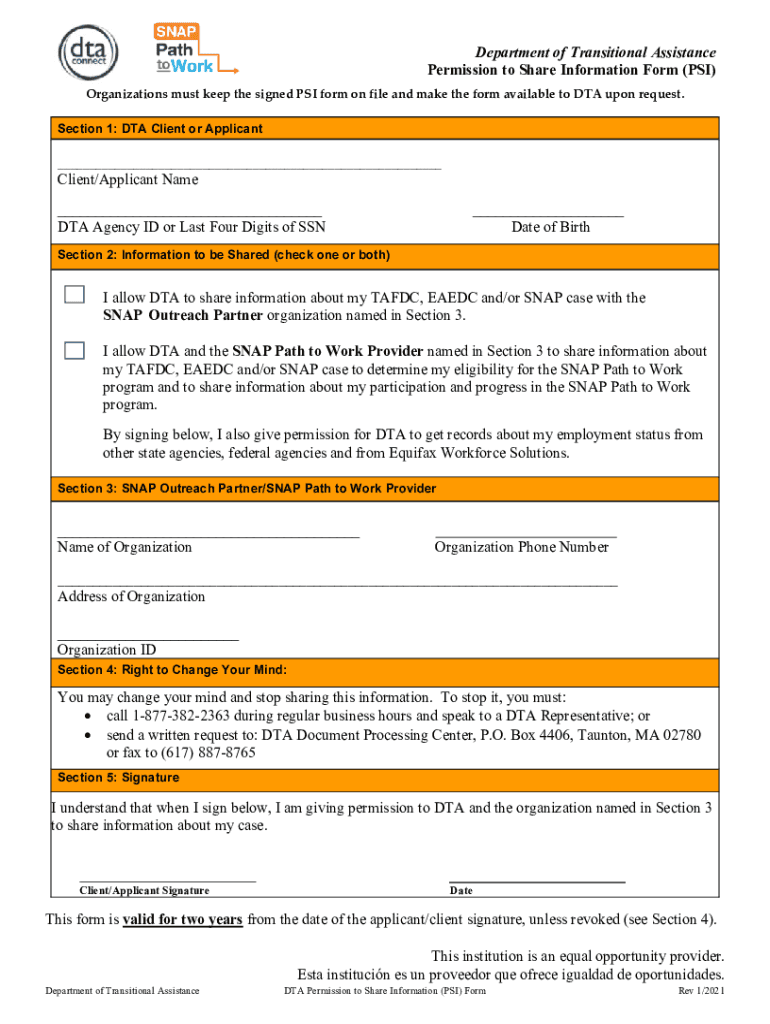
Department of Transitional Assistance Permission to Share Information Form (PSI) OrganizationsmustkeepthesignedPSIformonfileandmaketheformavailabletoDTAuponrequest. Section 1: DTA Client or Applicant Client/Applicant.
Loading

Open form follow the instructions

Easily sign the form with your finger

Send filled & signed form or save
How to fill out the MA DTA Permission To Share Information Form online
Filling out the MA DTA Permission To Share Information Form is an essential step for individuals seeking to share their information with designated organizations. This guide provides clear instructions for completing the form online, ensuring a seamless experience for users.
Follow the steps to complete the form online efficiently.
- Click the ‘Get Form’ button to access the document and open it in your online form editor.
- In Section 1, enter your name as the DTA client or applicant, followed by either your DTA Agency ID or the last four digits of your Social Security Number. Next, provide your date of birth.
- Moving to Section 2, check one or both boxes to indicate whether you permit DTA to share information about your TAFDC, EAEDC, and/or SNAP case with the organizations mentioned in Section 3.
- In Section 3, write the name of the SNAP Outreach Partner or SNAP Path to Work Provider. Additionally, include their phone number, address, and organization ID for thorough identification.
- Section 4 explains your right to change your mind. Note the contact methods provided to revoke your permission to share information if you choose to do so in the future.
- Finally, in Section 5, sign and date the form, confirming your understanding and consent to share your information as specified.
- Once you have completed the form, you can save your changes, download a copy, print it for your records, or share it as needed.
Complete your MA DTA Permission To Share Information Form online today to streamline your service process.
Experience a faster way to fill out and sign forms on the web. Access the most extensive library of templates available.
Related content
DTA Permission to Share Information (PSI) Form. Rev 1/2021 ... I allow DTA to share...
However, the remaining information on the form must be completed, ... by signing below I...
Normally, trading on the order book is restricted to broker-dealers and market making...
Get answers to your most pressing questions about US Legal Forms API.
DTA Connect Frequently Asked Questions | Mass.gov
Check your balance by: Downloading and logging onto the DTA Connect mobile application. Logging on to the DTA Connect website. Calling the EBT Customer Service number ((800) 997-2555) on the back of your card.
15. How do I send DTA my documents? | Mass Legal Services
Identity of the head of household, Your Massachusetts residence, Social Security Numbers for all household members who are applying. Current earned income or self-employment, Unearned income that DTA cannot verify through a database, Last day of work, if you stopped work recently, and.
What proofs (verifications) do I need and how do I get them to DTA ...
Select the App Store icon on your device. Select Search from the menu and type DTA Connect in the search bar. Select the DTA Connect icon. Tap GET. ... When downloading is complete, GET will change to INSTALL. ... When the installation is complete, INSTALL will change to OPEN.
Download the DTA Connect mobile app | Mass.gov
Call the DTA Assistance Line at 877-382-2363 and follow the prompts to do an address change (no need to talk to a DTA worker), Change your address through DTA Connect See How do I get information about my SNAP case online or with my smartphone?,
How do I download the DTA Connect app?
Tap the Google Play icon on your device. Tap Search. In the search box, type DTA Connect. From the results list, tap the DTA Connect icon. Tap INSTALL. When installed, tap OPEN.
Overview of SNAP Reporting Requirements | Mass.gov
Massachusetts Department of Transitional Assistance. Request to Stop Benefits or. Withdraw Application. Give this form to DTA. By mail: DTA Document Processing Center, P.O. Box 4406, Taunton, MA 02780-0420. By fax: (617) 887-8765. In person at your local DTA office. Upload to the DTA Connect App.
How do I send documents to DTA?
Upload your documents through DTA Connect. The documents go straight into your DTA case record. ... FAX documents to DTA at 617-887-8765. MAIL documents to: ... Hand-deliver documents to any local DTA office and ask DTA to help you scan them directly into your case.
Using your EBT card | Mass.gov
DTA Connect is the Department of Transitional Assistance's (DTA) mobile application and website. You can access your case information on your time. ... On both the DTA Connect app and website, you can view your case status, check your EBT card balance, upload and submit documents, update your information, and more.
Can I email DTA?
Email our IT help desk at dtaapphelpdesk@state.ma.us with your Agency ID or Web Application Number (if you have one).
Use professional pre-built templates to fill in and sign documents online faster. Get access to thousands of forms.
If you believe that this page should be taken down, please follow our DMCA take down process here.