Loading
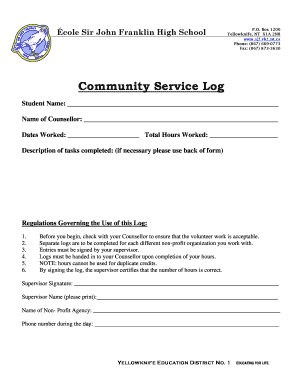
Get Canada Ecole Sir John Franklin High School Community Service Log 2012-2026
How it works
-

Open form follow the instructions
-

Easily sign the form with your finger
-

Send filled & signed form or save
How to fill out the Canada Ecole Sir John Franklin High School Community Service Log online
Filling out the Canada Ecole Sir John Franklin High School Community Service Log online is an essential part of documenting volunteer hours. This guide provides a clear and supportive walkthrough to ensure that users can complete the form accurately and efficiently.
Follow the steps to complete your Community Service Log online.
- Click ‘Get Form’ button to obtain the Community Service Log and open it for editing.
- In the section labeled 'Student Name,' enter your full name to identify yourself as the volunteer.
- Next, fill in the 'Name of Counsellor' field with the name of your counselor, as they will oversee your community service hours.
- Record the 'Dates Worked' by specifying the start and end dates for the service period.
- Indicate the 'Total Hours Worked' by summing up the hours you dedicated to your community service.
- Provide a brief 'Description of tasks completed' in the designated area, detailing the volunteer work you performed. If more space is needed, you may use the back of the form.
- Ensure that your supervisor completes the 'Supervisor Signature' field to verify your hours worked. They should also print their name in the 'Supervisor Name' section.
- Fill out the 'Name of Non-Profit Agency' and the 'Phone number during the day' to provide additional contact information for your supervisor.
- After completing all sections of the form, save your changes, and download or print the document if required. You may then share it with your counselor.
Complete your Canada Ecole Sir John Franklin High School Community Service Log online and ensure your volunteering is properly documented.