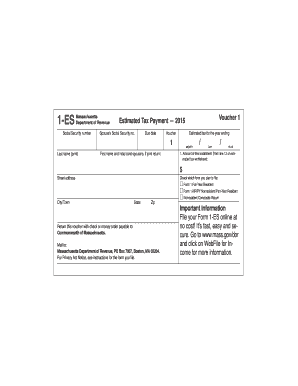
ES must be 8 1/2" x 3 2/3". b. Paperweight must be 20 pounds/500 sheets. c. Smoothness - between 65 and 200 Sheffield units on both sides. Unacceptable coatings include carbon coating and no-carbon required coatings. The coupon must be free of foreign matter such as staples, paper clips, adhesive tape or glue, etc. There can be no holes in the coupon. d. Bottom edge must be perpendicular to within 2 degrees to the right-hand and lefthand edges. e. No tears are allowed on the right-hand.

How it works
  • Open form

    Open form follow the instructions

  • Easily sign form

    Easily sign the form with your finger

  • Share form

    Send filled & signed form or save

How to fill out the WI DoR 1-ES (D-101) online

Filling out the WI DoR 1-ES (D-101) online ensures a smooth process for making your estimated tax payments. This guide will provide you with clear, step-by-step instructions to complete the form accurately and efficiently.

Follow the steps to fill out your estimated tax voucher correctly.

  1. Press the ‘Get Form’ button to access the online version of the WI DoR 1-ES (D-101) and open it in your preferred digital editor.
  2. Begin by entering your legal last name and first name in the designated fields. Ensure that both names match your Social Security card for accurate processing.
  3. In the space provided for Social Security numbers, enter your number without any hyphens. If applicable, input your partner's Social Security number in the corresponding field.
  4. If you are filing as a trust or estate, select the appropriate option and fill in the required Federal Employer Identification Number (FEIN) or the decedent's Social Security number.
  5. Complete the address section by providing your home address, including the city, state, and ZIP code. Make sure this information is up-to-date, particularly if it differs from past filings.
  6. Check the box if you need to correct your address from a previous payment voucher. This will help prevent any issues with future correspondence.
  7. Indicate the amount of payment you are making. Ensure this matches the estimated tax payment you intend to submit.
  8. Before finalizing, review all entries to confirm accuracy, as errors may delay processing. Pay attention to the year on the voucher, making sure it corresponds to the correct tax year.
  9. Once you have completed the form, save your changes, and download a copy for your records. You can also print the voucher for submission.
  10. Mail the completed voucher to the address provided on the form without attaching any additional documents or instruction sheets.

Get started on your estimated tax payment and complete your WI DoR 1-ES (D-101) online today.

Get form

Experience a faster way to fill out and sign forms on the web. Access the most extensive library of templates available.

Related content

2024 Form 1-ES Instructions – Estimated Income...

You must pay Wisconsin estimated tax for 2024 if you expect to owe, after subtracting your...

Learn more
2019 I-111 Form 1 Instructions - Wisconsin Income...

Dec 31, 2019 — Tax Rates Reduced – The tax rate for the first and second tax bracket...

Learn more
User Manual

Esta é uma Philips Android TV™. A Android TV oferece milhares de filmes, shows e jogos...

Learn more
Questions & Answers

Get answers to your most pressing questions about US Legal Forms API.

Contact support

Where can I pick up Wisconsin tax forms?

You can pick up Wisconsin tax forms at various locations, such as local government offices or tax preparers. However, the most efficient way is to go online to the Wisconsin Department of Revenue. They offer downloadable forms, including the essential WI DoR 1-ES (D-101). This saves time and ensures you have the right documents.

If you earn income in Wisconsin, you likely need to file a state tax return. This applies to residents and non-residents earning income within the state. Make sure to review your income sources and corresponding tax obligations. Using forms like the WI DoR 1-ES (D-101) can guide you through the filing process.

Tax forms can be picked up at various locations, such as local libraries, tax offices, and the Wisconsin Department of Revenue. However, for convenience, I recommend downloading them directly from their website, especially the WI DoR 1-ES (D-101). This way, you can avoid the hassle of searching through physical locations.

You can obtain Wisconsin tax forms directly from the Wisconsin Department of Revenue’s website. They provide a variety of forms, including the WI DoR 1-ES (D-101), for different tax purposes. Additionally, certain tax preparation offices also carry forms. Accessing forms online ensures that you have the most recent versions.

If you have employees in Wisconsin or withhold taxes from payments, you need a Wisconsin withholding tax number. This number is vital for reporting wages and withholding tax to the state. You can apply for this number through the Wisconsin Department of Revenue’s website. Having the correct documentation, like the WI DoR 1-ES (D-101), simplifies the process.

The post office generally does not carry tax forms like the WI DoR 1-ES (D-101). However, they can provide you with a few commonly needed forms or direct you to where you can obtain them. Most tax forms are available online through the Wisconsin Department of Revenue's website. It’s easier to access the latest forms directly online rather than relying on postal services.

To obtain a Wisconsin sales tax ID number, you need to register with the Wisconsin Department of Revenue. You can do this online through their website. Once registered, you will receive your sales tax ID number, which is essential for collecting and remitting sales tax. If you plan to make sales in Wisconsin, this step is crucial for your business.

You can request to have an underpayment penalty waived by proving reasonable cause for not making the required payments. Documentation, such as medical expenses or unexpected financial difficulties, may support your case. Additionally, filing your WI DoR 1-ES (D-101) accurately can potentially help you navigate this situation more effectively.

Tax on a $100,000 income in Wisconsin will depend on various factors, including deductions and filing status. The effective tax rate for this income may be around 6-7%, but individual circumstances can impact this amount. By utilizing resources like WI DoR 1-ES (D-101), you can estimate your tax liability more accurately.

Some exceptions exist for the underpayment penalty, such as being a victim of a natural disaster or having a limited income. If your return is based on a loss or you have incurred specified deductions, you can avoid this penalty. Completing the WI DoR 1-ES (D-101) accurately can help clarify your eligibility for these exceptions.

Get This Form Now!

Use professional pre-built templates to fill in and sign documents online faster. Get access to thousands of forms.

If you believe that this page should be taken down, please follow our DMCA take down process here.

WI DoR 1-ES (D-101) Form

This form is available in several versions. Select the version you need from the drop-down list below.

Get WI DoR 1-ES (D-101)