Loading
Form preview
  • US Legal Forms
  • Other Templates
  • More Forms
  • More Multi-State Forms
  • Genova Diagnostics Inbound International Commercial Invoice 2023

Get Genova Diagnostics Inbound International Commercial Invoice 2023-2026

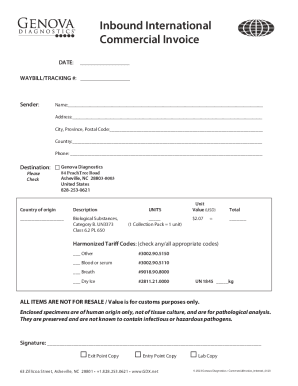
Dress: City, Province, Postal Code: Country: Phone: Destination: Please Genova Diagnostics 84 PeachTree Road Asheville, NC 28803-0003 United States 828-253-0621 Country of origin Description.

How it works

  1. Open form

    Open form follow the instructions

  2. Easily sign form

    Easily sign the form with your finger

  3. Share form

    Send filled & signed form or save

How to fill out the Genova Diagnostics Inbound International Commercial Invoice online

This guide provides a clear and supportive overview of how to complete the Genova Diagnostics Inbound International Commercial Invoice online. Whether you are familiar with international shipping documents or new to them, this step-by-step guide will help you navigate the process with ease.

Follow the steps to complete your invoice accurately and efficiently.

  1. Click the ‘Get Form’ button to obtain the invoice form and open it in your preferred online editor.
  2. Fill in the date in the designated field at the top of the invoice. This should reflect the date you are completing the invoice.
  3. Enter the waybill or tracking number in the appropriate field to assist in tracking the shipment.
  4. In the 'Sender' section, provide your name, address, city, province, postal code, country, and phone number. Ensure all details are accurate for successful communication.
  5. For the 'Destination' section, fill in the provided address of Genova Diagnostics, including the country and phone number. Verify that the details match the official address to avoid delivery issues.
  6. In the 'Country of origin' field, indicate the country where the goods originate. This information is crucial for customs clearance.
  7. Describe the items being shipped in the designated area. For this document, include 'Biological Substances, Category B. UN3373, Class 6.2 PL 650' for clarity.
  8. Specify the number of units being sent in the appropriate section. For instance, if you have 1 collection pack, indicate it as 1 unit.
  9. Fill in the unit value in USD next to the corresponding number of units. Remember, this value is purely for customs purposes.
  10. Total the value and place it in the 'Total' field to summarize the invoice amount.
  11. Check any applicable Harmonized Tariff Codes that pertain to your items, making sure to mark all that apply.
  12. Acknowledge the statement regarding the nature of items and their intended use by including your signature in the designated area.
  13. Finally, review the completed invoice for accuracy before saving your changes. You may choose to download, print, or share the form as necessary.

Complete your international commercial invoice online today for a seamless shipping experience.

Get form

Experience a faster way to fill out and sign forms on the web. Access the most extensive library of templates available.
Get form

Related content

Amendment No. 1 to Form F-1
We have applied to list our Class A common shares on the Nasdaq Global Market, or Nasdaq...
Learn more
HCCC February 2022 Board of Trustees Meeting
Sep 1, 2022 — WHEREAS, this Agreement will remain in effect until June 30, 2023 unless...
Learn more
Untitled
... form government travelers pdf, Fers cash out, Kamen rider gaim episode 5 kissasian...
Learn more

Related links form

TX Comptroller 50-141 2013 TX Comptroller 50-144 2018 TX Comptroller 50-144 2017 TX Comptroller 50-144 2016

Questions & Answers

Get answers to your most pressing questions about US Legal Forms API.

Contact support

Unlike a regular sales invoice, a commercial invoice includes the necessary extra details for crossing the border, such as country of origin, harmonized system (HS) code, freights terms, and so on. In this guide, we will explain what a commercial invoice is, along with how to issue it and pack it for shipment.

A commercial invoice is a critical document for international trade, as it helps ensure smooth shipment, legal protection, and financial record-keeping. It is typically prepared by the seller and provided to the buyer to facilitate the import or export of goods across international borders.

Basically, the main distinction is that one is used as an estimate, and the other as a request for final payment. A pro forma is used before goods are shipped and no payment is required. A commercial invoice is sent after the goods have been delivered and now, it is time to pay.

Invoices often have a more detailed and itemized format, including a description of the goods or services provided, their quantity and price, any applicable taxes or fees, and the payment terms. Bills may be less detailed and may simply include the total amount owed, the payment terms, and any applicable taxes or fees.

A commercial invoice is a required document for the export and import clearance process. It is sometimes used for foreign exchange purposes. In the buyer's country, it is the document that is used by their customs officials to assess import duties and taxes.

As mentioned, a proforma invoice is issued before the placement of a purchase order. A commercial invoice is issued after the placement of a purchase order, and this is the document the seller uses to request payment. This is why this document is also called the final invoice.

Get This Form Now!

Use professional pre-built templates to fill in and sign documents online faster. Get access to thousands of forms.
Get form
If you believe that this page should be taken down, please follow our DMCA take down processhere.
Get Genova Diagnostics Inbound International Commercial Invoice
Get form
  • Adoption
  • Bankruptcy
  • Contractors
  • Divorce
  • Home Sales
  • Employment
  • Identity Theft
  • Incorporation
  • Landlord Tenant
  • Living Trust
  • Name Change
  • Personal Planning
  • Small Business
  • Wills & Estates
  • Packages A-Z
  • Affidavits
  • Bankruptcy
  • Bill of Sale
  • Corporate - LLC
  • Divorce
  • Employment
  • Identity Theft
  • Internet Technology
  • Landlord Tenant
  • Living Wills
  • Name Change
  • Power of Attorney
  • Real Estate
  • Small Estates
  • Wills
  • All Forms
  • Forms A-Z
  • Other Templates
  • Legal Hub
  • About Us
  • Help Portal
  • Legal Resources
  • Blog
  • Affiliates
  • Contact Us
  • Delete My Account
  • Site Map
  • Industries
  • Forms in Spanish
  • Localized Forms
  • State-specific Forms
  • Forms Kit
  • Real Estate Handbook
  • All Guides
  • Notarize
  • Incorporation services
  • For Consumers
  • For Small Business
  • For Attorneys
  • USLegal
  • FormsPass
  • pdfFiller
  • signNow
  • altaFlow
  • DocHub
  • Instapage
Form Packages
  • Adoption
  • Bankruptcy
  • Contractors
  • Divorce
  • Home Sales
  • Employment
  • Identity Theft
  • Incorporation
  • Landlord Tenant
  • Living Trust
  • Name Change
  • Personal Planning
  • Small Business
  • Wills & Estates
  • Packages A-Z
Form Categories
  • Affidavits
  • Bankruptcy
  • Bill of Sale
  • Corporate - LLC
  • Divorce
  • Employment
  • Identity Theft
  • Internet Technology
  • Landlord Tenant
  • Living Wills
  • Name Change
  • Power of Attorney
  • Real Estate
  • Small Estates
  • Wills
  • All Forms
  • Forms A-Z
  • Other Templates
Customer Service
  • Legal Hub
  • About Us
  • Help Portal
  • Legal Resources
  • Blog
  • Affiliates
  • Contact Us
  • Delete My Account
  • Site Map
  • Industries
  • Forms in Spanish
  • Localized Forms
  • State-specific Forms
  • Forms Kit
Legal Guides
  • Real Estate Handbook
  • All Guides
Prepared for you
  • Notarize
  • Incorporation services
Our Customers
  • For Consumers
  • For Small Business
  • For Attorneys
Our Sites
  • USLegal
  • FormsPass
  • pdfFiller
  • signNow
  • altaFlow
  • DocHub
  • Instapage
Social Media
Call us now toll free:
+1 833 426 79 33
As seen in:
© Copyright 1999-2026 airSlate Legal Forms, Inc. 17 Station Street, Ste. 203, Brookline, MA 02445
  • Your Privacy Choices
  • Terms of Service
  • Privacy Notice
  • Content Takedown Policy
  • Bug Bounty Program