Loading
Form preview
  • US Legal Forms
  • Other Templates
  • More Forms
  • More Multi-State Forms
  • Au Rockhampton Regional Council Rrc144 2021

Get Au Rockhampton Regional Council Rrc144 2021-2026

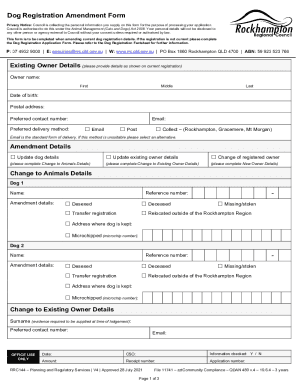
Dog Registration Amendment Form Privacy Notice: Council is collecting the personal information you supply on this form for the purpose of processing your application. Council is authorised to do this.

How it works

  1. Open form

    Open form follow the instructions

  2. Easily sign form

    Easily sign the form with your finger

  3. Share form

    Send filled & signed form or save

How to fill out the AU Rockhampton Regional Council RRC144 online

Filling out the AU Rockhampton Regional Council RRC144 form is an essential step for amending dog registration details. This guide provides a clear, step-by-step approach to help users navigate through the online form efficiently.

Follow the steps to complete the RRC144 form online effectively.

  1. Press the ‘Get Form’ button to access the online version of the AU Rockhampton Regional Council RRC144 form in your preferred digital editor.
  2. Provide your existing owner details as shown on the current dog registration. Include the owner's name (first, middle, last), date of birth, postal address, preferred contact number, and preferred delivery method (choose between email, post, or collect).
  3. Indicate the amendment details by selecting one or more options: update dog details, update existing owner details, or change the registered owner. If changing the registered owner, be prepared to provide the necessary sections: Change to Animals Details, Change to Existing Owner Details, or New Owner Details.
  4. If updating dog details, fill out the section for each dog. Provide the dog’s name, reference number, and select the amendment details such as desexed, deceased, missing/stolen, transfer registration, or relocate outside the area. Also, include the address where the dog is kept and the microchip number if applicable.
  5. For any change to existing owner details, enter the new surname (provide evidence at lodgement), preferred contact number, and email. Make sure to complete the new owner details if applicable.
  6. Fill out the residential address, including street number and name, suburb, state, and postcode. If the mailing address differs, include that as well.
  7. If applicable, indicate whether the dog has been desexed. If yes, prepare to attach a copy of the desexing certificate at the time of lodgement.
  8. Complete any alternative contact details, including name and contact number, that can be used in case the dog owner cannot be reached.
  9. If requesting a refund, provide the account name, bank name, BSB, and account number. Ensure to review the Dog Registration Factsheet for refund eligibility.
  10. Before submitting, gather the necessary supporting documentation such as desexing certificate, microchip certificate, or other required evidence, and confirm they're included.
  11. Finalize the form by signing it, indicating your name, date, and confirming that you are aware of the allowable number of dogs at your property.
  12. Submit the form online and remember to save changes, download, print, or share the completed form as needed.

Complete your forms online today!

Get form

Experience a faster way to fill out and sign forms on the web. Access the most extensive library of templates available.
Get form

Related links form

MA ST-7R 2015 MA ST-7R 2009 MA ST-MAB-4 2009 MA State Tax Form 128 2016

Questions & Answers

Get answers to your most pressing questions about US Legal Forms API.

Contact support

Rockhampton Regional Council currently has 7 divisions. Residents in each division elect a Councillor to represent their community's needs. All Rockhampton Region residents elect the Mayor. The Queensland State Government has legislated that the Electoral Commission of Queensland conduct all Council Elections.

Mayor Tony Williams Rockhampton Regional Council.

Rockhampton Regional Local Government Area | Electoral Commission of Queensland.

Payment by credit card may be made over the phone by contacting Council on 07 4932 9000 or 1800 22 55 77, from Monday to Friday, 8 am to 5.00 pm (except on public holidays). You will need to quote the infringement notice number.

LARGEST HEAD OF CATTLE The region is also serviced by two abattoirs with a total daily processing capacity of 2,400 head, and is currently seeking investment in more cattle feedlots and abattoirs. With these numbers, it's no wonder the Rockhampton region is commonly referred to as the Beef Capital of Australia.

By Phone 07 4932 9000 Our Customer Service Call Centre is your first point of contact for all enquiries and operates Monday to Friday 8.00am to 5.00pm.

Contact Us Phone: 07 4932 9000 or 1300 22 55 77. Email: enquiries@rrc.qld.gov.au. Fax: 07 4936 8862 or 1300 22 55 79.

Rockhampton Regional Local Government Area | Electoral Commission of Queensland.

Get This Form Now!

Use professional pre-built templates to fill in and sign documents online faster. Get access to thousands of forms.
Get form
If you believe that this page should be taken down, please follow our DMCA take down processhere.
Get AU Rockhampton Regional Council RRC144
Get form
  • Adoption
  • Bankruptcy
  • Contractors
  • Divorce
  • Home Sales
  • Employment
  • Identity Theft
  • Incorporation
  • Landlord Tenant
  • Living Trust
  • Name Change
  • Personal Planning
  • Small Business
  • Wills & Estates
  • Packages A-Z
  • Affidavits
  • Bankruptcy
  • Bill of Sale
  • Corporate - LLC
  • Divorce
  • Employment
  • Identity Theft
  • Internet Technology
  • Landlord Tenant
  • Living Wills
  • Name Change
  • Power of Attorney
  • Real Estate
  • Small Estates
  • Wills
  • All Forms
  • Forms A-Z
  • Other Templates
  • Legal Hub
  • About Us
  • Help Portal
  • Legal Resources
  • Blog
  • Affiliates
  • Contact Us
  • Delete My Account
  • Site Map
  • Industries
  • Forms in Spanish
  • Localized Forms
  • State-specific Forms
  • Forms Kit
  • Real Estate Handbook
  • All Guides
  • Notarize
  • Incorporation services
  • For Consumers
  • For Small Business
  • For Attorneys
  • USLegal
  • FormsPass
  • pdfFiller
  • signNow
  • altaFlow
  • DocHub
  • Instapage
Form Packages
  • Adoption
  • Bankruptcy
  • Contractors
  • Divorce
  • Home Sales
  • Employment
  • Identity Theft
  • Incorporation
  • Landlord Tenant
  • Living Trust
  • Name Change
  • Personal Planning
  • Small Business
  • Wills & Estates
  • Packages A-Z
Form Categories
  • Affidavits
  • Bankruptcy
  • Bill of Sale
  • Corporate - LLC
  • Divorce
  • Employment
  • Identity Theft
  • Internet Technology
  • Landlord Tenant
  • Living Wills
  • Name Change
  • Power of Attorney
  • Real Estate
  • Small Estates
  • Wills
  • All Forms
  • Forms A-Z
  • Other Templates
Customer Service
  • Legal Hub
  • About Us
  • Help Portal
  • Legal Resources
  • Blog
  • Affiliates
  • Contact Us
  • Delete My Account
  • Site Map
  • Industries
  • Forms in Spanish
  • Localized Forms
  • State-specific Forms
  • Forms Kit
Legal Guides
  • Real Estate Handbook
  • All Guides
Prepared for you
  • Notarize
  • Incorporation services
Our Customers
  • For Consumers
  • For Small Business
  • For Attorneys
Our Sites
  • USLegal
  • FormsPass
  • pdfFiller
  • signNow
  • altaFlow
  • DocHub
  • Instapage
Social Media
Call us now toll free:
+1 833 426 79 33
As seen in:
© Copyright 1999-2026 airSlate Legal Forms, Inc. 17 Station Street, Ste. 203, Brookline, MA 02445
  • Your Privacy Choices
  • Terms of Service
  • Privacy Notice
  • Content Takedown Policy
  • Bug Bounty Program