Loading
Get Sanford Health Mr20115 2022-2026
How it works
-

Open form follow the instructions
-

Easily sign the form with your finger
-

Send filled & signed form or save
How to fill out the Sanford Health MR20115 online
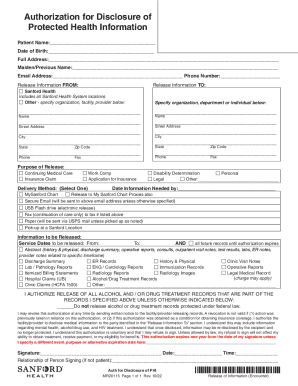
The Sanford Health MR20115 form is crucial for the authorization of disclosing protected health information. This guide will provide you with a clear walkthrough on how to accurately complete this form online, ensuring that you understand each component and field.
Follow the steps to complete the form effectively.
- Click the ‘Get Form’ button to access the document and open it in your preferred digital format.
- In the 'Patient Name' field, enter the full name of the individual who is authorizing the release of information.
- Provide the 'Date of Birth' of the patient in the designated format. This is essential for identifying the correct medical records.
- Fill in the 'Full Address' of the patient, including street, city, state, and zip code, ensuring all information is accurate.
- If applicable, document the 'Maiden/Previous Name' of the patient to assist in locating past records.
- Enter the 'Email Address' and 'Phone Number' where you can be reached, ensuring that this information is up to date.
- Identify the entity from which the information is being released by checking the appropriate box under 'Release Information FROM.' If another organization is involved, specify it in the provided space.
- Specify the entity or individual receiving the information under 'Release Information TO.' Provide all requested details including name, address, city, state, phone number, and fax.
- Select the 'Purpose of Release' by checking the appropriate box that reflects why the information is needed, such as continuing medical care or insurance claim.
- Choose the 'Delivery Method' that works best for you by checking the corresponding option.
- Indicate the 'Date Information Needed by' in the designated area to signify any urgency in receiving the documents.
- In the 'Information to be Released' section, specify the service dates. You can either set specific dates or check 'all future records until authorization expires.'
- Check the specific types of records you wish to include in the disclosure, such as lab reports and outpatient visit notes.
- Read through the authorization statement thoroughly. Sign the form in the 'Signature' section, date it, and provide the time of signing.
- If the individual signing is not the patient, state the relationship in the designated field.
- Once all sections are filled out, review your entries for accuracy. You can then save the changes, download, print, or share the form as necessary.
Complete your paperwork easily and securely by filling out the Sanford Health MR20115 online.
Related links form
Hear this out loud PauseIn October 2020, Intermountain Healthcare and Sanford Health signed an intent to merge. The merger would make Sanford Health a subsidiary of Intermountain Healthcare with the resulting system consisting of 70 hospitals with 89,000 employees.