Loading
Form preview
  • US Legal Forms
  • Other Templates
  • More Forms
  • More Multi-State Forms
  • Ak Chugach Foothills Condominium Association Exterior Alteration Application 2015

Get Ak Chugach Foothills Condominium Association Exterior Alteration Application 2015-2026

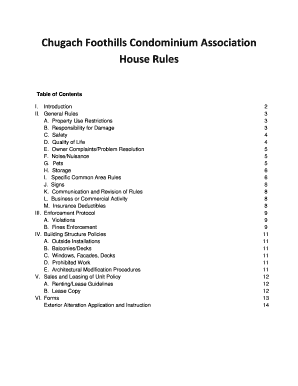
Church Foothills Condominium Association House Rules Table of Contents I. Introduction II. General Rules A. Property Use Restrictions B. Responsibility for Damage C. Safety D. Quality of Life E. Owner.

How it works

  1. Open form

    Open form follow the instructions

  2. Easily sign form

    Easily sign the form with your finger

  3. Share form

    Send filled & signed form or save

How to fill out the AK Chugach Foothills Condominium Association Exterior Alteration Application online

Filling out the AK Chugach Foothills Condominium Association Exterior Alteration Application is an essential step for owners wishing to make changes to their property. This guide provides user-friendly support to ensure a smooth submission process.

Follow the steps to successfully complete your application.

  1. Click the ‘Get Form’ button to access and open the Exterior Alteration Application in the digital editor.
  2. Fill in your personal information, including your name, address, home phone, work phone, and email address.
  3. Provide a detailed description of the project, including the type of alteration you are applying for. Be sure to check all applicable boxes like 'FENCE', 'LANDSCAPE', or 'DECK'.
  4. Attach any drawings or plans that describe the work to be performed. Ensure that these include the size, color, materials to be used, location, and intended use.
  5. Include the contact information of your contractor, along with copies of their license and insurance. Confirm that all required documents are attached to avoid submission delays.
  6. Specify the start date of the project and the anticipated completion date. It is advisable to submit your request well in advance of the intended start date.
  7. Review your application to ensure all fields are complete and correct.
  8. After filling out the application, you can save changes, download a copy for your records, print it, or share it with the Association as required.

Complete your exterior alteration application online today to enhance your property.

Get form

Experience a faster way to fill out and sign forms on the web. Access the most extensive library of templates available.
Get form

Related content

MEMORANDUM State of Alaska
Nov 3, 2017 — The Alaska Department of Transportation and Public Facilities (DOT&PF)...
Learn more
a web gis application for online residential...
by JN Dowling · 2014 · Cited by 3 — The resulting web application is intended to...
Learn more
SAN RAFAEL GENERAL PLAN 2040 & DOWNTOWN ...
Jan 7, 2021 — ... form of infill/intensification on sites either already developed...
Learn more

Related links form

University Of Texas At San Antonio Official Employers Letterhead 2009 Montana State University Declaration Of Homestead Abandonment 2021 Texas A&M University Brick Order Form 2013 Perpetual Inventory 1996

Get This Form Now!

Use professional pre-built templates to fill in and sign documents online faster. Get access to thousands of forms.
Get form
If you believe that this page should be taken down, please follow our DMCA take down processhere.
Get AK Chugach Foothills Condominium Association Exterior Alteration Application
Get form
  • Adoption
  • Bankruptcy
  • Contractors
  • Divorce
  • Home Sales
  • Employment
  • Identity Theft
  • Incorporation
  • Landlord Tenant
  • Living Trust
  • Name Change
  • Personal Planning
  • Small Business
  • Wills & Estates
  • Packages A-Z
  • Affidavits
  • Bankruptcy
  • Bill of Sale
  • Corporate - LLC
  • Divorce
  • Employment
  • Identity Theft
  • Internet Technology
  • Landlord Tenant
  • Living Wills
  • Name Change
  • Power of Attorney
  • Real Estate
  • Small Estates
  • Wills
  • All Forms
  • Forms A-Z
  • Other Templates
  • Legal Hub
  • About Us
  • Help Portal
  • Legal Resources
  • Blog
  • Affiliates
  • Contact Us
  • Delete My Account
  • Site Map
  • Industries
  • Forms in Spanish
  • Localized Forms
  • State-specific Forms
  • Forms Kit
  • Real Estate Handbook
  • All Guides
  • Notarize
  • Incorporation services
  • For Consumers
  • For Small Business
  • For Attorneys
  • USLegal
  • FormsPass
  • pdfFiller
  • signNow
  • altaFlow
  • DocHub
  • Instapage
Form Packages
  • Adoption
  • Bankruptcy
  • Contractors
  • Divorce
  • Home Sales
  • Employment
  • Identity Theft
  • Incorporation
  • Landlord Tenant
  • Living Trust
  • Name Change
  • Personal Planning
  • Small Business
  • Wills & Estates
  • Packages A-Z
Form Categories
  • Affidavits
  • Bankruptcy
  • Bill of Sale
  • Corporate - LLC
  • Divorce
  • Employment
  • Identity Theft
  • Internet Technology
  • Landlord Tenant
  • Living Wills
  • Name Change
  • Power of Attorney
  • Real Estate
  • Small Estates
  • Wills
  • All Forms
  • Forms A-Z
  • Other Templates
Customer Service
  • Legal Hub
  • About Us
  • Help Portal
  • Legal Resources
  • Blog
  • Affiliates
  • Contact Us
  • Delete My Account
  • Site Map
  • Industries
  • Forms in Spanish
  • Localized Forms
  • State-specific Forms
  • Forms Kit
Legal Guides
  • Real Estate Handbook
  • All Guides
Prepared for you
  • Notarize
  • Incorporation services
Our Customers
  • For Consumers
  • For Small Business
  • For Attorneys
Our Sites
  • USLegal
  • FormsPass
  • pdfFiller
  • signNow
  • altaFlow
  • DocHub
  • Instapage
Social Media
Call us now toll free:
+1 833 426 79 33
As seen in:
© Copyright 1999-2026 airSlate Legal Forms, Inc. 17 Station Street, Ste. 203, Brookline, MA 02445
  • Your Privacy Choices
  • Terms of Service
  • Privacy Notice
  • Content Takedown Policy
  • Bug Bounty Program