Loading
Form preview
  • US Legal Forms
  • Form Library
  • More Forms
  • More Multi-State Forms
  • Sc Richland School District Two Medication Permission Form 2023

Get Sc Richland School District Two Medication Permission Form 2023-2026

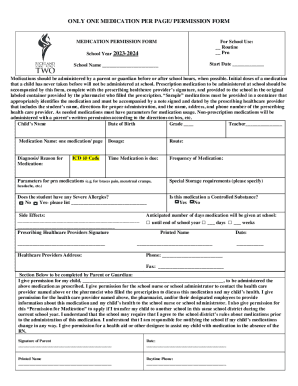
ONLY ONE MEDICATION PER PAGE/ PERMISSION FORMMEDICATION PERMISSION FORMFor School Use: Routine PrnSchool Year 20232024Start Date School Name Medications should be administered by a parent.

How it works

  1. Open form

    Open form follow the instructions

  2. Easily sign form

    Easily sign the form with your finger

  3. Share form

    Send filled & signed form or save

How to fill out the SC Richland School District Two Medication Permission Form online

Filling out the SC Richland School District Two Medication Permission Form is a crucial step in ensuring that your child receives the appropriate medication while attending school. This guide will provide you with a clear, step-by-step process for completing the form online.

Follow the steps to complete the form accurately and efficiently.

  1. Click ‘Get Form’ button to access the Medication Permission Form and open it in your preferred editor.
  2. Begin by entering the school year, which is 2023-2024, followed by the start date for medication administration.
  3. Provide the name of the school where your child is enrolled.
  4. Fill in your child’s name, date of birth, grade, and teacher’s name as indicated in the relevant fields.
  5. Specify the medication name. Remember, only one medication is allowed per page of this form.
  6. Indicate the dosage, route, and the diagnosis or reason for the medication.
  7. Specify the time the medication is due, along with the frequency of dosage.
  8. If applicable, enter the ICD 10 code related to the condition being treated.
  9. List any parameters for ‘as needed’ medications, such as specific conditions under which the medication should be given.
  10. Include any special storage requirements for the medication.
  11. If your child has severe allergies, indicate 'Yes' or 'No' and list any allergies if applicable.
  12. Detail any potential side effects of the medication.
  13. Ensure the prescribing healthcare provider signs the form and provides their address.
  14. Confirm whether the medication is a controlled substance by checking 'Yes' or 'No'.
  15. State the anticipated number of days the medication will be administered at school.
  16. In the section below, as the parent or guardian, provide your child’s name and give permission for administering the medication as prescribed.
  17. Sign and date the form, ensuring you also provide your printed name and daytime phone number.

Complete the SC Richland School District Two Medication Permission Form online to ensure your child's medication needs are met.

Get form

Experience a faster way to fill out and sign forms on the web. Access the most extensive library of templates available.
Get form

Related content

CHANGE CONTROL RECORD
Apr 1, 2019 — Funds Transfer (EFT) Authorization Agreement forms ... Pharmacy Services...
Learn more
Forms - Richland School District
Forms provided here are for district-level processes and procedures. Please reach out to...
Learn more
PROVIDER MANUAL
For a standard authorization request, Molina makes the determination and provides...
Learn more

Related links form

Premiere Select IRA One-Time Distribution Request 2015 Premiere Select IRA One-Time Distribution Request 2020 IRS 8453-OL 2002 NM MVD-10284 1995

Questions & Answers

Get answers to your most pressing questions about US Legal Forms API.

Contact support

Richland County is home to some of the best educational institutions in South Carolina. About 70,000 students attend school in the County's three school districts. There are 21 private schools and eight higher learning institutions, including the University of South Carolina.

(803) 231-7000 - Main Line.

If you have any questions regarding recruitment, please contact the Human Resources Office at 803-231-7418.

(803) 231-7000 - Main Line Email us at info@richlandone.org.

Student can be absent for no more than 10 days per school year. A note from a parent/guardian or certified medical practitioner must be submitted to the school immediately or within five days upon the return of the student.

Kim Moore blazes a new path as new Richland Two superintendent.

District Name: Richland 01 schools for this districtNCES District ID: 4503360State District ID: SC-4001Mailing Address: 1616 Richland Street Columbia, SC 29201Physical Address: 1616 Richland Street Columbia, SC 29201Phone: (803)231-7000Type: Regular local school districtStatus: OpenTotal Schools: 484 more rows

Follow Us Richland Northeast High. Ridge View High. Spring Valley High. Westwood High.

Get This Form Now!

Use professional pre-built templates to fill in and sign documents online faster. Get access to thousands of forms.
Get form
If you believe that this page should be taken down, please follow our DMCA take down processhere.

Industry-leading security and compliance

US Legal Forms protects your data by complying with industry-specific security standards.
  • In businnes since 1997
    25+ years providing professional legal documents.
  • Accredited business
    Guarantees that a business meets BBB accreditation standards in the US and Canada.
  • Secured by Braintree
    Validated Level 1 PCI DSS compliant payment gateway that accepts most major credit and debit card brands from across the globe.
Get SC Richland School District Two Medication Permission Form
Get form
  • Adoption
  • Bankruptcy
  • Contractors
  • Divorce
  • Home Sales
  • Employment
  • Identity Theft
  • Incorporation
  • Landlord Tenant
  • Living Trust
  • Name Change
  • Personal Planning
  • Small Business
  • Wills & Estates
  • Packages A-Z
  • Affidavits
  • Bankruptcy
  • Bill of Sale
  • Corporate - LLC
  • Divorce
  • Employment
  • Identity Theft
  • Internet Technology
  • Landlord Tenant
  • Living Wills
  • Name Change
  • Power of Attorney
  • Real Estate
  • Small Estates
  • Wills
  • All Forms
  • Forms A-Z
  • Form Library
  • Legal Hub
  • About Us
  • Help Portal
  • Legal Resources
  • Blog
  • Affiliates
  • Contact Us
  • Delete My Account
  • Site Map
  • Industries
  • Forms in Spanish
  • Localized Forms
  • State-specific Forms
  • Forms Kit
  • Real Estate Handbook
  • All Guides
  • Notarize
  • Incorporation services
  • For Consumers
  • For Small Business
  • For Attorneys
  • USLegal
  • FormsPass
  • pdfFiller
  • signNow
  • altaFlow
  • DocHub
  • Instapage
Form Packages
  • Adoption
  • Bankruptcy
  • Contractors
  • Divorce
  • Home Sales
  • Employment
  • Identity Theft
  • Incorporation
  • Landlord Tenant
  • Living Trust
  • Name Change
  • Personal Planning
  • Small Business
  • Wills & Estates
  • Packages A-Z
Form Categories
  • Affidavits
  • Bankruptcy
  • Bill of Sale
  • Corporate - LLC
  • Divorce
  • Employment
  • Identity Theft
  • Internet Technology
  • Landlord Tenant
  • Living Wills
  • Name Change
  • Power of Attorney
  • Real Estate
  • Small Estates
  • Wills
  • All Forms
  • Forms A-Z
  • Form Library
Customer Service
  • Legal Hub
  • About Us
  • Help Portal
  • Legal Resources
  • Blog
  • Affiliates
  • Contact Us
  • Delete My Account
  • Site Map
  • Industries
  • Forms in Spanish
  • Localized Forms
  • State-specific Forms
  • Forms Kit
Legal Guides
  • Real Estate Handbook
  • All Guides
Prepared for you
  • Notarize
  • Incorporation services
Our Customers
  • For Consumers
  • For Small Business
  • For Attorneys
Our Sites
  • USLegal
  • FormsPass
  • pdfFiller
  • signNow
  • altaFlow
  • DocHub
  • Instapage
Social Media
Call us now toll free:
+1 833 426 79 33
As seen in:
© Copyright 1999-2026 airSlate Legal Forms, Inc. 3720 Flowood Dr, Flowood, Mississippi 39232
  • Your Privacy Choices
  • Terms of Service
  • Privacy Notice
  • Content Takedown Policy
  • Bug Bounty Program