Loading
Get Tn Rvf-16041 2021-2026
How it works
-

Open form follow the instructions
-

Easily sign the form with your finger
-

Send filled & signed form or save
How to fill out the TN RVF-16041 online
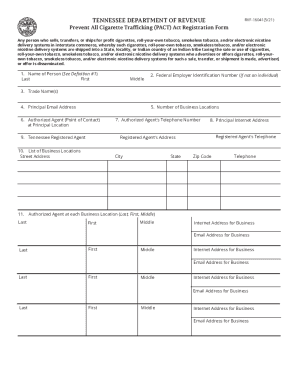
Filling out the TN RVF-16041 form is an important step for those engaged in the sale, transfer, or shipment of tobacco products and electronic nicotine delivery systems. This guide provides clear, step-by-step instructions to help you complete the form online accurately and efficiently.
Follow the steps to successfully complete the TN RVF-16041 online
- Click ‘Get Form’ button to access the TN RVF-16041 form and open it in the online editor.
- Begin by entering the name of the person registering in the specified fields, ensuring to include the last name, first name, and middle name as required.
- Provide the Federal Employer Identification Number (FEIN) if you are not registering as an individual.
- List all trade names associated with the person registering in the designated area.
- Input the principal email address that the registering person uses for communications.
- Indicate the total number of business locations that are associated with the person registering.
- Designate an authorized agent who will act as the point of contact at the principal location, and provide their details.
- Enter the telephone number for the authorized agent you designated for the principal address.
- Fill in the principal internet address associated with your business.
- Provide the contact details for your registered agent in Tennessee, including their name, address, and phone number.
- List each business location’s address, including street, city, state, zip code, and telephone number.
- For each business location, provide the names of the authorized agents, including their internet addresses and email addresses.
- After completing all fields, review your entries carefully for accuracy.
- Once confirmed, you can save any changes, download, print, or share the completed form as necessary.
Begin filling out your TN RVF-16041 form online today to ensure compliance with the PACT Act.
Once you are signed into your account, simply follow these three steps to check the status of your PACT Act claim: Go to your “My VA” dashboard. You will find the link for this dashboard in the top right corner of the page once you're signed in. Scroll down to the “Track Claims” section.