Loading
Get Mi Copper Country Intermediate School District Desk Audit Procedures 2009-2026
How it works
-

Open form follow the instructions
-

Easily sign the form with your finger
-

Send filled & signed form or save
How to fill out the MI Copper Country Intermediate School District Desk Audit Procedures online
This guide provides clear and concise instructions on completing the MI Copper Country Intermediate School District Desk Audit Procedures online. By following these step-by-step directions, users can ensure that they accurately fill out each section of the form.
Follow the steps to successfully complete the audit procedures form
- Press the ‘Get Form’ button to access the form and open it in your editor.
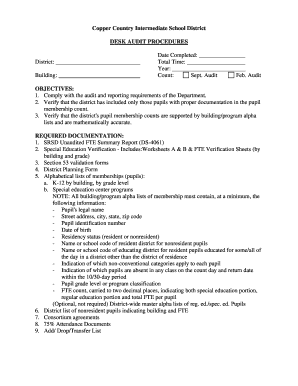
- Begin by entering the district and building information at the top of the form. This is essential for identifying the specific site of the audit and will serve as a reference throughout the process.
- Fill in the date completed, total time spent on the audit, and the year of the audit. Make sure to double-check these details to ensure accuracy.
- Complete the pupil membership count sections for both the September and February audits. Ensure that the data is accurate and reflects the required documentation outlined in the procedures.
- Review the objectives section to confirm that you have met each audit requirement, such as verifying proper documentation and ensuring numerical accuracy in pupil membership counts.
- Collect and upload the required documentation as detailed in the form, including the SRSD Unaudited FTE Summary Report, Special Education Verification Worksheets, and alphabetical lists of memberships.
- Conduct a thorough review of the alphabetical lists of membership to ensure they meet all requirements specified, such as pupil's legal name, residency status, and identification numbers.
- Finalize the form by confirming the completion of the desk audit procedures. Sign and date the form to validate the audit process. Ensure that all necessary fields are filled appropriately.
- Once the form is completed, you can save your changes, download a copy for your records, print the form for physical submission if needed, or share it electronically with relevant parties.
Complete the MI Copper Country Intermediate School District Desk Audit Procedures online to ensure compliance and accuracy.
Free Divorce Forms for Couples with NO Children Both spouses must agree on all parts of the divorce. You and your spouse need to agree that you have “irreconcilable differences” One or both of you must have lived in Tennessee for the last six months or when the decision to divorce was made.