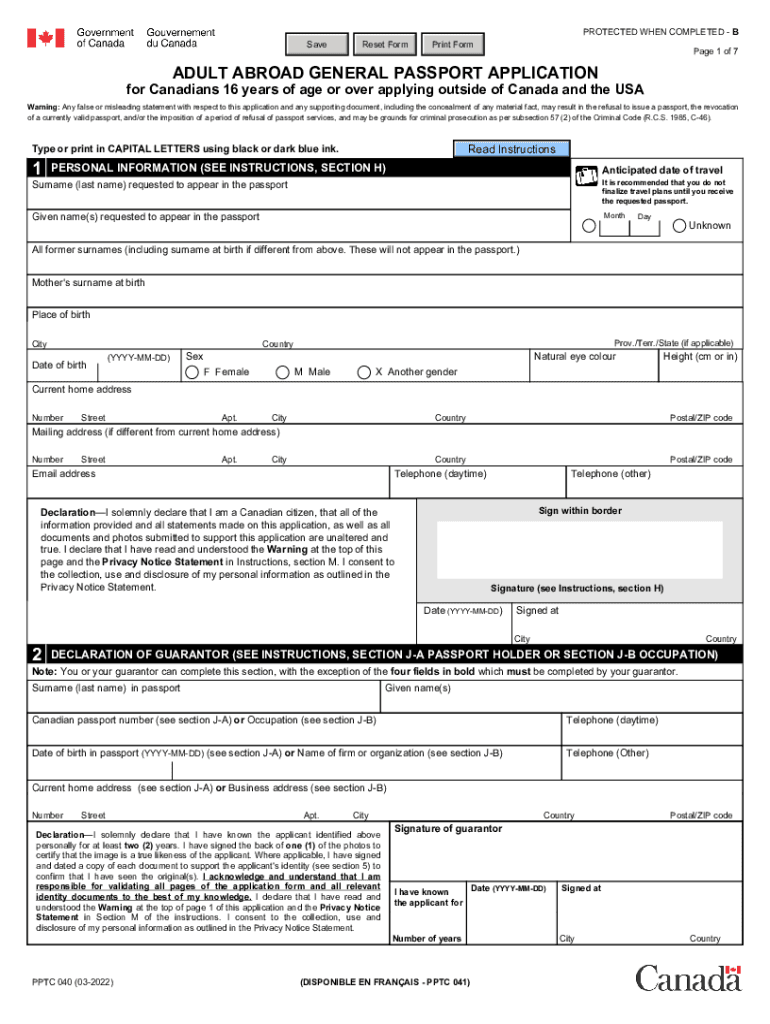
Severest FormPROTECTED WHEN COMPLETED Print Form Page 1 of 7ADULT ABROAD GENERAL PASSPORT APPLICATION for Canadians 16 years of age or over applying outside of Canada and the USA Warning: Any false.

Open form follow the instructions

Easily sign the form with your finger

Send filled & signed form or save
How to fill out the Www.coursehero.comfile83111769pptc040.pdf - Save Reset Form PROTECTED WHEN COMPLETED - B online
This guide provides step-by-step instructions on how to accurately fill out the Adult Abroad General Passport Application form. Following these instructions will help ensure that your application is completed correctly and submitted without issues.
Follow the steps to successfully complete your passport application online.
- Locate and access the form by clicking the ‘Get Form’ button to obtain it and open it in your chosen editor.
- Begin with the personal information section. Enter your anticipated date of travel, surname, given name(s), and any former surnames. Be sure to provide your mother's surname at birth, place of birth, date of birth, sex, natural eye color, height, current home address, and mailing address if different.
- Complete the declaration section by signing within the provided border, ensuring all information is accurate and consenting to the collection of personal information as required.
- If applicable, provide the declaration of the guarantor. This section must be completed by your guarantor, including their name, occupation, contact details, and signature.
- On the second page, indicate whether you have a prior Canadian travel document. If yes, provide relevant details, including the date of issue.
- In the proof of Canadian citizenship section, provide the appropriate documentation based on whether you were born in Canada or abroad, ensuring valid originals are submitted.
- Complete the documents to support identity segment, which requires at least one valid identification document issued by a government authority. Ensure copies are signed and dated by your guarantor.
- Select a period of validity (5-year, 10-year, etc.) as applicable, and complete the additional personal information section, including addresses and occupations in the last two years, and references.
- Optionally, fill in emergency contact information, as this may be beneficial while traveling.
- Review all filled sections for accuracy, save your changes, and follow the instructions to submit the application, selecting options like downloading, printing, or sharing the form as needed.
Complete your application form online today to ensure a smooth passport application process.
Experience a faster way to fill out and sign forms on the web. Access the most extensive library of templates available.
Use professional pre-built templates to fill in and sign documents online faster. Get access to thousands of forms.
If you believe that this page should be taken down, please follow our DMCA take down process here.
This form is available in several versions. Select the version you need from the drop-down list below.