Loading
Get Medstar Health Ms 100400 2021-2026
How it works
-

Open form follow the instructions
-

Easily sign the form with your finger
-

Send filled & signed form or save
How to fill out the MedStar Health MS 100400 online
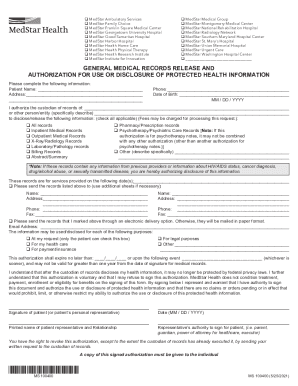
Filling out the MedStar Health MS 100400 form is essential for authorizing the release of your medical records. This guide provides simple, step-by-step instructions to help you complete the form accurately and confidently.
Follow the steps to fill out the MedStar Health MS 100400 online.
- Click ‘Get Form’ button to obtain the form and open it in the editor.
- Begin by entering your full name in the 'Patient Name' field. Ensure that you provide your legal name as it appears on official documents.
- Next, fill out your current address in the designated area. Provide as much detail as necessary, including unit or apartment numbers if applicable.
- Input your phone number, making sure to include the area code to ensure accurate communication.
- Enter your date of birth in the specified format (MM/DD/YYYY) to confirm your identity.
- Indicate the custodian of records or entity responsible for your records by providing the name in the respective field.
- Select the types of records you wish to disclose by checking the appropriate boxes. You may choose multiple categories such as 'All records', 'Pharmacy/Prescription records', etc.
- If applicable, list the specific date(s) of service for which you are requesting records.
- Provide the name and address of the individual or organization to which the records should be sent. If necessary, use additional sheets to include more recipients.
- Select your preferred method of receiving the records, indicating the electronic delivery option if you would like to receive them via email.
- Specify the purpose for the disclosure of records by checking one or more boxes, ensuring that at least one box is checked.
- Set a date for expiration of the authorization or describe an event that will terminate the authorization earlier.
- Sign and date the form as indicated. If you are signing on behalf of another individual, include your printed name and relationship to them.
- After completing the form, review the information for accuracy, then save your changes. You may then choose to download, print, or share the completed form as needed.
Complete your MedStar Health MS 100400 form online today to ensure your medical records are released smoothly.
MedStar Health operates 10 hospitals across Baltimore, central Maryland, Washington, D.C., and southern Maryland. Our facilities offer a full range of healthcare services and are recognized both regionally and nationally for excellence in medical care.