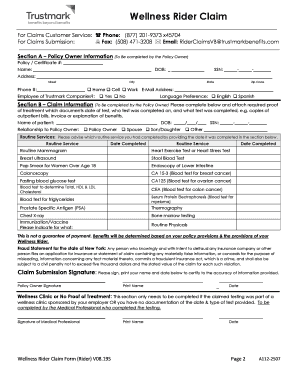
Wellness Rider Claim For Claims Customer Service: ( Phone: (877) 2019373 x45704 For Claims Submission: 7 Fax: (508) 4713208 * Email: RiderClaimsVB trustmarkbenefits.comInstructions for Claim Submission Please.

How it works
  • Open form

    Open form follow the instructions

  • Easily sign form

    Easily sign the form with your finger

  • Share form

    Send filled & signed form or save

How to fill out the Wellness Rider Claim Form V08.19S.DOCX online

Completing the Wellness Rider Claim Form V08.19S.DOCX online is a straightforward process designed to help you submit your claim efficiently. This guide will walk you through each section of the form to ensure a complete and accurate submission.

Follow the steps to complete your Wellness Rider Claim Form online.

  1. Click 'Get Form' button to obtain the form and open it in your browser.
  2. Begin filling out Section A: Policy Owner Information. Provide your policy number, name, date of birth, social security number, address, phone number, email address, and employment information. Ensure all information is accurate and legible.
  3. Complete Section B: Claim Information. Fill in the patient's name, date of birth, social security number, and relationship to the policy owner. List the routine services completed, including the dates.
  4. Attach the required supporting documentation that validates your claim. This includes bills, invoices, or treatment notes that specify the date of service, the individual treated, and the specific test performed.
  5. Ensure you complete the Claim Submission Signature section by signing, printing your name, and dating the form to certify that the information provided is accurate.
  6. If applicable, have the medical professional complete the Wellness Clinic or No Proof of Treatment section, only if services were provided at a wellness clinic or if documentation is unavailable.
  7. Optionally, complete the Consent for Use of Electronic Communication section to receive updates about your claim via email or text messaging.
  8. If you wish to authorize third-party communication, fill out the Third Party Communication Authorization section as needed.
  9. Review the completed form for accuracy. Once satisfied, save any changes, or download the form as needed. You can then print or share the claim form with the necessary contact information for submission.

Take the step towards your wellness benefits—complete your claim form online today!

Get form

Experience a faster way to fill out and sign forms on the web. Access the most extensive library of templates available.

Related content

HCBS basic sample forms and policies - 245D...

Electronic claim attachments. The sample documents represent current licensing Setup...

Learn more
Human Resources Forms | Tennessee Board of Regents

General HR Forms, Educational Assistance Forms, FMLA Forms, Insurance Forms, Regular...

Learn more
Care Coordination Organization/ Health Home...

The purpose of this Manual is to provide Medicaid policy and comprehensive guidance to...

Learn more
Questions & Answers

Get answers to your most pressing questions about US Legal Forms API.

Contact support

How many DX codes can be printed in a CMS 1500 claim form?

The CMS 1500 claim form allows for multiple diagnosis codes, typically up to 12. Each code should be accurately noted to represent the patient's condition clearly. When using the Wellness Rider Claim Form V08.19S.DOCX, ensure that all codes are entered correctly to prevent claim rejections and to facilitate timely reimbursement.

To fill a motor insurance claim form, begin by gathering all necessary documentation, such as incident reports and vehicle details. Carefully complete each section of the form, ensuring accuracy with your information. If you're using the Wellness Rider Claim Form V08.19S.DOCX for motor insurance claims, double-check key details to enhance your chances of a successful claim.

Yes, you can print a CMS 1500 form. When using the Wellness Rider Claim Form V08.19S.DOCX, simply ensure that your printer has sufficient ink and is set to print the correct format. After checking the alignment and layout, click the print button to generate a physical copy of your form.

Printing text only in the CMS 1500 form requires specific settings in your print dialogue. First, you can select 'Text Only' under the print settings if that option is available. This step is essential when working with the Wellness Rider Claim Form V08.19S.DOCX to maintain a clean and professional appearance, ensuring it meets submission standards.

Filling out a reimbursement claim form involves collecting necessary information, such as patient details and treatment codes. Begin by accurately completing each section of the form, referring to your insurance policy for specifics. If you are using the Wellness Rider Claim Form V08.19S.DOCX, ensure all information is current and double-check for any missing entries to facilitate smooth processing.

To print the CMS 1500 claim form, start by downloading the Wellness Rider Claim Form V08.19S.DOCX from a reliable source. Open the document in a compatible word processor, and ensure your printer settings are adjusted to fit the form size. Once you're ready, click on the print option and verify that the preview appears correct before proceeding to print.

For printing the CMS 1500 claim form, it is recommended to use black ink. This ensures clarity and compliance with submission requirements. Utilizing the appropriate ink type helps maintain the readability of your Wellness Rider Claim Form V08.19S.DOCX, which is crucial for processing your claims without delays.

Processing a reimbursement claim typically involves gathering your documentation and filling out the necessary forms. After completing the Wellness Rider Claim Form V08.19S.DOCX along with your receipts, submit them to your insurance provider. Keep copies of everything for your records and follow up if you do not receive notification of your claim's status within a few weeks.

When filling out a reimbursement form, start by providing your contact and insurance information. Follow that with a detailed account of each expense, including dates, amounts, and descriptions of services. Including the Wellness Rider Claim Form V08.19S.DOCX can streamline your submission, making it easier for the processing team to review your claim.

To fill a reimbursement claim form online, find the digital version of the Wellness Rider Claim Form V08.19S.DOCX on your insurance provider's website or the US Legal Forms platform. Enter all required information accurately, and ensure you attach scanned copies of your receipts and other supporting documents. Review all entries before submitting to prevent processing delays.

Get This Form Now!

Use professional pre-built templates to fill in and sign documents online faster. Get access to thousands of forms.

If you believe that this page should be taken down, please follow our DMCA take down process here.

Get Wellness Rider Claim Form V08.19S.DOCX