Loading
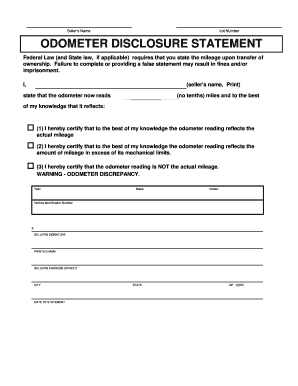
Get Nj Classic Car Auction Odometer Disclosure Statement - Atlantic City
How it works
-

Open form follow the instructions
-

Easily sign the form with your finger
-

Send filled & signed form or save
How to fill out the NJ Classic Car Auction Odometer Disclosure Statement - Atlantic City online
Completing the NJ Classic Car Auction Odometer Disclosure Statement is an important step in the vehicle transfer process. This guide will provide clear and informative steps to ensure that you accurately fill out the form online, fulfilling legal requirements.
Follow the steps to complete the form successfully.
- Press the ‘Get Form’ button to access the document and open it for editing.
- Begin by entering your name in the designated field labeled 'Seller's Name'. Make sure to print your name clearly.
- Locate the section for 'Lot Number' and input the appropriate number associated with the auction lot.
- In the 'Odometer Disclosure Statement' section, enter the current mileage reading of the vehicle, ensuring you do not include tenths of a mile.
- Choose one of the certification statements provided for the odometer reading. Indicate whether the reading reflects the actual mileage, shows mileage in excess of mechanical limits, or indicates that the reading is not accurate.
- Fill in the vehicle details, including the Year, Make, Model, and Vehicle Identification Number (VIN) in the respective fields.
- Sign the document in the 'Seller's Signature' field. Also, print your name below the signature line.
- Provide your address including street, city, state, and ZIP code.
- Finally, date the statement to confirm when it was filled out.
Complete your documents online for a smooth vehicle transfer process.
If you notice an error on your title, you can visit a motor vehicle agency or submit a written request through the mail to request a correction. If you visit a motor vehicle agency: You must provide proof that a correction is needed. There is no charge to correct a title if the error was clearly caused by the MVC.